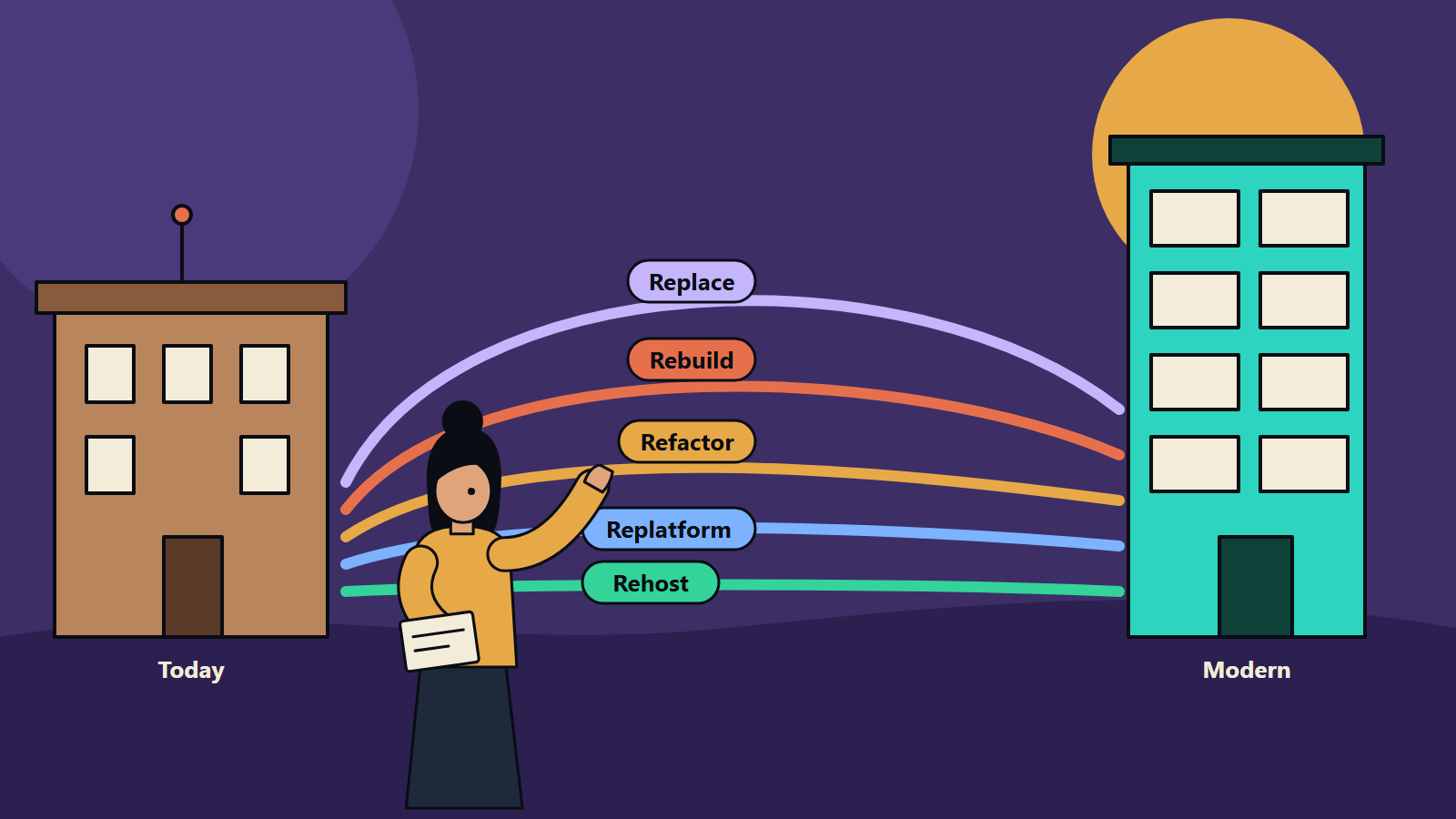
Short on time? Sort each application into one of five paths: rehost, replatform, refactor, rebuild or replace. Start with the one that costs the most to keep and risks the most if it fails. Modernize in slices so the business keeps running while you change it.
Every company that has been trading for a few years owns software it would rather not touch. It might be an order system written in an older language, a billing engine only two people understand, or a desktop tool that still runs the warehouse. It works, so it stays. Then a security patch stops arriving, a regulator asks a question the system cannot answer, or a new product needs data that sits locked inside it.
Legacy application modernization is the work of bringing such systems up to date so they can be changed safely, run at a sensible cost and connect to the rest of the business. The hard part is choosing how far to go. This guide compares the main paths, shows how to choose between them, and gives a plan that works for a small firm with a single critical application as well as for an enterprise with hundreds.
Key takeaways
- Modernization is a portfolio decision. Each application gets its own path: retire, retain, rehost, replatform, refactor, rebuild or replace.
- Rehosting is the fastest route and changes the least. Rebuilding changes the most and carries the most risk.
- Incremental approaches, such as the strangler fig pattern, let you replace a system piece by piece while it keeps serving users.
- Start with an inventory: business value, technical health, risk, cost and dependencies for every application.
- Plan data migration, testing and the cut-over before you write the first line of new code.
- The right answer for a ten-person company and for a multinational can be the same path, applied at a different scale.
What counts as a legacy application
Age alone does not make an application legacy. A system becomes a legacy problem when it shows some of these signs:
- The vendor no longer supports its platform, language or database.
- Few people understand the code, and the documentation is thin or missing.
- Each change takes weeks and breaks something unrelated.
- It cannot connect to modern tools, APIs or cloud services without custom workarounds.
- It runs on hardware or an operating system that is costly to maintain or hard to secure.
- It holds data the business needs, locked in formats other systems cannot read.
The paths at a glance
Cloud providers and analysts each publish their own list of options. AWS, for example, describes seven migration strategies: retire, retain, rehost, relocate, repurchase, replatform and refactor. The grouping below follows the same logic in plain terms and adds rebuild, which many teams treat as a separate choice.
- Retire: the application is switched off. Effort is low. The main risk is a hidden user or dependency. It fits when nobody uses it or another system already does the job.
- Retain: nothing changes for now. The risk is that cost and exposure keep growing. It fits when the system was upgraded recently or depends on hardware with no cloud equivalent.
- Rehost: the same application runs on new infrastructure. Effort is low. Old problems move with it. It fits when a data centre contract ends soon and the code is stable.
- Replatform: small changes let the application use managed services. Effort is low to medium. Watch for compatibility surprises. It fits when moving a database or runtime to a managed service saves real operating effort.
- Refactor: code and design are reworked while behaviour stays the same. Effort is medium to high. Regressions are the main risk without tests. It fits when the business logic is sound but the structure blocks change.
- Rebuild: a new application is written to the same goals. Effort is high, and scope growth and delay are the main risks. It fits when the old design cannot meet new needs at all.
- Replace: a bought product or SaaS service takes over. Effort is medium. Process fit and data migration are the risks. It fits when a vendor product covers most of what you do.
Rehost: move it as it is
Rehosting, often called lift and shift, moves the application to new servers or a cloud environment without changing the code. It suits a deadline such as a hosting contract that expires. It gives you little improvement in cost or speed of change by itself, so treat it as a first step if you plan more work afterwards. AWS’s own guidance for large programmes recommends rehosting or replatforming first and modernizing after the move.
Replatform: small changes for a clear gain
Replatforming keeps the design but swaps parts, for example moving a self-managed database to a managed one or packaging the application in a container. It trims operating effort without a rewrite. Test carefully, because small platform differences can surface old bugs.
Refactor: improve the inside
Refactoring restructures the code, often splitting a large monolith into smaller services or modules, while the visible behaviour stays the same. It works best when the business rules are right but the code is hard to change. Automated tests are the safety net. If none exist, writing them is the first job.
Rebuild: start again on purpose
A rebuild makes sense when the old design cannot support what the business needs, for example real-time data, mobile access or a new pricing model. It also costs the most and has the longest time before users see any benefit. Teams that rebuild everything in one go often discover forgotten features late. Keep the scope tight and compare against an incremental route first.
Replace: buy instead of build
If a commercial product or SaaS service covers most of the need, replacing can be cheaper than keeping custom code. The effort moves into configuration, data migration, integration and training. Check how the vendor handles data export and contract exit before you sign.
Retire and retain
Some applications should simply go. Others should stay as they are for now, because the cost of change exceeds the benefit or because they depend on equipment with no sensible alternative. Writing down a reason and a review date turns “we never got round to it” into a decision.
Choose by facts, with a simple scoring grid
Score each application from 1 to 5 on these questions, then discuss the outliers with the people who use it.
- Business value: how much revenue or operational work depends on it?
- Technical health: how hard is it to change, test and deploy?
- Risk: security exposure, compliance duties, single points of failure, key-person dependence.
- Running cost: licences, hosting, support and the hours spent keeping it alive.
- Dependencies: which systems and teams rely on its data or functions?
- Fit for change: will the business need it to do something new in the next two years?
High value with poor health points to refactor or rebuild. Low value with high cost points to retire or replace. High value with good health may only need rehosting or replatforming.
Modernize in slices
The strangler fig pattern, described by software author Martin Fowler, builds new functions around the old system and moves behaviour across a piece at a time until the old system can be switched off. You can read his explanation of the pattern. In practice that means:
- Put a routing layer, such as an API gateway or proxy, in front of the old system.
- Pick one function with clear boundaries, for example invoice generation.
- Build it new, send a small share of traffic to it and compare results.
- Move the rest of the traffic across, then retire the old code for that function.
- Repeat, keeping every step reversible.
This approach gives the business visible progress every few weeks and limits the damage if something goes wrong.
Data, testing and the cut-over
Most delays come from three areas that teams plan too late.
Data. Map every field, clean the duplicates and decide what history moves across. Run trial migrations and reconcile counts and totals each time. Check where data must stay for legal reasons, since rules differ between countries and sectors.
Testing. Capture how the old system behaves before you change it, then compare. Include performance, security and the awkward cases that only show up at month-end or year-end.
Cut-over. Choose between a big switch and a phased move. Prepare a rollback plan, agree a freeze window with the business and name the people who decide go or no-go.
A practical plan, from small firms to enterprises
- Inventory (weeks 1 to 3). List applications, owners, users, platforms, costs and dependencies. A small firm may have five entries. A large one will need tooling and several workshops.
- Assess and score (weeks 3 to 5). Apply the grid and agree a path for each.
- Choose a pilot (week 6). Pick a system that matters enough to prove the approach and is small enough to finish.
- Build the foundations. Version control, automated tests, deployment pipelines, monitoring and security checks.
- Deliver in slices. Release small, measure, adjust.
- Review quarterly. Retire what is replaced, update the inventory and re-score what remains.
Mistakes that raise cost
- Starting with technology choices before the inventory exists.
- Treating a rehost as the end of the journey.
- Rebuilding everything because the old code looks untidy.
- Leaving data migration to the final month.
- Ignoring the people who use the system daily. Their knowledge of workarounds saves weeks.
- Skipping a clear measure of success. Pick two or three, such as deployment frequency, support cost or incident count.
How SoftSapien approaches modernization
Every estate has a different mix of systems, budgets and deadlines. SoftSapien starts with the inventory and scoring described above, agrees a path for each application with the people who use it, and delivers the change in slices so operations are never put at risk. Our engineers work across legacy application modernization, enterprise software integration, custom software development and cloud and datacenter solutions, for organisations of every size and in every region we serve.
Visit our contact page to chat with our team, send a message or schedule a free consultation call about your applications.
Frequently asked questions
What is legacy application modernization?
It is the work of updating an older business application so it can be changed safely, run at a reasonable cost and connect to current tools. The work can range from moving it to new infrastructure to rebuilding it.
What are the main legacy modernization approaches?
The common paths are retire, retain, rehost, replatform, refactor, rebuild and replace. Each application gets its own path based on business value, technical health, risk and cost.
What is the difference between rehosting and refactoring?
Rehosting moves the application to new infrastructure without changing its code. Refactoring restructures the code while keeping the same behaviour, so it takes more effort and delivers more long-term flexibility.
When should a company rebuild instead of modernize in steps?
Rebuild when the old design cannot meet new needs such as real-time data, mobile access or new business models. Compare it against an incremental route first, since rebuilds cost more and take longer to show results.
What is the strangler fig pattern?
It is a method where new functions are built around the old system and traffic moves across one piece at a time until the old system can be switched off. The business keeps running throughout.
How long does application modernization take?
It depends on the path and the size of the system. A rehost can take weeks, while a refactor or rebuild of a core system often takes many months. Slicing the work gives usable results sooner.
Is modernization worth it for a small business?
Often yes, in a lighter form. A short inventory, a decision on the one or two critical systems and a move to supported, secure platforms can remove real risk without a large programme.
How do I start?
List every application with its owner, users, cost and dependencies, then score each one on value, health and risk. SoftSapien can help with this assessment. Contact SoftSapien through the contact page to chat with our team or schedule a free consultation call.