Short on time? Multi-cloud pays off when you have a specific reason: regulation, resilience, a needed service from a second provider, an acquisition or negotiating strength. Without one, a single well-run cloud is usually simpler and cheaper. If you go multi-cloud, standardise identity, networking, tooling and cost reporting from day one.
Using more than one cloud provider sounds like insurance. In practice it is a trade. You gain choice and resilience in some areas and take on complexity, skills and cost in others. Many organisations end up multi-cloud by accident, through acquisitions or teams choosing their own tools, and then try to bring order afterwards.
This guide explains when a deliberate multi-cloud strategy makes sense, what it costs to run, and how to keep it manageable. The ideas apply from a small company using two providers for different workloads to a global enterprise with regulated data in several countries.
Key takeaways
- Multi-cloud means using services from two or more public cloud providers. It differs from hybrid cloud, which mixes public cloud with private or on-premises systems.
- Good reasons include regulation, data location, best-fit services, resilience for critical systems, mergers and negotiating position.
- The costs are real: more skills, more tooling, more security surface, more data transfer fees and less use of each provider’s discounts.
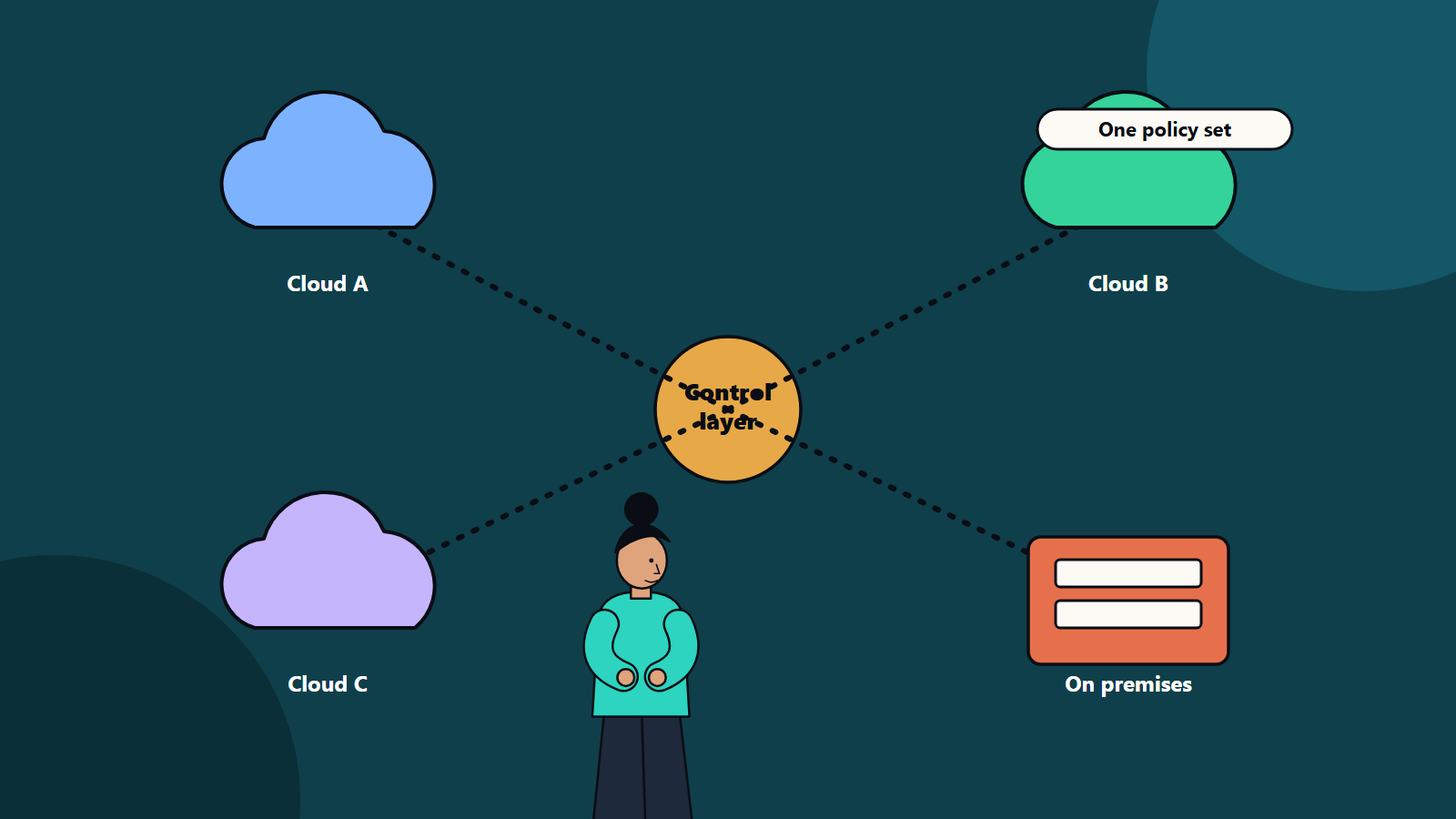
- A control layer for identity, policy, networking, observability and cost makes multi-cloud workable.
- Decide per workload. Not every system needs to be portable.
What the terms mean
The NIST definition of cloud computing describes a model with five essential characteristics, three service models and four deployment models. Public, private, community and hybrid are among those deployment models. Multi-cloud is a common term in industry for using several public providers. A hybrid setup connects public cloud with private infrastructure. Many organisations are both.
Reasons that justify multi-cloud
Regulation and data location. Some countries and sectors require data to remain within borders or under certain controls. If one provider lacks a region or certification you need, another may supply it.
Best-fit services. A provider may lead in a specific capability such as analytics, machine learning or a particular database. Using it for that workload can be more sensible than forcing all work onto one platform.
Resilience. For a small set of critical services, running across providers can reduce exposure to a single provider outage. It is difficult and costly to do well, so reserve it for systems where downtime is very expensive.
Mergers and acquisitions. A merged company inherits what the acquired business used. Consolidating takes time, and in some cases the cost is not worth it.
Commercial leverage. Knowing you can move workloads supports stronger negotiation, though real portability has a cost.
Customer requirements. Some customers insist on a given provider for their own governance reasons.
Reasons that do not justify it
- A vague wish to avoid lock-in with no plan to move anything. Some degree of dependence on a platform is the price of using its managed services.
- Following a trend.
- Letting every team pick its favourite tools without governance.
What it costs
- Skills: engineers need depth in each provider’s services, security model and billing.
- Tooling: you need consistent monitoring, logging, deployment and cost tools that span providers.
- Security surface: more identity systems, networks and configurations mean more places for mistakes.
- Data transfer: moving data between clouds is charged, and latency can affect performance.
- Lost discounts: splitting spend can reduce volume discounts and commitment benefits.
- Lowest common denominator: designing for portability may stop you using the most valuable provider-specific services.
Design principles that keep it manageable
- Decide per workload. Classify applications by criticality, regulation and need for portability. Only the top group may need active-active design across providers.
- Use open standards where they help. Containers, Kubernetes, open databases, standard APIs and infrastructure as code reduce rework when moving.
- Centralise identity. One identity provider and consistent role design across clouds prevents sprawl of accounts and keys.
- Standardise networking and security policy. Shared network patterns, encryption standards and policy as code keep controls consistent.
- Build one view of operations. Central logs, metrics and alerts shorten incident response.
- Make costs visible. A common tagging scheme and a cost dashboard across providers supports FinOps practice.
- Set landing zones. A prepared, governed starting environment in each cloud saves time and reduces risk for new projects.
Data strategy
Data gravity often decides where applications run. Keep data and the systems that use it close together. If analytics need data from several clouds, decide whether to replicate, federate queries or move processing, and calculate the transfer costs before you commit.
A decision path
- List the workloads and their requirements.
- Mark any that have regulatory, resilience or service-specific reasons for a second provider.
- Estimate the added run cost and skills for each.
- Compare with the benefit, such as avoided downtime, compliance or capability.
- Start with one workload, prove the operating model, then expand.
Common mistakes
- Building a portability layer that costs more than moving would.
- Running two clouds without a clear owner of the overall architecture.
- Ignoring exit and reversal plans.
- Under-investing in training.
How SoftSapien supports multi-cloud programmes
SoftSapien helps organisations decide whether multi-cloud is worth it, then design and run the environment. We assess workloads, build landing zones, set up identity, networking and monitoring across providers, and keep spend visible. Explore our multi-cloud solutions and broader cloud and datacenter solutions.
To discuss your own situation, visit the contact page and chat with an adviser, send us a message or arrange a free consultation call.
Frequently asked questions
What is multi-cloud?
Multi-cloud means using services from two or more public cloud providers. It differs from hybrid cloud, which combines public cloud with private or on-premises infrastructure.
What are good reasons to use multiple clouds?
Common reasons include regulation and data location, a best-fit service from a second provider, resilience for critical systems, mergers and acquisitions, and customer requirements.
What does multi-cloud cost?
Expect higher skill needs, extra tooling, a larger security surface, data transfer charges and reduced volume discounts compared with a single provider.
Does multi-cloud remove vendor lock-in?
It reduces dependence on one provider in some areas, but portability has a price. Decide per workload which systems truly need to move.
How do I begin a multi-cloud programme?
Classify workloads, justify each second-provider use, build landing zones and common identity and monitoring, and start with one workload. Contact SoftSapien through the contact page to chat with our team, send a message or schedule a free consultation call.