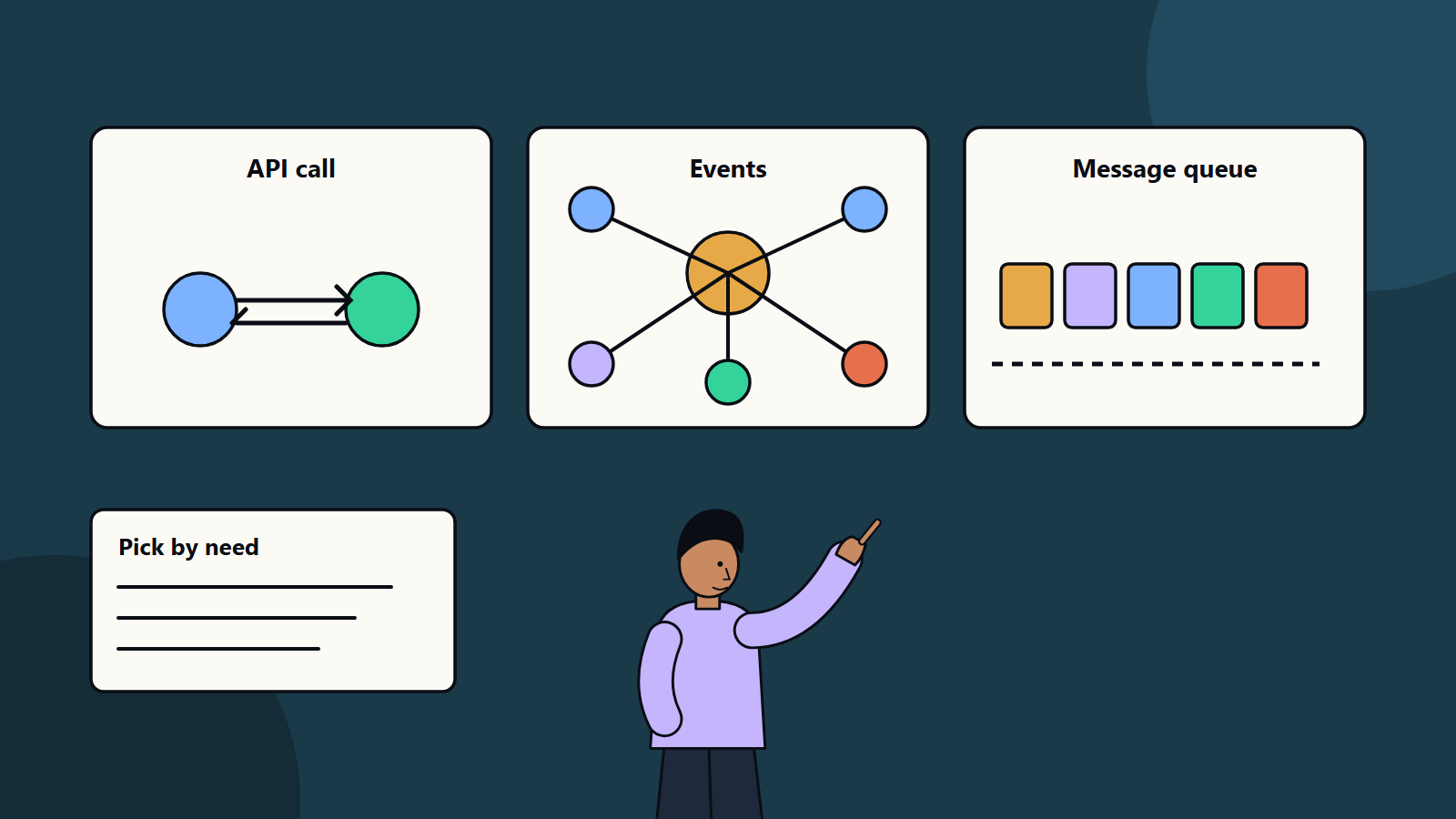
Short on time? Choose the integration style by the job: APIs for requests that need an immediate answer, events when many systems react to a change, message queues to smooth load and guarantee delivery, and file or batch transfer for large scheduled loads. Most organisations use several, tied together with clear contracts, monitoring and ownership.
Every business runs more than one system: CRM, finance, inventory, support, HR, e-commerce and a growing list of SaaS tools. They need to share data. If they do not, staff retype information, reports disagree and customers hear different answers from different teams.
Integration is the work of connecting these systems reliably. The right pattern depends on how fast data must move, how many systems take part and what happens when something fails. This guide compares the main patterns in plain terms. It applies from a small company linking its shop to accounting software to a global enterprise with hundreds of applications.
Key takeaways
- Four common styles are request and response APIs, events, messaging queues and batch file transfer.
- Pick by timing needs, volume, coupling and failure handling.
- Design contracts and versioning early, since changes in one system can break others.
- Plan for retries, duplicates, ordering and monitoring from the start.
- A catalogue of integrations with owners prevents sprawl.
A reference for vocabulary
The book and website Enterprise Integration Patterns by Gregor Hohpe and Bobby Woolf documents a pattern language for integration. Its integration styles are file transfer, shared database, remote procedure invocation and messaging. Many of today’s tools implement these ideas in new forms, so the vocabulary remains useful.
Pattern 1: API request and response
One system calls another and waits for an answer, usually over HTTP with formats such as JSON. Examples include checking a customer’s balance or creating an order.
Good for: real-time lookups and actions, user-facing features, simple point-to-point links.
Watch for: tight coupling, since the caller needs the other system to be up. Slow responses affect the user. Rate limits and versioning need care. Many direct links create a tangle as the number of systems grows.
Practices: publish clear API documentation, use authentication and authorisation, set timeouts and retries with backoff, version changes and use an API gateway for security and traffic control.
Pattern 2: Events and publish-subscribe
A system announces that something happened, such as “order placed”, and any interested system reacts. The publisher does not know who listens.
Good for: several systems reacting to the same change, loose coupling, real-time updates, analytics feeds.
Watch for: harder tracing of what happens after an event, eventual consistency, duplicate and out-of-order events, and governance of event definitions.
Practices: define event schemas and owners, include unique identifiers so receivers can ignore duplicates, keep events small and meaningful and store them long enough for replay and recovery.
Pattern 3: Message queues
A sender puts a message in a queue, and a receiver takes it when ready. The queue buffers the work.
Good for: smoothing traffic spikes, guaranteed delivery, work that can happen later such as sending emails, generating invoices or processing uploads.
Watch for: delay between sending and processing, poison messages that keep failing, and the need to monitor queue length.
Practices: use dead-letter queues for failed messages, make receivers idempotent so repeated delivery does no harm, and set alerts on backlog and age of the oldest message.
Pattern 4: Batch and file transfer
Systems exchange files or bulk extracts on a schedule, such as nightly stock updates or monthly financial exports.
Good for: large volumes, legacy systems without APIs, reporting and data warehouse loads.
Watch for: data that is out of date until the next run, partial failures, format drift and security of files in transit.
Practices: validate files on arrival, log every run, handle restarts without duplicating data and encrypt transfers.
Other useful patterns
- Change data capture: reads changes from a database log and streams them to other systems with low load on the source.
- Data virtualisation: queries data where it lives, with no copying.
- Orchestration versus choreography: a central workflow engine directs steps, or services react to each other’s events. Orchestration is easier to follow, while choreography is more flexible.
- Backend for frontend: a tailored API layer per app type.
- Anti-corruption layer: a translation layer that protects a new system from the quirks of an old one.
How to choose
Ask:
- How quickly must data arrive? Seconds suggest APIs or events. Hours suggest batch.
- How many consumers? Many suggest events.
- What if the receiver is down? If work must not be lost, use queues or events with durable storage.
- How much volume and burstiness? Queues absorb spikes.
- How much coupling can you accept? The more independent teams need to be, the more events and well-defined contracts help.
- What can the systems support? Legacy tools may limit you to files or database access.
Governance that keeps integrations healthy
- Keep a catalogue of interfaces, owners, data shared and service levels.
- Use consistent naming, formats and security standards.
- Version contracts and announce changes in advance.
- Test with contract tests and in staging environments with realistic data.
- Monitor latency, error rates and volumes, and trace requests across systems.
- Document recovery steps for failures.
- Check data protection rules for personal data crossing system and country boundaries.
Platform choices
Options include integration platforms as a service, enterprise service buses, API management tools, event streaming platforms and custom code. Evaluate on connectors available, security, scalability, cost, skills and how easily you can move away. Our article on API-first strategy covers designing systems for integration from the start.
Common mistakes
- Building point-to-point links for every pair of systems.
- Ignoring failure cases until production.
- Sharing databases directly between applications.
- Changing interfaces without notice.
- Missing ownership, so nobody maintains the link when staff move on.
How SoftSapien delivers integration
SoftSapien designs and builds integrations across ERP, CRM, finance, e-commerce and custom systems, with monitoring and documentation as part of every delivery. See our enterprise software integration and enterprise software engineering services.
To map your own systems, go to the contact page and chat with us, send a message or schedule a free consultation call.
Frequently asked questions
What are the main integration patterns?
The common styles are request and response APIs, events with publish-subscribe, message queues and batch or file transfer. Most organisations use several.
When should I use events instead of APIs?
Use events when several systems must react to the same change and loose coupling matters. Use APIs for requests that need an immediate answer.
How do I handle failures in integrations?
Plan retries with backoff, dead-letter queues, idempotent receivers, monitoring of backlog and clear recovery steps.
Why keep an integration catalogue?
A catalogue of interfaces, owners, data shared and service levels prevents sprawl and makes changes safer.
Can SoftSapien design our integrations?
Yes, across ERP, CRM, finance and custom systems. Contact SoftSapien through the contact page to chat with our team, send a message or schedule a free consultation call.