Short on time? Monitoring tells you that something is wrong. Observability helps you find out why, even for problems you did not predict. Collect three signals, metrics, logs and traces, track the four golden signals of latency, traffic, errors and saturation, alert on symptoms that matter to users and link technical data to business outcomes.
When a checkout slows down at peak time, three questions arrive in quick succession: is it really slow, where is it slow and why? A team with good observability answers them in minutes by following a request through the system. A team without it spends hours guessing, restarting servers and arguing in chat.
This guide explains observability in plain terms for managers and engineers, the signals involved, the practices that make it useful and how to avoid common traps. It applies to a small team with one application and an enterprise with hundreds of services.
Key takeaways
- Observability is the ability to understand a system’s internal state from the data it emits.
- Three main signals work together: metrics, logs and traces.
- The four golden signals, latency, traffic, errors and saturation, give strong coverage for services.
- Alert on user-visible symptoms, and keep every alert actionable.
- Tie technical measures to business measures, such as conversion or order completion.
Monitoring and observability
Monitoring watches known conditions: is the server up, is the error rate below a threshold? Observability goes further. The OpenTelemetry project, an open standard for telemetry, describes it as the ability to understand a system’s internal state by examining its outputs, which lets you investigate new problems you did not anticipate and answer why something is happening. For that to work, applications must emit telemetry so that you do not need to add new instrumentation in the middle of an incident.
The two work together. Monitoring catches known problems quickly. Observability helps you explore unknown ones.
The three signals
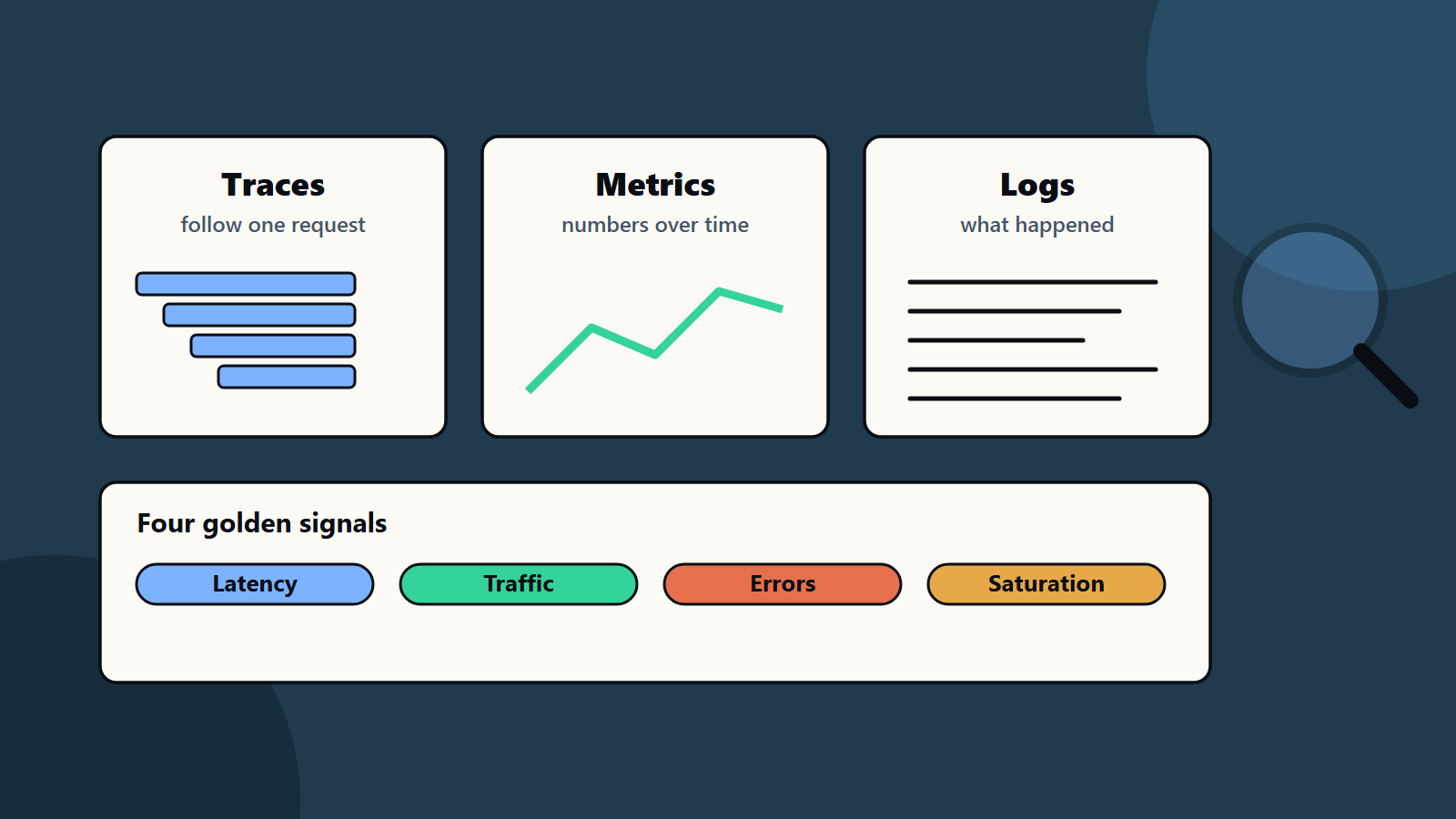
The OpenTelemetry observability primer describes three main signals.
Metrics are numeric values aggregated over time, describing infrastructure or application behaviour, such as error rate, CPU use and request rate. They are cheap to store and good for dashboards, alerts and trends.
Logs are timestamped messages from services or components. They record events and details, and are most useful when correlated with a trace and span so that you can see what happened during a particular request. Structured logs, with consistent fields in a machine-readable format, are far easier to search than free text.
Traces follow a single request as it moves through multiple services. Each trace is made of spans, which represent individual units of work. Together they show the request’s full path and where time is spent, which is vital in distributed systems.
Some teams add profiles to see where code spends CPU and memory, and events that record business or deployment changes, such as a release or a configuration change.
The four golden signals
Google’s site reliability engineering book, in its chapter on monitoring distributed systems, names four signals that cover most user-facing services:
- Latency: the time to serve a request. Track successful and failed requests separately, since fast errors can hide problems.
- Traffic: the demand on the system, such as requests per second.
- Errors: the rate of failed requests, whether explicit such as server errors, implicit such as wrong content with a success code, or by policy such as responses slower than a promised limit.
- Saturation: how full the service is, focusing on its most constrained resources. Many systems degrade before reaching full capacity, so set a utilisation target.
The book advises that if you measure all four and page a human when one is problematic, your service will be at least decently covered. It also recommends paging on symptoms, and only for definite, imminent problems, with every page being actionable.
Service level objectives
An observable system can express reliability goals clearly:
- Service level indicator (SLI): a measure of behaviour, such as the share of requests that succeed in under 300 milliseconds.
- Service level objective (SLO): the target, such as 99.9 percent over thirty days.
- Error budget: the amount of failure the SLO allows. When the budget is used, the team slows feature work to fix reliability.
SLOs give engineers and business owners a shared way to talk about reliability and trade-offs. Our guide to site reliability engineering explains these ideas in depth.
What to instrument
- Entry points: every request to a web app, API or job.
- Dependencies: database calls, queues, caches and external services.
- Business events: orders placed, payments completed, sign-ups and searches with no results. These link technical health to outcomes.
- Infrastructure: hosts, containers, network and storage.
- User experience: page load, errors in the browser and mobile crashes, so you see problems that servers cannot. Our guide to Core Web Vitals covers front-end measures.
- Deployments and changes, shown on charts, since many incidents follow changes.
Use open standards such as OpenTelemetry where possible, so that you are not tied to one vendor’s agents.
Practices that make it useful
Make data searchable and connected
- Include correlation identifiers in logs and traces, so you can jump from a slow trace to the related logs.
- Use consistent names, units and labels.
- Tag by service, environment, version and region.
Design dashboards for questions
Create a service overview showing the golden signals, a dependency view and a business view. Keep them simple, and link to deeper views. Our guide to business intelligence dashboards shares design principles that also apply to operations.
Alert with care
- Alert on symptoms users feel, such as high error rates or slow checkouts, and use cause-based alerts for early warning where helpful.
- Each alert should have an owner, a clear description and a runbook with first steps.
- Remove noisy alerts. Alert fatigue makes people ignore real problems.
- Route by severity: urgent pages for outages, tickets for slow burn issues.
Investigate with a method
- Check the golden signals and recent changes.
- Narrow down the affected service, region or customer group.
- Follow traces to find slow or failing steps.
- Examine logs for the cause.
- Fix or roll back, then verify recovery with the same signals.
- Hold a blameless review, and record what to improve.
Control cost and volume
Telemetry can become expensive. Sample traces, set retention by value, drop noisy logs, aggregate metrics and watch high-cardinality labels that explode storage. Review spend regularly, as part of your cloud cost routine. Our cloud cost optimization checklist covers this approach.
Protect data
Logs and traces can contain personal and sensitive data. Mask or exclude it at the source, limit access and set retention to match privacy rules, which vary by country.
Observability for modern stacks
- Microservices: traces are essential to see paths across services.
- Containers and orchestration: monitor clusters, pods and nodes, with service-level views above them.
- Serverless: rely on provider metrics and distributed tracing, with attention to cold starts and timeouts.
- Data pipelines: monitor freshness, volume and quality as well as job success.
- AI systems: add measures of output quality, cost per request, latency and safety events.
Maturity path
- Basic monitoring: uptime checks and infrastructure metrics.
- Centralised logs and golden signals for key services.
- Distributed tracing and SLOs.
- Business and user experience correlation.
- Automation: anomaly detection, automated runbooks and feedback into engineering priorities.
Common mistakes
- Collecting everything and understanding nothing.
- Alerts on every metric.
- Logs with no structure or context.
- No link between technical and business signals.
- Dashboards nobody owns.
- Ignoring cost until the bill arrives.
- Adding observability only after an incident has already happened.
How SoftSapien supports observability
SoftSapien designs and implements monitoring and observability stacks, sets SLOs and runbooks and operates them as part of managed services. See our DevOps and managed services offerings.
To improve visibility into your systems, visit the contact page and chat with our team, send a message or schedule a free consultation call.
Frequently asked questions
What is the difference between monitoring and observability?
Monitoring watches known conditions. Observability lets you understand a system's internal state from its outputs and investigate problems you did not predict.
What are the three observability signals?
Metrics are numeric values over time, logs are timestamped event messages and traces follow one request across services.
What are the four golden signals?
Latency, traffic, errors and saturation. Measuring all four and paging on user-visible problems gives strong coverage for most services.
How do I keep observability costs under control?
Sample traces, set retention by value, drop noisy logs, aggregate metrics and watch high-cardinality labels.
Can SoftSapien set up observability?
Yes, including SLOs and runbooks. Contact SoftSapien through the contact page to chat with our team, send a message or schedule a free consultation call.