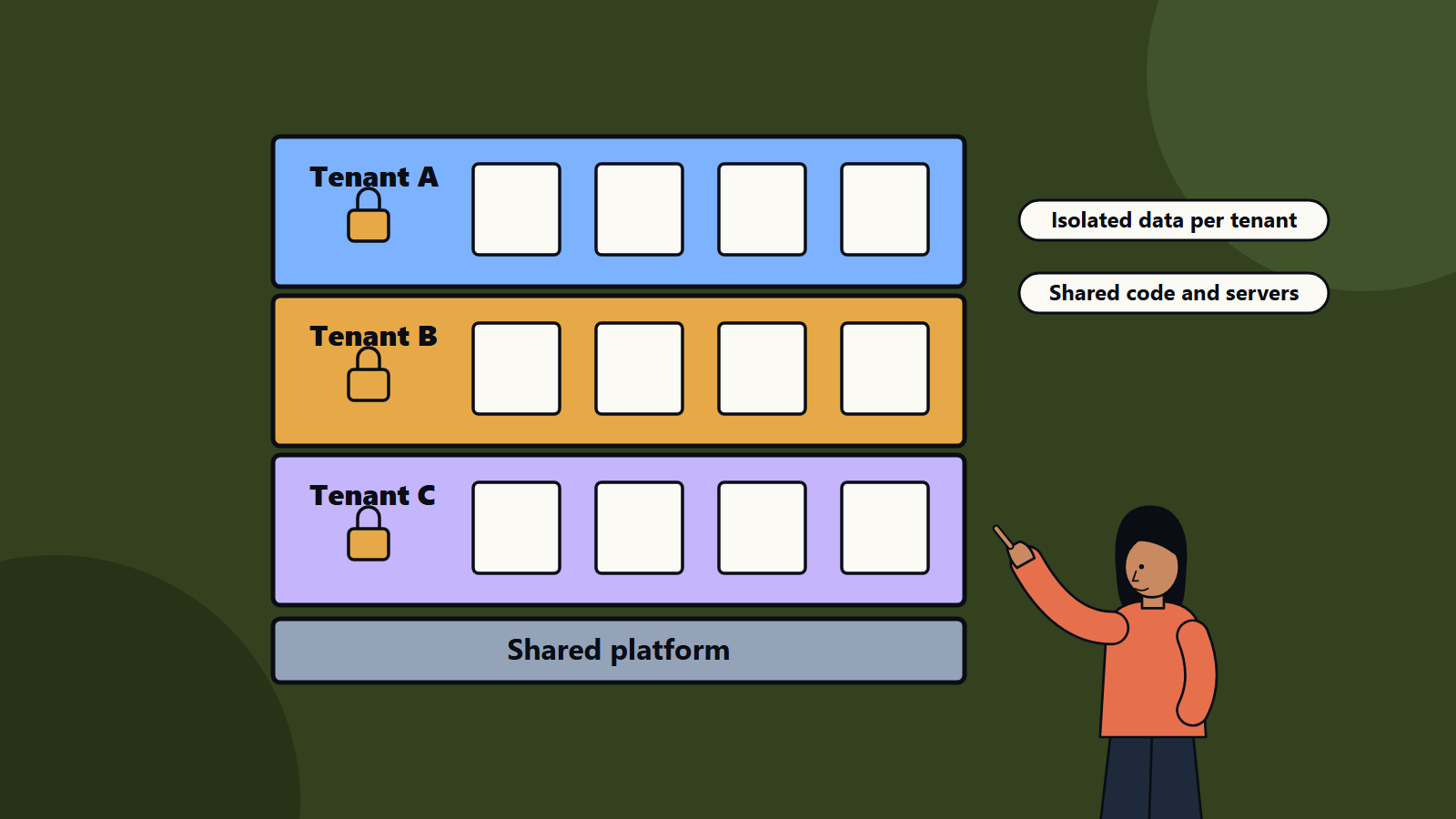
Short on time? Multi-tenancy means one SaaS platform serves many customers, called tenants, while keeping their data separate. The main choices run from a shared database with a tenant identifier to a separate database or deployment per tenant. Pick by isolation needs, compliance, performance, cost and the effort of running and upgrading each model, and plan for a mix as customers differ.
A SaaS product is one platform serving many customers at once, each expecting their data to be private, their performance to be steady and their needs to be met. How you divide the platform between them is among the most important architecture decisions in a SaaS business.
Get it right and you can add customers cheaply, release updates to everyone at once and meet demanding security requirements. Get it wrong and you face data leaks, noisy neighbours, painful migrations or costs that grow faster than revenue.
This guide explains the main tenancy models, their trade-offs and the practices that make them work. It helps founders choosing a first architecture and teams scaling an established product.
Key takeaways
- A tenant is a customer organisation. Many users from one organisation belong to one tenant.
- Models range from fully shared to fully isolated, with hybrids in between.
- Shared models cost less to run and operate. Isolated models suit strict security, compliance and customisation needs.
- Tenant identity, access control, data isolation and noisy-neighbour protection are core design concerns.
- Choose a model that you can change in steps as your customers and requirements evolve.
What multi-tenancy means
Microsoft’s architecture guidance on multitenant solutions defines a multitenant solution as one used by multiple customers, or tenants. Tenants are distinct from users: several users from one organisation form a single tenant. Examples include business-to-business software as a service, such as accounting and work tracking tools, business-to-consumer services such as music streaming and photo sharing, and enterprise platforms such as a shared cluster used by several business units.
The guidance covers architectural considerations, approaches by resource type and service-specific advice. The concepts apply on any cloud.
The main tenancy models
1. Shared everything
All tenants share the same application instances and the same database, with a tenant identifier on each row of data. Queries always filter by tenant.
Strengths: lowest cost per tenant, simplest operations, one deployment to update, efficient use of resources.
Weaknesses: a bug in filtering can expose one tenant’s data to another, so isolation relies on careful code and testing. One heavy tenant can slow others. Per-tenant backup, restore and data deletion are harder. Some customers will not accept it.
2. Shared application, separate schema
Tenants share the application, and each has its own schema within a shared database server.
Strengths: stronger logical separation, easier tenant-level export and customisation.
Weaknesses: management of many schemas, migrations that must run for each, and database limits at large tenant counts.
3. Shared application, separate database
Each tenant has its own database, while application servers are shared.
Strengths: strong data isolation, per-tenant backups and restores, flexibility in placing databases in different regions, and the ability to move large tenants to bigger resources.
Weaknesses: higher infrastructure and operational overhead, and more complex deployment and migration tooling.
4. Separate deployment per tenant
Each tenant gets its own copy of the full stack, sometimes called single tenancy or a siloed model.
Strengths: maximum isolation, customisation and security, easy to meet strict compliance and data location needs, and no noisy neighbours.
Weaknesses: highest cost, heavy operations, slower rollout of updates, and the risk of versions drifting apart. Needs strong automation.
5. Hybrid
Most mature SaaS companies end up with a mix: a pooled shared tier for most customers and dedicated resources for large or regulated tenants. Design the platform so a tenant can move between models.
How to choose
Ask these questions:
- Isolation and compliance: what do your customers require? Regulated industries or government may insist on dedicated resources or specific regions. Our guide to data residency and sovereignty explains the location side.
- Number and size of tenants: thousands of small tenants point to shared models. A few large tenants may justify dedicated ones.
- Performance and variability: do tenants have very different load patterns?
- Customisation: how much do tenants need to change data models, workflows or branding?
- Cost and pricing: what margin does your price allow? Dedicated resources must be reflected in the price.
- Operational capacity: can your team run many databases or deployments?
- Time to market: shared models are quicker to build at first.
- Growth plans: will you need to add regions, tiers or enterprise features?
Core design concerns
Tenant identity and context
Every request must carry a trusted tenant identity, established at sign-in and propagated through services, queues and background jobs. Derive tenant context from authenticated claims, and never from user-supplied parameters alone.
Data isolation
- Enforce tenant filters in one place, such as a data access layer, and not by trusting every developer to add them.
- Use database features such as row-level security where available.
- Test isolation explicitly, with automated tests that try to read across tenants.
- Encrypt data, and consider per-tenant keys for high-assurance customers.
Authentication and authorisation
Support enterprise single sign-on, per-tenant roles and permissions and tenant administrators. Keep clear separation between tenant users and your own staff, and log and control support access to tenant data.
Noisy neighbour protection
- Apply rate limits and quotas per tenant.
- Isolate heavy workloads with queues and separate worker pools.
- Monitor per-tenant resource use, and move heavy tenants to dedicated resources.
Customisation and configuration
Offer configuration, feature flags and extension points in place of custom code per tenant. Per-tenant forks multiply maintenance. Our guide to web application architecture explains how to keep structure manageable.
Onboarding and lifecycle
Automate tenant creation, configuration, data import, billing set-up and offboarding, including deletion and export of data according to contract and law.
Observability and cost allocation
Tag logs, metrics and traces by tenant, so you can investigate issues for a specific customer, calculate cost to serve and spot unprofitable tenants. See our article on observability.
Upgrades and migrations
Shared deployments update everyone at once, which is efficient and needs careful release practices such as feature flags, canary releases and backwards-compatible database changes. Per-tenant deployments need automated, staged rollouts and a limit on the number of supported versions.
Backup and recovery
Plan for restoring one tenant without affecting others. Separate databases or schemas make this easier. In shared models, build tooling for tenant-level export and restore.
Security and compliance
- Threat-model cross-tenant access, privilege escalation and shared resource attacks.
- Keep secrets, keys and credentials separate per environment, and per tenant where needed.
- Prepare evidence for audits and customer questionnaires, such as certifications and penetration test summaries.
- Handle personal data according to privacy laws in each region you serve.
Pricing and packaging links
Tenancy affects pricing. A pooled tier can offer lower prices, a dedicated tier a premium for isolation, region choice and service levels. Make sure your cost model reflects real resource use.
Common mistakes
- Choosing a heavily isolated model too early for a product with few customers.
- Trusting application code alone to prevent cross-tenant data access, with no tests.
- No per-tenant limits.
- Custom forks per customer.
- Hard-coding the tenancy model so it cannot change.
- Neglecting tenant-level observability and cost tracking.
A practical path
- Start with a shared model with strong isolation enforcement and tests.
- Build tenant context, quotas and observability from the first release.
- Design data and deployment so large or regulated tenants can move to dedicated resources.
- Automate onboarding and operations.
- Review the model as the customer base grows.
How SoftSapien builds SaaS platforms
SoftSapien designs and builds multi-tenant SaaS products, from architecture and security to billing, onboarding and operations. Learn about our SaaS development and enterprise software engineering services.
To plan your SaaS architecture, use the contact page to chat with our team, send a message or schedule a free consultation call.
Frequently asked questions
What is multi-tenancy?
It is a design where one solution serves multiple customers, called tenants, while keeping their data separate. Several users from one organisation form one tenant.
Which tenancy model should a SaaS start-up choose?
Often a shared model with strong isolation enforcement and tests, designed so large or regulated tenants can later move to dedicated resources.
What is the noisy neighbour problem?
One heavy tenant slows others on shared resources. Rate limits, quotas, queues and per-tenant monitoring reduce it.
How do I prevent cross-tenant data access?
Derive tenant identity from authenticated claims, enforce filters in one data access layer, use row-level security where available and test isolation explicitly.
Can SoftSapien build a multi-tenant platform?
Yes, from architecture to operations. Contact SoftSapien through the contact page to chat with our team, send a message or schedule a free consultation call.