Short on time? Treat data migration as its own project with its own owner. Inventory the data, decide what moves, clean it before you load, map every field, run several trial loads with business sign-off, plan the cut-over and rollback and keep the old system available until the new one is proven. Reconcile counts and totals every time.
When a company replaces its ERP, CRM, finance system or any core application, the software gets most of the attention. The data decides the outcome. If customer records arrive duplicated, balances do not match the ledger or order history goes missing, users lose trust in the new system in the first week.
Data migration is repetitive, detailed work that rewards planning. This checklist covers the stages from first inventory to post-go-live checks. It applies to a small business moving to a new accounting package and to a large organisation consolidating dozens of systems.
Key takeaways
- Decide what to migrate before you decide how: scope, history and retention.
- Clean and standardise data in the source or staging area before loading.
- Map fields and transformation rules in writing, and have business owners approve them.
- Run multiple trial loads, and reconcile results at every step.
- Plan the cut-over with a rollback path, and keep the old system accessible.
1. Define scope and ownership
- Name an owner for data migration, separate from the software project manager, with authority across departments.
- List the source systems and the target system.
- Decide what to migrate: master data such as customers, products and suppliers, open transactions such as unpaid invoices and open orders, balances and, where needed, history.
- Set rules for history. Migrating ten years of transactions costs effort and may add little value. Many companies move summarised history and archive the rest in a searchable store.
- Check legal and retention duties, such as tax, audit and privacy rules, which vary by country and sector.
- Agree success criteria: accuracy targets, acceptable error rates and sign-off roles.
2. Inventory and profile the data
- Identify every data store, including spreadsheets, side databases and files that people rely on.
- Record volumes, formats, owners, update frequency and quality.
- Profile the data: counts, nulls, duplicates, ranges, formats and relationships.
- Note sensitive and personal data, and plan how to protect it.
- Identify dependencies between data sets, such as orders that reference customers and products.
3. Clean before you move
Fixing data after loading is harder. In the source or a staging area:
- Remove or merge duplicates.
- Correct obvious errors and standardise formats for names, addresses, dates, currencies and units.
- Fill required fields that the new system demands.
- Archive obsolete records, such as inactive customers and discontinued products.
- Resolve conflicts between systems, deciding which source wins.
- Assign owners to approve decisions on difficult cases.
Our article on data quality for machine learning lists quality dimensions that apply equally to migration.
4. Design the target and the mapping
- Study the target data model: required fields, formats, reference data and validation rules.
- Map each source field to a target field, with transformation rules written in plain language and in code.
- Define reference data, such as code lists, and how old values convert to new ones.
- Decide how to carry identifiers. Keep legacy keys in a reference field to help support and reconciliation.
- Handle special cases: merged customers, split accounts, closed periods and attachments.
- Document the mapping in a shared specification that business owners review and sign.
5. Choose tools and approach
- Tools: built-in import tools, integration platforms, scripts and specialist migration software. Choose by volume, complexity, repeatability and skills.
- Approach: one big load at cut-over, phased loads by module or site, or continuous synchronisation until cut-over.
- Staging area: a place to hold, transform and validate data before loading.
- Automation: make the migration repeatable, so trial loads are fast and consistent.
- Security: encrypt data in transit and at rest, limit access and mask personal data in test environments.
Our article on enterprise software integration patterns covers batch, streaming and change data capture approaches.
6. Build and test the migration
Run several trial loads:
- Trial 1: find technical errors and big mapping gaps.
- Trial 2: fix issues, and let the business check records.
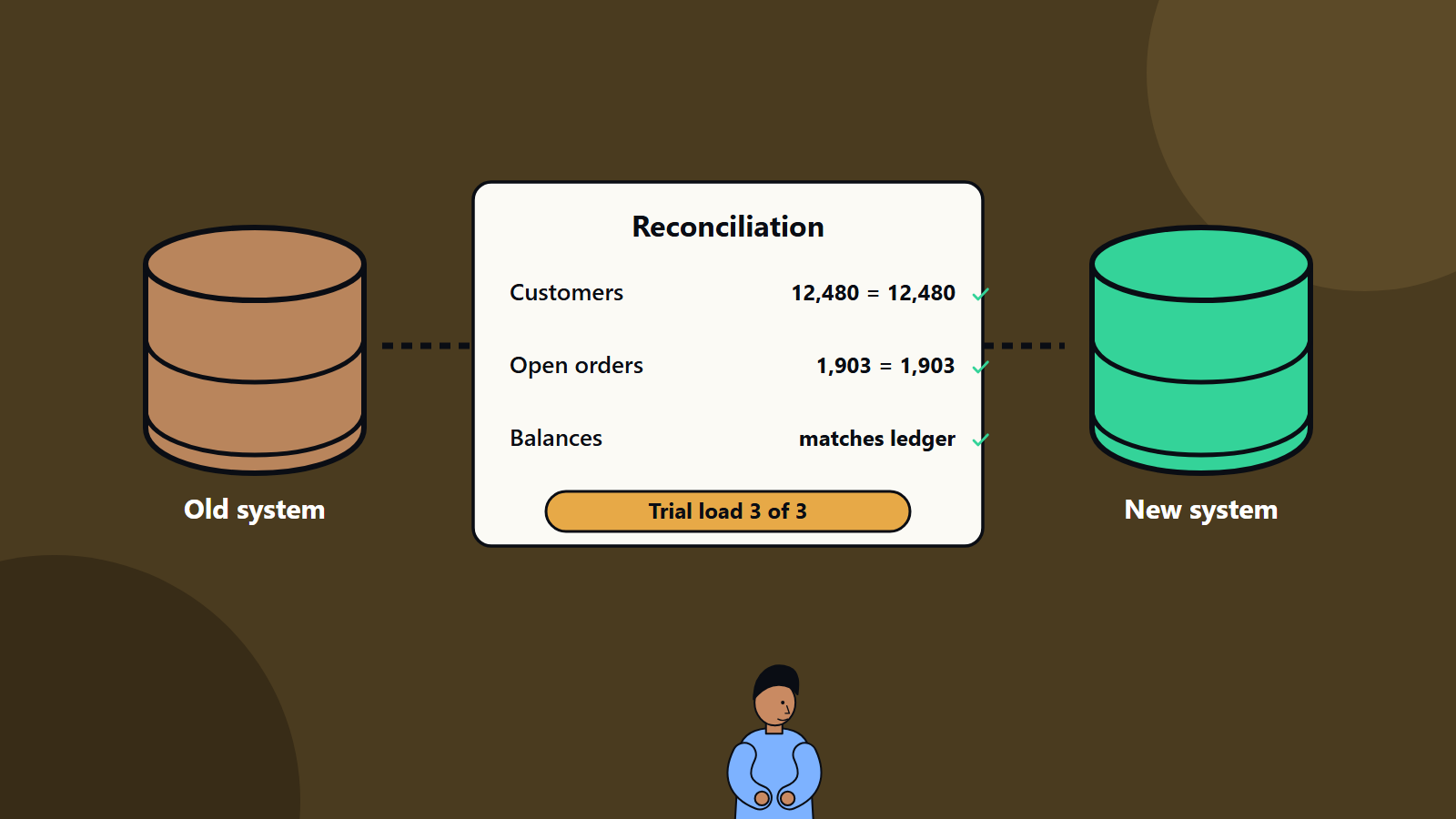
- Trial 3 and beyond: performance, final quality and a full rehearsal of the cut-over steps, with timing.
At each trial:
- Reconcile counts: records read, loaded, rejected.
- Reconcile values: financial balances, stock quantities, open item totals and key reports against the source.
- Sample check records by hand, including the awkward ones.
- Test the new system with migrated data: can users find customers, run reports and process transactions?
- Log and classify errors, then fix the causes behind the symptoms.
- Get sign-off from data owners and finance.
7. Plan the cut-over
- Choose a window that suits the business, with low activity, and avoid period ends where possible.
- Freeze changes in the old system, or plan how to capture changes made during the migration.
- Write a minute-by-minute runbook with owners, timings, checks and decision points.
- Define go and no-go criteria, and who decides.
- Plan rollback: how to return to the old system if serious problems appear, and until when.
- Prepare communication to users and customers.
- Arrange extra support for the first days.
8. Go live and verify
- Run the final migration according to the runbook.
- Reconcile immediately, and compare key reports with the source.
- Let a small group of power users validate before opening to everyone.
- Monitor errors, performance and user feedback closely.
- Keep the old system available in read-only mode for reference during an agreed period.
9. After go-live
- Fix migration defects found in use, with a clear process and owner.
- Re-run reconciliations at the first period end, such as month-end close.
- Archive or retire the old system according to retention rules, and keep a secure, documented archive of data you must retain.
- Delete data you no longer need, in line with policy and law.
- Capture lessons, and update documentation.
Special topics
Personal data and privacy
Migrations move large amounts of personal data. Limit access, mask data in test environments, check that you have a lawful basis to keep and use what you move and respect deletion requests. If systems or vendors sit in different countries, check transfer rules. Our guide to data residency and sovereignty explains the main concepts.
Cloud migrations
Moving data to the cloud adds considerations: bandwidth, transfer methods, costs and cut-over timing. Our cloud migration checklist covers the wider programme.
Attachments and unstructured content
Documents, images and emails attached to records need their own plan: where they will live, how links will work and how to move them in volume.
Integrations
Interfaces to other systems must point to the new system at cut-over. Plan changes, tests and timing with the owners of connected applications.
Roles
- Data migration lead: plan, schedule and coordination.
- Data owners: business decisions on scope, quality and sign-off.
- Data analysts and engineers: profiling, mapping, build and testing.
- Target system specialists: configuration and load tools.
- Finance and operations testers: reconciliation and acceptance.
- Security and privacy leads: controls and compliance.
Common mistakes
- Leaving migration to the last weeks.
- Moving all history without a business reason.
- No data owners, so nobody decides on duplicates and conflicts.
- Skipping reconciliation, so problems surface after go-live.
- Only one trial load.
- No rollback plan.
- Switching off the old system too early.
A one-page summary checklist
- Owner named and scope agreed
- Sources inventoried and profiled
- Cleaning rules approved
- Mapping documented and signed
- Tools and environments ready
- Three or more trial loads reconciled
- Cut-over runbook rehearsed
- Rollback plan agreed
- Support in place for go-live
- Post-go-live reconciliation scheduled
How SoftSapien supports data migration
SoftSapien plans and runs data migrations for ERP, CRM, finance and custom systems, with profiling, cleaning, automated loads, reconciliation and cut-over support. See our enterprise software integration and legacy application modernization services.
To plan your own migration, go to the contact page and chat with our team, send a message or schedule a free consultation call.
Frequently asked questions
What should I migrate to a new system?
Master data, open transactions, balances and, where needed, summarised history. Archive the rest in a searchable store, within legal retention duties.
How many trial loads should I run?
At least three: one to find technical errors, one for business checking and one as a full rehearsal with timing, each reconciled and signed off.
What is data reconciliation?
Comparing counts and values between source and target, such as records loaded, financial balances, stock quantities and open items, to prove nothing was lost or altered.
Why keep the old system after go-live?
It gives a reference, supports rollback and lets you check problems found in use. Keep it read-only for an agreed period before retiring it.
Can SoftSapien run our data migration?
Yes, with reconciliation and cut-over support. Contact SoftSapien through the contact page to chat with our team, send a message or schedule a free consultation call.