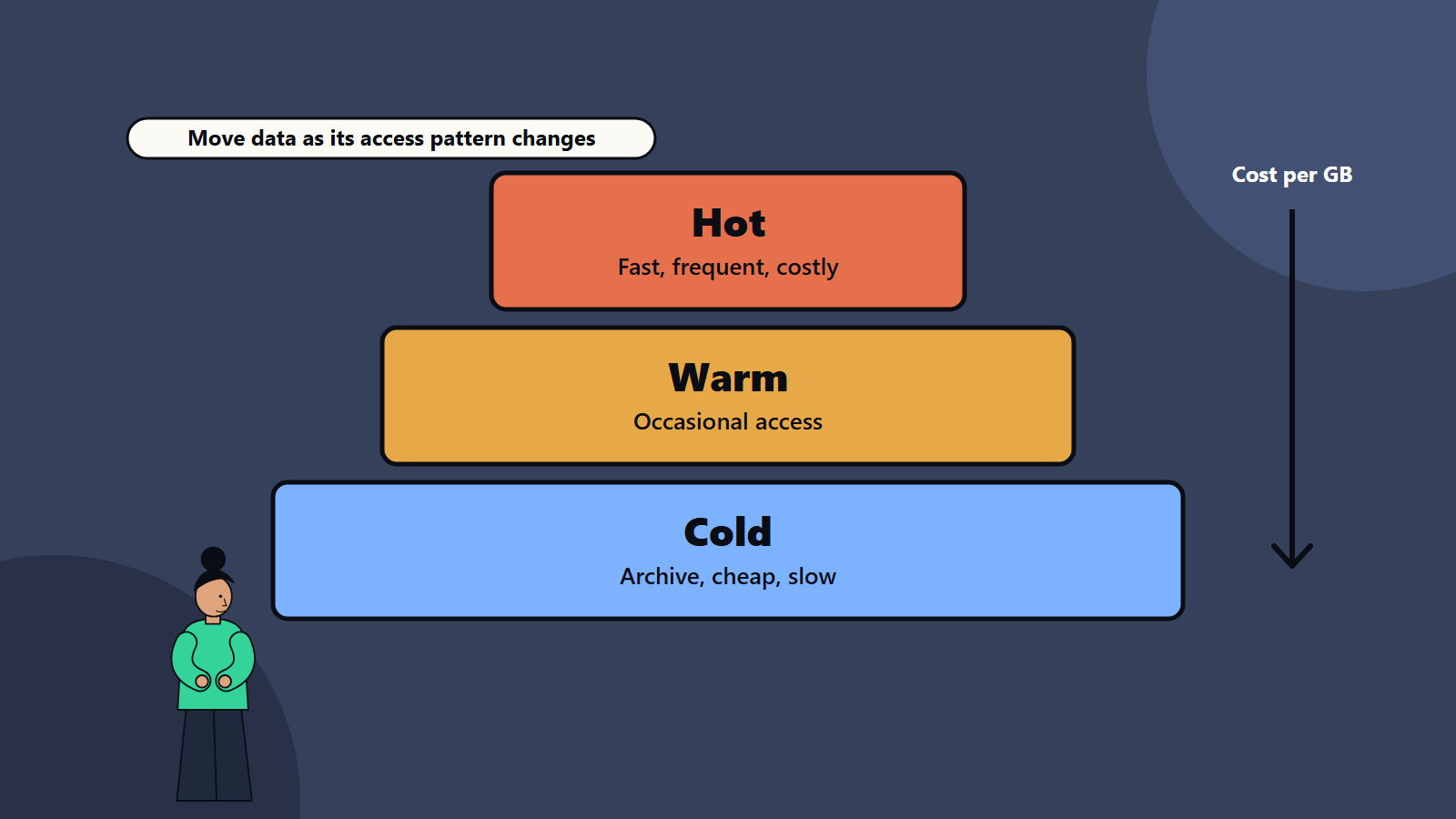
Short on time? Storage tiering places each piece of data on a class of storage that matches how often it is used, how fast it must be and how long it must be kept. Hot data sits on fast, costly storage, cold data on cheap, slower storage. Classify data, set rules, watch retrieval fees and minimum retention periods and review the policy regularly.
Most organisations keep everything on the same expensive storage because moving it seems risky and nobody owns the decision. Yet data ages. Last week’s orders are read constantly, and last year’s might be opened twice. Paying the same price per gigabyte for both is a common source of waste.
Storage tiering fixes this by matching data to the right cost class. This guide explains the idea for a small business using cloud storage, an enterprise running its own arrays and everyone in between.
Key takeaways
- Tiers trade speed and availability against cost, and access patterns decide which tier fits.
- Typical tiers are hot, warm, cold and archive, in the cloud and on premises.
- Some cloud classes have minimum storage durations and retrieval fees, which can make a wrong choice expensive.
- Rules and automation move data as it ages, and monitoring shows whether they work.
- Compliance, backup and recovery needs set limits on how far you can go.
The tiers
Names vary between vendors, and the concept is consistent.
- Hot: frequently accessed, latency sensitive data such as live databases, active documents and application files. Fast storage, such as solid-state drives, costs the most per gigabyte.
- Warm: data accessed now and then, such as recent reports or last quarter’s records. Moderate cost and speed.
- Cold: rarely accessed data that still needs fairly quick retrieval when required. Lower storage cost, with retrieval fees or small delays.
- Archive: data kept for compliance or history, accessed very rarely. The lowest storage cost, with retrieval that can take minutes to hours and often a fee.
Cloud examples
Cloud providers offer classes that map to these tiers. Amazon’s S3 storage classes are a widely used example:
- A standard class for frequently accessed data.
- An intelligent tiering class that moves objects between access tiers automatically based on use, with optional archive tiers.
- Infrequent access classes for data used less often but needed quickly, including a single-zone option that stores data in one availability zone at a lower price.
- Glacier classes for archives, with options for instant, flexible or deep archive retrieval.
Prices, minimum storage durations and retrieval charges differ by class, with some archive classes having minimum durations of 90 or 180 days, so check the provider’s current documentation before deciding. Other cloud platforms offer similar hot, cool, cold and archive options under their own names.
Remember the trade-offs: a cheaper class often brings a minimum storage period, a retrieval fee per gigabyte and slower access. If you move data to an archive class and then read it frequently, the total bill can exceed what you would have paid in a standard class.
On-premises examples
Storage arrays commonly combine fast flash drives and larger, slower disks, sometimes with tape or object storage as an archive. Software can move blocks or files between them automatically based on activity. Our guide to server and storage choices explains how hardware ages and when to replace it, and our comparison of data centre versus cloud shows how to weigh the cost of each.
Classify your data
Before choosing tiers, understand what you hold:
- Inventory: where data lives, how large it is, who owns it.
- Access pattern: how often each dataset is read and written, and how that changes with age.
- Performance need: what delay users and applications can accept.
- Business value and sensitivity: how costly would loss or exposure be?
- Retention rules: legal, tax, contractual and regulatory requirements for how long to keep data, and when to delete it.
- Recovery needs: how fast must it return after a failure? See disaster recovery planning and the 3-2-1 backup strategy.
Storage reports and access logs give the facts. Many teams are surprised by how large a share of their data has not been opened for a year.
Set tiering rules
A policy turns classification into action. Examples:
- Keep project files in the hot tier for 30 days after last change, then move to warm.
- Move logs to cold storage after 90 days, and delete them after the retention period.
- Move finished project archives and old backups to an archive class.
- Keep legal hold data unchanged, with locking where required.
- Keep application databases and anything customers wait for in the fastest tier.
Choose time-based rules for predictable ageing, access-based rules for unpredictable patterns, or an automatic tiering feature when access is hard to predict and objects are large enough for it to pay off. Check the fine print, since small objects may not be eligible for some automatic classes, and monitoring fees can apply.
Count all the costs
A fair comparison includes:
- Storage price per gigabyte per month.
- Request and operation fees.
- Retrieval fees and any early deletion charges.
- Data transfer out of the platform or region.
- The cost of moving data between tiers.
- Management effort and tooling.
- The cost of delay when someone needs archived data quickly.
Our guide to cloud cost optimisation shows how to tag, track and review these charges.
Security and compliance
- Apply encryption and access control in every tier.
- Keep audit logs for access, and for movement between tiers.
- Check data location rules when archives sit in other regions. See data residency and sovereignty.
- Use immutable or locked storage where regulations require records that cannot change.
- Test restores from the archive. Data you cannot recover is waste at any price.
Monitor and adjust
- Track cost per tier and per team, and the amount of data in each.
- Watch retrieval volumes, since high retrieval from a cold tier shows a rule moved data too early.
- Review rules every quarter, as products and habits change.
- Report savings, so the policy keeps support.
- Delete data that has passed its retention period, because the cheapest storage is none.
Common mistakes
- Moving data to archive with no check of access frequency.
- Ignoring minimum storage periods and retrieval fees.
- Tiering based only on file age.
- Forgetting backup copies and snapshots, which can be the largest share of storage.
- No owner for the policy.
- Never testing restores.
- Keeping everything forever without a retention rule.
A starting plan
- Run a storage report, and find the largest and oldest datasets.
- Choose two or three datasets where access has clearly dropped.
- Calculate the cost with all fees, then move them with a small rule.
- Monitor retrieval and bills for a month.
- Extend the policy, and write it down with an owner.
How SoftSapien supports storage and data cost management
SoftSapien’s infrastructure engineers analyse storage use, design tiering and retention policies, implement automation across cloud and on-premises systems and set up cost monitoring. See our server and storage solutions and cloud and datacenter solutions services.
To bring your storage costs down, use the contact page to chat with our team, send a message or schedule a free consultation call.
Frequently asked questions
What is storage tiering?
It places data on storage classes that match how often it is used, how fast it must be and how long it must be kept, from hot and fast to cold and cheap.
What costs can surprise people?
Retrieval fees, minimum storage durations, request charges and data transfer. Archiving data you read often can cost more than a standard class.
How do we decide what goes where?
Inventory the data, measure access patterns, note performance needs and retention rules, then set time-based or access-based rules and test them on a small dataset.
Does tiering affect backup and recovery?
Yes. Check recovery time needs, and test restores from every tier, including archives.
Can SoftSapien help reduce storage cost?
Yes, with analysis and automation. Contact SoftSapien through the contact page to chat with our team, send a message or schedule a free consultation call.