Short on time? Large language models explained in one paragraph: an LLM reads text as tokens, uses the Transformer design from the 2017 paper “Attention Is All You Need” to weigh how each token relates to the others, and predicts the next token, over and over. Its context window limits how much it can consider at once, and it can sound sure while being wrong. This full guide covers tokens, context, training, prompting, retrieval, cost, safety and code.
Large language models, or LLMs, sit behind chat assistants, code helpers, search tools and many business apps. Most articles on large language models explained either skip the mechanics or bury you in maths. This guide takes a middle path. It explains each idea in plain words, shows small pieces of code and ends with a plan for using LLMs well at work.
It suits students, developers, managers and business owners. Read it start to finish, or jump to a section from the contents list. If you are new to AI, read Learn AI From Scratch and Generative AI Explained first or alongside.
Key takeaways
- An LLM predicts the next token. Everything else, from answers to code, comes from repeating that step.
- Tokens are pieces of text. Google’s documentation says a token is roughly four characters, and 100 tokens are about 60 to 80 English words.
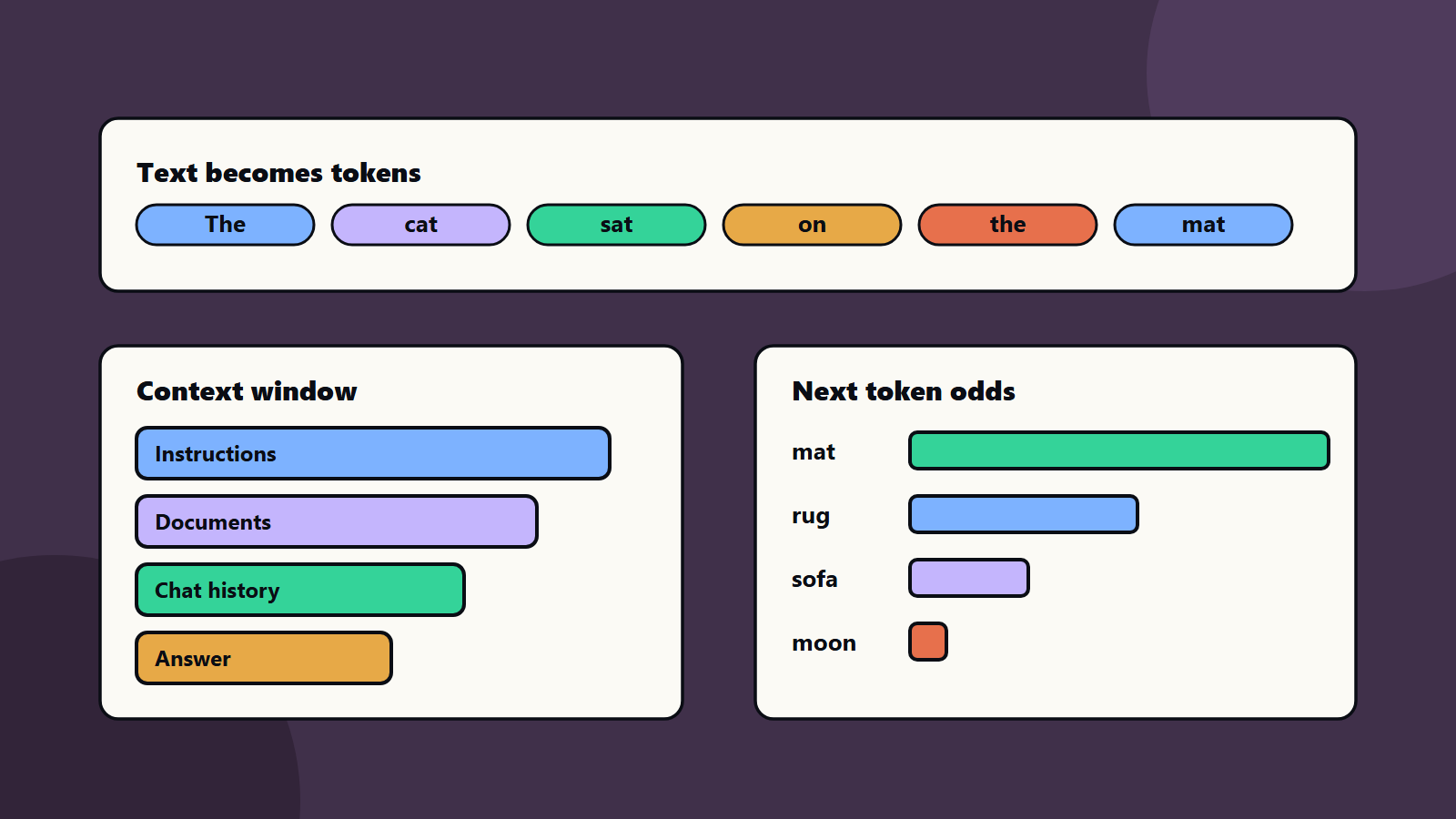
- The context window is the total tokens a model can consider at once, covering your prompt, documents, history and the answer.
- The Transformer, introduced in 2017, is based solely on attention mechanisms and is the design behind most modern LLMs.
- LLMs are fluent but not always right. Ground them with retrieval, test them and keep people in charge of important decisions.
Contents
- What an LLM is
- Tokens, the unit of everything
- Embeddings: meaning as numbers
- The Transformer and attention
- How a model is trained
- How a model writes: sampling and temperature
- The context window and its limits
- Prompting that works
- Retrieval and tools
- Fine-tuning, small models and choosing a model
- Cost, speed and quality
- Risks and safety
- Code walk-through
- A worked example
- Small business and enterprise views
- Common mistakes
- A learning and starting plan
1. Large language models explained: what an LLM is
A language model is a program that assigns probabilities to text. Given the start of a sentence, it estimates which piece of text is likely to come next. “Large” refers to the size of the model, measured in parameters (the numbers adjusted during training), and to the large amount of text used for training.
The Hugging Face LLM Course introduces the topic with transformer models and the pipeline() function, which lets you try tasks such as text generation, classification and translation in a few lines of code. That is a good first experiment once you finish reading here.
An LLM does not look facts up the way a search engine does. It produces text that fits the patterns it learned. When patterns and facts agree, answers are useful. When they do not, you get confident mistakes. Keep this idea in mind for the rest of the guide. That is large language models explained in one line.
2. Tokens, the unit of everything
Models do not read letters or whole words. They read tokens, which are chunks of text. A common word may be one token. A rare word may be split into several. Spaces, punctuation and numbers also become tokens.
Google’s token documentation explains that tokens can be single characters, whole words or parts of words, that a token is roughly four characters and that 100 tokens are about 60 to 80 English words. It also notes that you can count tokens before sending a request, and that the number matters because it sets cost and limits.
Why tokens matter to you:
- Cost. Providers usually price by tokens in and tokens out.
- Limits. The context window is measured in tokens.
- Languages. Text in some languages needs more tokens for the same meaning, so it can cost more and fit less.
- Odd behaviour. Models see tokens, not letters, which is why counting letters in a word can trip them up.
A rough estimator helps with planning. This is only an estimate, so use your provider’s counting tool for real numbers:
def estimate_tokens(text: str) -> int:
    """Rough estimate: about 4 characters per token for English text."""
    return max(1, round(len(text) / 4))

prompt = "Summarise the attached meeting notes in five bullet points."
print(estimate_tokens(prompt))            # a small prompt
print(estimate_tokens("word " * 1000))    # a 1,000-word document
3. Embeddings: meaning as numbers
Each token is turned into a list of numbers called an embedding. Tokens with related meanings end up with similar numbers. The model learns these during training.
The same idea powers search by meaning. You turn a sentence into an embedding, then compare it with embeddings of your documents. Closer numbers mean closer meaning. The Sentence Transformers documentation shows the pattern: load a model, encode sentences into embeddings and calculate similarity between them. We use this in Build Your First RAG App.
Here is a small illustration of similarity using plain Python. The three-number vectors are made up for teaching, because real embeddings have hundreds or thousands of numbers:
import math

def cosine(a, b):
    dot = sum(x * y for x, y in zip(a, b))
    na = math.sqrt(sum(x * x for x in a))
    nb = math.sqrt(sum(y * y for y in b))
    return dot / (na * nb)

cat    = [0.9, 0.1, 0.3]
kitten = [0.85, 0.15, 0.35]
car    = [0.1, 0.9, 0.2]

print(round(cosine(cat, kitten), 3))  # high: similar meaning
print(round(cosine(cat, car), 3))     # lower: different meaning
4. The Transformer and attention
Before 2017, most language models read text one step at a time. The paper Attention Is All You Need, posted on arXiv in June 2017, proposed a new design called the Transformer, based solely on attention mechanisms. It dropped recurrence and convolutions. The paper reported strong results on translation tasks, with more parallel training and less training time.
What attention does
When the model processes a token, attention lets it look at the other tokens in the context and decide how much each one matters. In “The trophy did not fit in the suitcase because it was too big”, the word “it” depends on “trophy”. Attention helps the model link them.
The building blocks
A Transformer stacks the same block many times. Each block has:
- Attention layers, which mix information between tokens.
- Feed-forward layers, which transform each token’s representation.
- Residual connections and normalisation, which keep training stable.
Position information is added so the model knows word order.
Encoder, decoder and the models you use
The original design had an encoder and a decoder. Today’s chat models are mostly decoder-style models: they read the text so far and predict the next token. The Hugging Face course explains encoder, decoder and encoder-decoder models and what each is good at. Encoders suit understanding tasks such as classification. Decoders suit generation.
5. How a model is trained
Training happens in stages.
Pre-training
The model reads a very large amount of text and learns to predict the next token. Each wrong prediction produces an error, and the training process adjusts the parameters to reduce it, using backpropagation, which Google’s neural networks module describes as the most common training algorithm for neural networks. After many rounds, the model captures grammar, facts, styles and patterns of reasoning found in the text.
Instruction tuning and alignment
A pre-trained model completes text. To make it follow requests, builders train it further on examples of instructions and good answers, and often use human or AI feedback to prefer helpful, safe responses. Details differ by provider, and each provider publishes its own model documentation.
Fine-tuning for your needs
You can adapt a model further with your own examples. This helps with tone, format and narrow tasks. It is a larger project than prompting, so try prompts and retrieval first.
What training means for you
- The model’s knowledge stops at a training cutoff. Use retrieval or tools for current facts.
- It can reflect biases in its data.
- It cannot be assumed to know your private information.
6. How a model writes: sampling and temperature
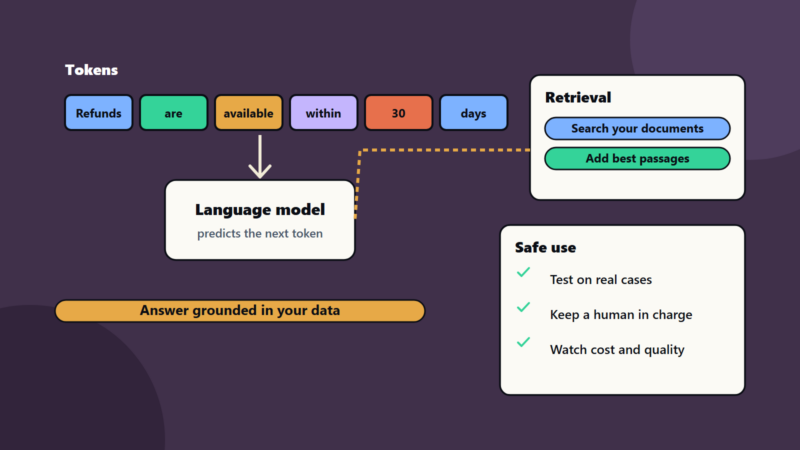
At each step, the model produces a score for every token in its vocabulary. A function called softmax turns scores into probabilities. Then the system picks a token.
- Greedy: always pick the most likely token. Output is steady and can be repetitive.
- Sampling: pick randomly according to the probabilities. Output varies.
- Temperature: a setting that sharpens or flattens the probabilities. Low values give predictable text. High values give more variety and more risk.
- Top-k and top-p: limit the choice to the most likely tokens.
This small program shows the effect of temperature:
import math, random

def softmax(scores, temperature=1.0):
    scaled = [s / temperature for s in scores]
    top = max(scaled)
    exps = [math.exp(s - top) for s in scaled]
    total = sum(exps)
    return [e / total for e in exps]

tokens = ["mat", "rug", "sofa", "moon"]
scores = [3.0, 2.2, 1.0, -1.0]

for t in (0.3, 1.0, 2.0):
    probs = softmax(scores, t)
    print(t, [f"{tok}:{p:.2f}" for tok, p in zip(tokens, probs)])

choice = random.choices(tokens, weights=softmax(scores, 1.0))[0]
print("sampled:", choice)
At a temperature of 0.3 the top token dominates. At 2.0 the choices spread out. For tasks that need consistency, such as data extraction, use a low temperature. For brainstorming, use a higher one.
7. The context window and its limits
The context window is the number of tokens the model can consider in one request. It includes everything: system instructions, your question, any documents you add, earlier conversation and the answer being written. Google’s documentation notes that context windows differ by model and that you can check how many tokens a request uses.
What happens when you run out
- The request can be rejected.
- Older parts of the conversation may be cut.
- The answer may be cut short.
Long context is not free
Even when a model accepts a very long input, three issues remain:
- Cost and speed. More tokens cost more and take longer.
- Attention to detail. Models can miss details buried in long inputs. Test with your own documents.
- Noise. Irrelevant text can distract the model.
Good habits
- Send the passages that matter, and not the whole archive.
- Summarise long conversations after several turns.
- Put key instructions clearly at the start or end.
- Count tokens in tests so you know your real usage.
8. Prompting that works
A prompt is the input you give the model. Good prompts are clear, specific and testable.
A reliable structure
- Role and goal. Say who the model acts as and what you want.
- Context. Provide the facts it needs.
- Task. State the steps or the question.
- Format. Describe the output you want.
- Rules. List limits, such as “use only the text below” and “say when you do not know”.
Example
You are a support assistant for a software company.
Use only the policy text below. If the answer is not there, say you do not know.

Policy:
{policy_text}

Question:
{question}

Answer in two short paragraphs, then list the policy sections you used.
Techniques
- Examples in the prompt (few-shot) show the pattern you want.
- Step-by-step instructions help with multi-part tasks.
- Structured output such as JSON makes results easy to check by code.
- Separating data from instructions reduces confusion and some security risks.
Test prompts on a set of real cases, and keep the versions that work. Treat prompts as code.
9. Retrieval and tools
Two additions turn a general model into a useful business system.
Retrieval
Retrieval-augmented generation, or RAG, searches your documents and adds the best passages to the prompt, so the model answers from your data. It reduces made-up answers and lets you cite sources. See Build Your First RAG App.
Tools
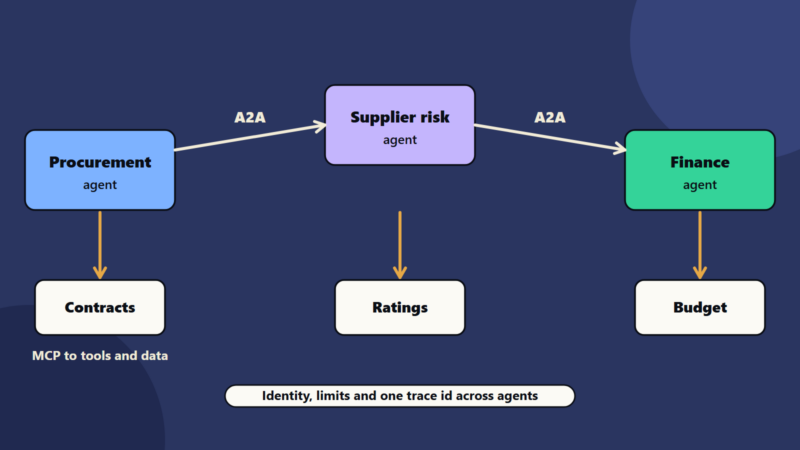
Tools let the model call functions: look up an order, run a calculation, create a ticket. The model suggests the call, your code runs it and the result goes back to the model. When a model plans and calls tools in a loop, you have an agent. See Build Your First AI Agent. The Model Context Protocol is an open standard for connecting AI applications to tools and data.
10. Fine-tuning, small models and choosing a model
Choose by task
Match the model to the job:
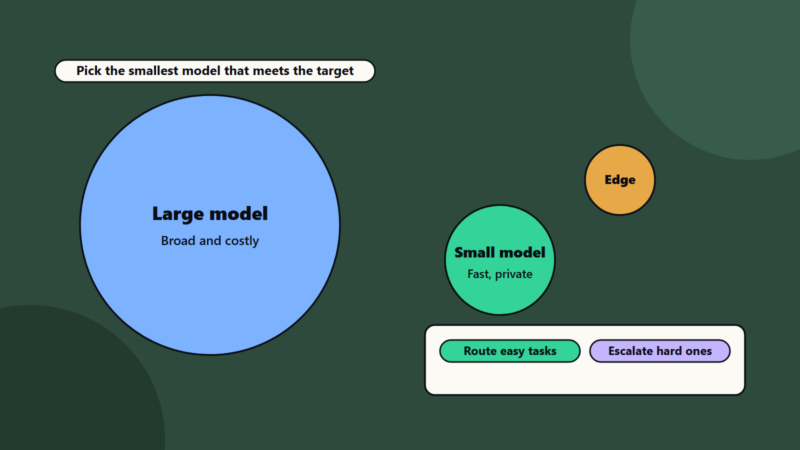
- Short classification or extraction: a small model may be enough. See Small Language Models.
- Complex reasoning or long documents: use a stronger model.
- Private or regulated data: consider private or sovereign hosting. See Cloud 3.0 and sovereign cloud.
Evaluate before you decide
Build a test set of 50 to 200 real examples with expected answers. Score each candidate model on quality, cost and speed. Choose the cheapest one that meets your target.
Open and closed models
Open-weight models can run in your own environment. Hosted models are easier to start with. Read licence terms for both.
11. Cost, speed and quality
Three dials trade off against each other.
- Quality: bigger models and more context usually help.
- Cost: driven by tokens and model size.
- Speed: smaller models and shorter outputs respond faster.
Ways to save without losing quality: shorter prompts, caching, routing simple requests to small models and batching non-urgent work. See The AI Infrastructure Reckoning.
12. Risks and safety
The OWASP Top 10 for LLM Applications 2025 is a good checklist. Its ten items are prompt injection, sensitive information disclosure, supply chain, data and model poisoning, improper output handling, excessive agency, system prompt leakage, vector and embedding weaknesses, misinformation and unbounded consumption.
Safety is part of large language models explained properly, so keep this checklist close.
Practical rules:
- Treat any text from outside as untrusted.
- Never give a model more tool access than the task needs.
- Check outputs before they trigger actions or reach customers.
- Keep secrets out of prompts.
- Set budgets and rate limits.
- Keep logs, and review samples.
- Keep a person responsible for important decisions.
The NIST AI Risk Management Framework gives a structure for managing AI risk across an organisation. See also AI Security Maturity.
13. Code walk-through
Try a ready-made model with Hugging Face
The Hugging Face course shows that the pipeline() function connects a model with the steps before and after it. This is a minimal example:
from transformers import pipeline

classifier = pipeline("sentiment-analysis")
result = classifier("This guide made large language models much clearer.")
print(result)
The first run downloads a default model, so expect a wait. For production, choose and pin a specific model.
Call a hosted model through an API
Every provider has its own library. The shape is similar: send messages, receive text. This pattern is generic, so adapt it to your provider’s documentation:
def ask(client, question, context, model="your-model-name"):
    prompt = (
        "Use only the context. If the answer is missing, say you do not know.\n\n"
        f"Context:\n{context}\n\nQuestion: {question}"
    )
    response = client.generate(model=model, input=prompt, temperature=0.2)
    return response.text
Check outputs with code
When you ask for structured output, validate it:
import json

def parse_reply(text):
    try:
        data = json.loads(text)
    except json.JSONDecodeError:
        return None
    if not {"answer", "sources"} <= data.keys():
        return None
    return data
If the check fails, retry once, then send the case to a person.
14. A worked example: an HR policy assistant
This example is illustrative.
A company with 800 staff wants an assistant that answers questions about leave, expenses and travel policies.
- Scope. Only HR policy questions. Anything else gets a polite refusal.
- Data. 60 policy documents, split into passages with titles and dates.
- Prompt. Use only the retrieved passages, cite document names, say when unsure.
- Model. Test two models on 100 real questions. Choose the smaller one if it meets the target for accuracy.
- Controls. No personal data in prompts, logs without names, a thumbs-down button and weekly review of poor answers.
- Safety. The assistant cannot change records. It can only answer and link to forms.
- Cost. Track tokens per answer, cache common questions and set a monthly budget alert.
- Rollout. Pilot with one department for six weeks, then expand.
Results to look for: most questions answered correctly with sources, fewer emails to HR and a clear list of policy gaps that the assistant exposed.
15. Small business and enterprise views
- Sole trader or small business: start with a hosted assistant under a business plan, write a half-page rule for what data goes in, check every answer that reaches a customer and keep a list of prompts that work.
- Mid-size company: build one or two retrieval-based tools, create a test set, track cost and quality and name an owner.
- Enterprise: run a model catalogue, central evaluation, routing, private hosting where needed, security testing, governance and training. See AI Orchestration.
Regional and regulatory notes
Data protection law applies when prompts or documents include personal data. The EU AI Act sets duties that vary by risk level, and some uses need transparency, for example telling users they are talking to an AI. See EU AI Act After the Digital Omnibus. Language support also varies by model, so test in each language you serve.
16. Common mistakes
- Treating fluent text as correct text.
- Sending whole documents when a few passages would do.
- No test set, so changes cannot be judged.
- Using the largest model for every task.
- Putting secrets or personal data in prompts.
- Giving tools broad rights.
- Ignoring cost until the bill arrives.
- No human review for important outputs.
17. A learning and starting plan
Use this plan to turn large language models explained on paper into skills you can use.
Week 1: read this guide, count tokens for your own prompts and try a few temperature settings.
Week 2: work through the first chapter of the Hugging Face LLM course and the Google Machine Learning Crash Course.
Week 3: build a small retrieval demo with your own documents.
Week 4: write a test set of 50 questions, and compare two models on quality and cost.
Month 2 and beyond: add logging, budgets and a review routine, then explore agents and fine-tuning when you have a clear need. For code skills, see Python for AI and Machine Learning for Beginners.
How SoftSapien supports LLM projects
SoftSapien’s AI engineers help teams choose models, build retrieval and agent systems, create test sets, set up monitoring and cost control and train staff. See our AI development and AI governance services.
To plan your first LLM project, use the contact page to chat with our team, send a message or schedule a free consultation call.
Frequently asked questions
What is a large language model?
A model trained on large amounts of text to predict the next token, which lets it write, summarise, translate and answer questions.
What is a token?
A piece of text such as a word, part of a word or a symbol. Google documents a rough rule of four characters per token, and 100 tokens as about 60 to 80 English words.
What is a context window?
The total number of tokens a model can consider in one request, covering instructions, documents, history and the answer.
Why do LLMs give wrong answers?
They generate likely text from patterns instead of looking facts up, so they can be fluent and wrong. Retrieval, testing and human review reduce the risk.
Can SoftSapien help us build with LLMs?
Yes, from model choice to production. Contact SoftSapien through the contact page to chat with our team, send a message or schedule a free consultation call.