Short on time? AI orchestration is the layer that connects models, data, tools and people into a reliable workflow. IBM’s 2026 trends say competitive edge is shifting from single models to orchestration as models commoditise. To build it well, route each task to the right model, ground answers in your data, give tools narrow permissions, add human checkpoints, test every step and watch cost and quality in production.
Many teams started with one question: which model is best? That question matters less every year. Models improve quickly, prices fall and several are good enough for most tasks. What decides whether an AI feature works in a real business is everything around the model: where the data comes from, which tools it may use, what happens when it is wrong and who approves the result.
That surrounding layer is orchestration. This article explains what it is, how it works and how to build it, using trends from IBM, Capgemini and Deloitte. It suits a small team wiring up its first assistant and an enterprise running many agents.
Key takeaways
- IBM’s 2026 trends list “systems over models”: the edge moves to orchestrating models, tools and workflows as models become commodities.
- Capgemini describes intelligent operations where agents monitor, optimise and orchestrate workflows while humans supervise.
- Core parts of AI orchestration: routing, retrieval, tools, memory, guardrails, evaluation and observability.
- Start with the simplest pattern that works, add steps only when tests show a need.
- Measure each step, since a chain is only as strong as its weakest link.
What the big firms are saying
IBM’s AI and technology trends for 2026 includes “systems over models”. It says competitive edge shifts to orchestration of models, tools and workflows as models commoditise. The same list names agent-to-agent communication, with multi-agent systems moving into production as protocols mature, and super agents that work across apps and channels. It also names “agentic parsing”, where document processing splits files into parts and each part goes to the model best suited to it. That is orchestration at work.
Capgemini’s 2026 tech trends include “the rise of intelligent ops”: enterprise systems shifting from static records toward process-focused operations where AI agents monitor, optimise and orchestrate workflows with humans supervising.
Deloitte’s Tech Trends 2026 has a chapter titled “The agentic reality check”, about preparing for a silicon-based workforce, and another on the AI infrastructure reckoning. Both point at the unglamorous parts: integration, cost and control.
What AI orchestration includes
Think of a conveyor with stations.
- Intake: receive a request, clean it and identify the task.
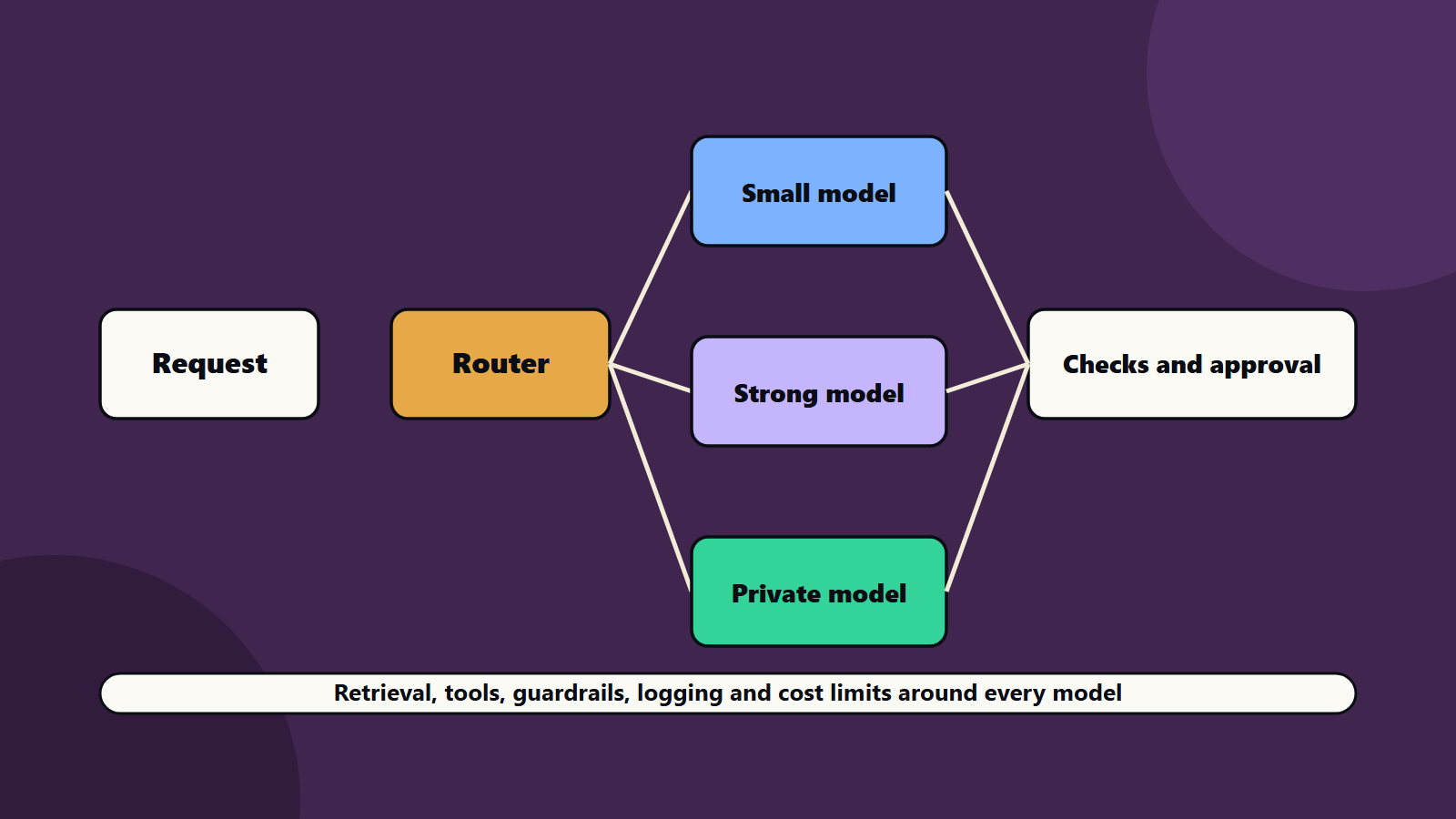
- Routing: pick the model or path. A small, cheap model may handle simple cases, and a stronger one handles hard cases.
- Retrieval: fetch the right facts from your data. See retrieval-augmented generation.
- Tools: call interfaces, databases or other software to look things up or take actions.
- Memory: keep the context of a conversation or task.
- Guardrails: check inputs and outputs for policy, safety and format.
- Human checkpoints: ask a person to approve risky steps.
- Evaluation and logging: score results and record what happened.
Common patterns
- Chain: step one feeds step two. Simple and predictable.
- Router: a first step decides which path to take.
- Parallel: several steps run at once and their results are merged, such as splitting a long document.
- Planner and executor: one agent writes a plan and others carry it out. See multi-agent systems explained.
- Critic loop: one step produces, another reviews and the first revises.
- Human in the loop: a person approves at defined points.
Pick the simplest pattern that passes your tests. Fancy designs add cost and failure points.
A small example of routing in code
This is a minimal router. It sends easy requests to a cheap path and hard ones to a stronger path, with a fallback.
def route(request):
    # simple rules first, a classifier can replace them later
    if request.length < 200 and request.topic in ("faq", "status"):
        return "small_model"
    if request.contains_personal_data:
        return "private_model"
    return "strong_model"

def handle(request):
    path = route(request)
    try:
        answer = call_model(path, request)
    except TimeoutError:
        answer = call_model("strong_model", request)   # fallback
    if not passes_checks(answer):                       # guardrails
        return escalate_to_human(request, answer)
    return answer
The code is short, and it holds the key ideas: choose a path, handle failure, check the output and escalate when unsure.
Reliability, cost and quality
Reliability
Add time limits, retries with limits, fallbacks and queues. Make steps safe to repeat, since a retry should not send a second email.
Cost
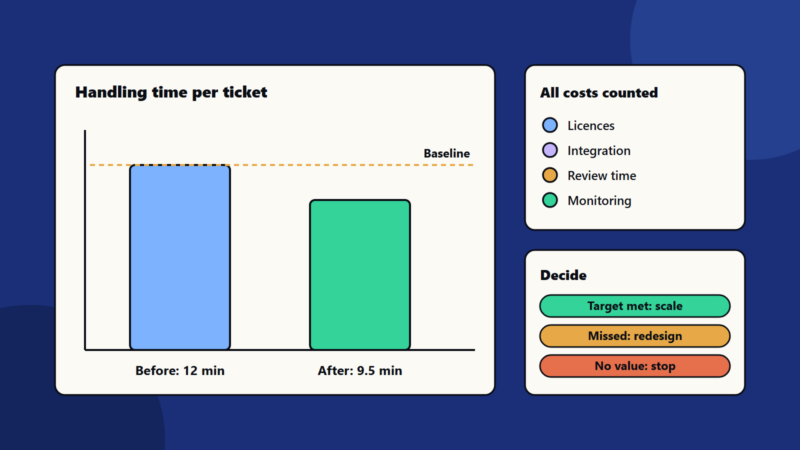
Orchestration is where AI cost is won or lost. Route simple work to cheaper models, cache repeated results, limit context size and set budgets per workflow. See measuring AI cost.
Quality
Test each step on its own, then test the full chain on realistic cases. Keep a fixed test set, and re-run it after every change. See testing AI features and evaluating model output.
Observability
Record each step with a shared trace id, so you can see where a failure began. See AI model monitoring.
Security in an orchestrated system
Every tool you connect is a door. Give each agent its own identity and narrow rights, validate inputs, and keep approvals for risky actions. Text from documents can carry hidden instructions. See AI agent identity and prompt injection explained.
A worked example: insurance claim triage
This example is illustrative.
An insurer wants to speed up first handling of claims.
- Intake: a claim email arrives with attachments.
- Parsing: a document step splits the pack into form, photos and invoices, and sends each to a suitable model.
- Retrieval: the policy terms are fetched from the policy system.
- Routing: simple claims under a limit go to an automated checklist, and complex ones go to a stronger model.
- Tools: the workflow checks the policy status and previous claims through interfaces, with read-only rights.
- Guardrails: the draft decision is checked against rules, and any mention of injury or legal action triggers escalation.
- Human checkpoint: a handler approves every payment and every denial.
- Logging: all steps are traced and scored against a test set each week.
The insurer’s gains come from the whole system: faster intake, consistent checks and clear approvals. No single model produces them.
Small business and enterprise views
- Sole trader or small business: use the workflow features in your tools, keep chains short and write down who approves what.
- Mid-size company: adopt an orchestration framework or platform, build a shared test set and set cost budgets per workflow.
- Enterprise: treat orchestration as a platform, with shared connectors, policy checks, identity for agents, evaluation pipelines and cost allocation. See platform engineering.
Regional and regulatory notes
Where data flows through an orchestrated chain matters. A single request may touch several providers and regions. Map those flows, and check rules on personal data, automated decisions and records. See data residency and sovereignty.
Common mistakes
- Chasing the best model and ignoring the workflow around it.
- Long chains with no tests on each step.
- No fallbacks, so one time-out breaks the process.
- Tools with broad rights.
- No human checkpoint for money or customer messages.
- Ignoring cost until the bill arrives.
- Logging only the final answer.
A starting plan
- Pick one workflow with a clear metric.
- Draw the steps, and mark where a person should approve.
- Build the simplest chain, with logging from day one.
- Create a test set, and measure each step.
- Add routing and caching to cut cost, and review AI orchestration results monthly.
How SoftSapien supports AI orchestration
SoftSapien’s AI engineers design and build orchestrated workflows: routing, retrieval, tool access, guardrails, evaluation and monitoring, connected to your business systems. See our AI development and conversational AI services.
To turn models into dependable workflows, use the contact page to chat with our team, send a message or schedule a free consultation call.
Frequently asked questions
What is AI orchestration?
The layer that connects models, data, tools and people into a workflow, with routing, retrieval, guardrails, human checkpoints and logging.
Why does orchestration matter more than the model?
Models improve and commoditise quickly, and reliability, cost and safety depend on how you wrap them.
Which pattern should we start with?
The simplest one that passes your tests, often a short chain, adding routers, parallel steps or critic loops only when tests show a need.
How do we control cost?
Route simple work to cheaper models, cache repeated results, limit context and set budgets per workflow.
Can SoftSapien help build orchestrated workflows?
Yes, from design to monitoring. Contact SoftSapien through the contact page to chat with our team, send a message or schedule a free consultation call.