Short on time? Multiplayer netcode hides the delay between players. Pick an architecture first, usually a server with authority, then use client prediction so controls feel instant, interpolation so other players move smoothly and lag compensation for fair hits. Fighting games often use rollback instead. Test with simulated bad networks from the start.
Two players press a button at the same moment, and the game must decide what happened. The signal travels between them in tens or hundreds of milliseconds, and nothing can make that faster than the network allows. Netcode is the set of techniques that make the game feel fair and responsive in spite of that delay.
This guide explains the main ideas in plain terms, so that producers, founders and engineers can follow the trade-offs. It covers mobile, PC and console games, from a small co-operative game to a competitive shooter.
Key takeaways
- Latency cannot be removed, so netcode hides it and shares out the unfairness.
- Most games use a server that holds the true game state, which limits cheating.
- Client prediction makes your own actions feel instant, and the server corrects mistakes.
- Interpolation and lag compensation make other players look smooth and make hits feel fair.
- Rollback replays recent frames when late inputs arrive, and suits games that need tight timing.
The problem in numbers
Several kinds of delay add up:
- Latency or ping: the round trip time between a player and the server.
- Jitter: variation in that time from one packet to the next.
- Packet loss: messages that never arrive.
- Bandwidth: the amount of data the connection can carry, which matters on mobile networks.
- Processing time: server tick rate, rendering and input handling.
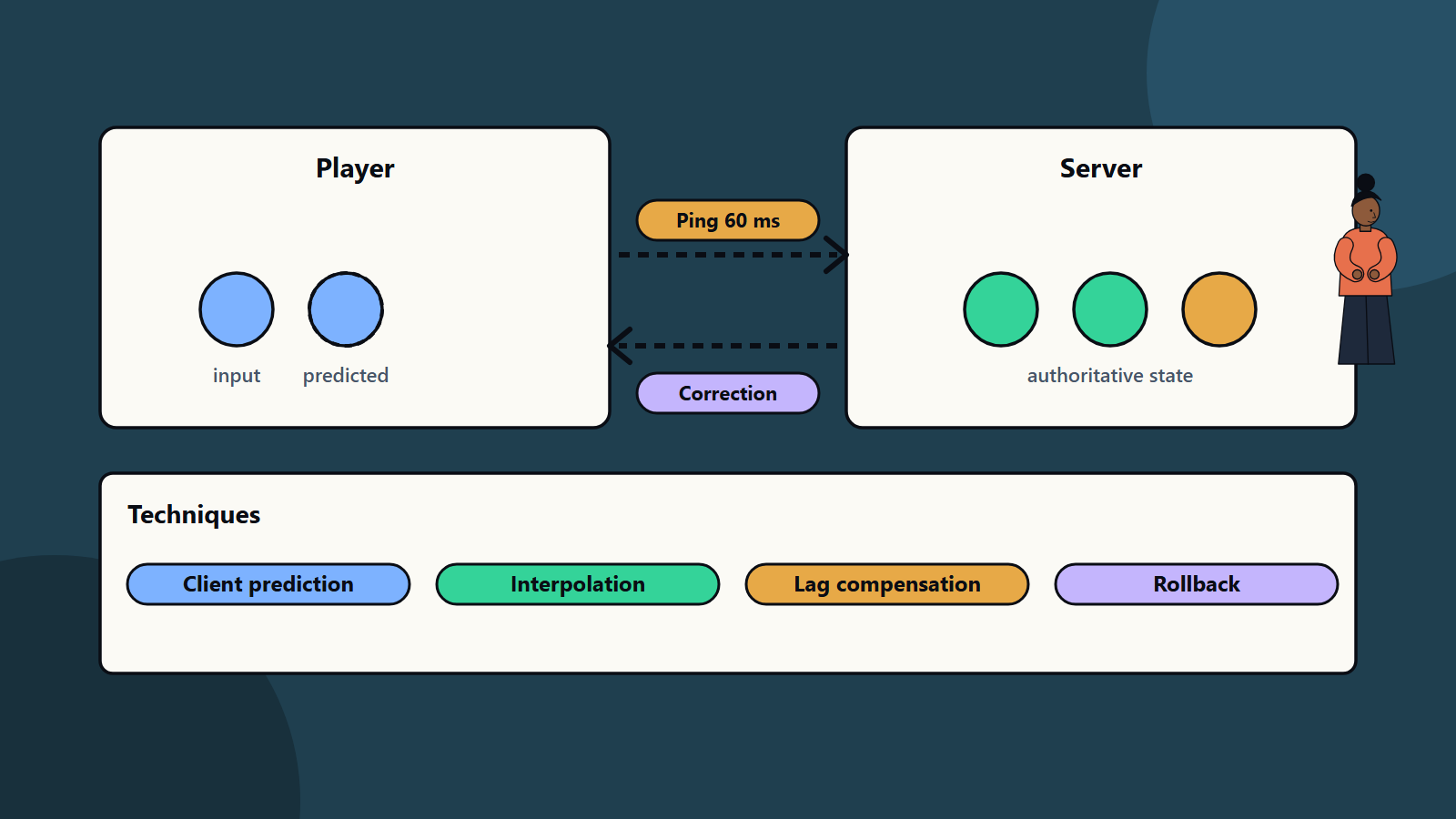
At a 60 millisecond round trip, a player sees an enemy where it was a fraction of a second ago. Fast games notice. Slow turn-based games hardly do, which is why the techniques below vary by genre.
Choose an architecture
Client and server with authority
Players send inputs to a server, which runs the game and sends back the state. Because the server decides, a modified client cannot easily award itself wins. This is the usual choice for competitive games, and it costs hosting and gives the player with the best connection to the server an advantage.
Peer to peer
Players connect directly. It reduces server cost and can lower latency, but each player’s machine is trusted more, which makes cheating easier, and home network conditions affect everyone. It also exposes player addresses, which raises privacy and safety concerns. It can fit small co-operative games and fighting games with rollback.
Relay or hybrid
A relay server forwards traffic between peers, which hides addresses and helps with network address translation problems. Some games combine models, such as an authoritative server for combat and client authority for cosmetic effects.
Client prediction
Waiting for the server to confirm every move would make controls feel sluggish. With client prediction:
- The client applies your input immediately.
- It sends the input to the server with a sequence number.
- The server processes it and sends back the authoritative result.
- The client compares the result with its prediction and, if they differ, corrects its state and replays the inputs the server has not yet confirmed.
When prediction and server agree, you never notice. When they disagree, for example because another player blocked you, you see a small correction, sometimes called a rubber band. Good design keeps these corrections small and smooth.
This approach depends on the game running the same rules on both sides, which links to our guide on game physics and fixed time steps.
Interpolation for other players
You do not predict other players’ inputs, since you do not have them. Instead the client keeps a short buffer of recent server snapshots and draws other players slightly in the past, blending between two known positions. That gives smooth motion even when updates arrive at a modest rate. The cost is a small, fixed delay in what you see of others, often one or two update intervals.
Lag compensation
Imagine you shoot at an enemy you see on screen. By the time your shot reaches the server, the enemy has moved. Lag compensation lets the server rewind the positions of other players to the moment you fired, based on your latency, and check the hit there. The shooter’s view is respected, at the price that a player behind cover may occasionally be hit just after reaching safety. Designers cap the amount of rewind, to limit this effect for players with very high latency.
Rollback for tight timing
Fighting games and some other genres need exact timing, where a few frames of delay change the result. Rollback netcode works like this:
- Each player’s game runs at once and predicts the opponent’s input, usually by repeating their last one.
- When the real input arrives and differs, the game rolls back to the frame of the difference, applies the correct input and quickly re-simulates to the present.
- Players see mostly instant responses, with occasional visual jumps when a prediction was wrong.
Rollback needs a deterministic game that can save, restore and re-run frames fast, so it affects engine and code design from the start. Compare this with the older delay-based approach, which waits for inputs and makes controls feel heavy as latency grows.
Reduce bandwidth and cost
- Send less: transmit changes and avoid full state, and quantise values, such as positions, to fewer bits.
- Prioritise: send nearby and important objects more often than far or unimportant ones.
- Choose the right transport: many real-time games use UDP-based protocols so a lost packet does not stall later ones, and add their own reliability only for messages that need it.
- Tune the tick rate: a higher rate improves precision and increases server cost and bandwidth.
- Plan mobile conditions: switching between wifi and cellular, battery and data limits.
Security and fair play
- Never trust the client for anything that affects fairness: damage, currency, cooldowns and positions.
- Validate every input on the server, and limit speed and rate.
- Encrypt traffic and authenticate sessions. See our guide to zero trust security for principles that also apply to game back ends.
- Plan reporting, detection and enforcement, and protect against denial of service.
- Be careful with the data you send, such as hidden positions, which cheaters can read even if the screen does not show them.
Test with bad networks
Do not wait for launch to find out how the game behaves at 150 milliseconds of latency with five percent packet loss. Use network emulation tools to add delay, jitter and loss during development, and test:
- A range of latency values for each region you serve.
- Packet loss, reordering and sudden disconnects.
- Mobile handover between networks.
- Large player counts and worst-case scenes.
- Long sessions, for drift between client and server.
Plan server locations by where your players live, and measure real results after launch with the practices in our guide to observability and performance testing. The game development pipeline shows where networking work belongs in a project plan.
Common mistakes
- Adding multiplayer late in a game designed for single player.
- Trusting the client for important decisions.
- Testing only on a local network.
- Ignoring jitter and packet loss.
- Sending too much data too often.
- Choosing peer to peer for a competitive game without a cheating plan.
- No server monitoring at launch.
A starting plan
- Decide the genre’s needs: precision, player count and fairness.
- Choose an architecture, and write down who has authority.
- Prototype with prediction and interpolation early.
- Add network emulation to every test build.
- Measure bandwidth and server cost per player.
- Run a closed test across regions before launch.
How SoftSapien supports multiplayer game development
SoftSapien’s game engineers design network architecture, build prediction and server back ends, set up testing with simulated conditions and operate live services for mobile, PC and console titles. See our game development and DevOps services.
To plan your multiplayer game, use the contact page to chat with our team, send a message or schedule a free consultation call.
Frequently asked questions
What is client prediction?
The client applies your input at once, sends it to the server and corrects itself if the server result differs. It makes controls feel instant despite network delay.
What is rollback netcode?
The game predicts the opponent input, and when the real input arrives late it rolls back to that frame, applies the correct input and re-simulates. It suits games that need tight timing, such as fighting games.
Is peer to peer a good choice?
It lowers server cost and can suit small co-operative or rollback-based games. Each machine is trusted more, so cheating and privacy risks are higher for competitive games.
How do we test netcode before launch?
Use network emulation to add latency, jitter and packet loss to every test build, and test regions, mobile handover and long sessions.
Can SoftSapien help build multiplayer features?
Yes, from architecture to live operations. Contact SoftSapien through the contact page to chat with our team, send a message or schedule a free consultation call.