Short on time? Disaster recovery testing proves that your plan works before a real disaster. Set recovery time and recovery point targets, start with tabletop exercises, then restore in non-production, then run controlled drills in production where safe. Time every step, record gaps, fix them and repeat at least twice a year. A plan you have never tested is a hope.
Most organisations have a disaster recovery plan. Fewer have shown that it works through disaster recovery testing. When a data centre fails, a region goes down or ransomware strikes, untested plans meet reality: missing passwords, out-of-date diagrams, backups that will not restore and teams who do not know who decides.
Disaster recovery testing closes that gap. This article is a how-to with a maturity ladder. It suits a small business with one server room and an enterprise with many regions.
Key takeaways
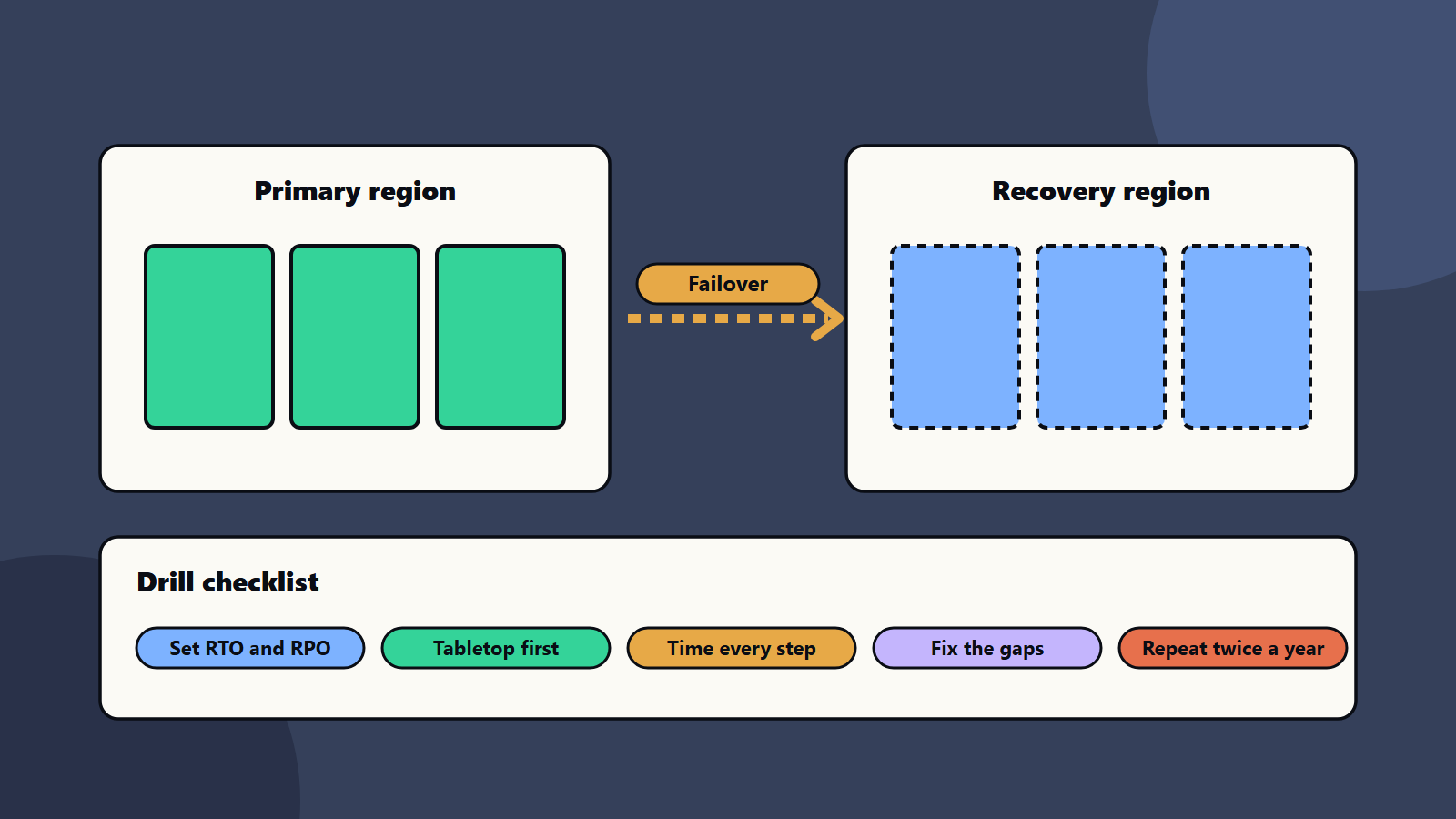
- Define recovery time objective (RTO) and recovery point objective (RPO) for each system before you test.
- Test in steps: tabletop, restore tests, partial failover, then full drills.
- Time each step, and record every surprise.
- Test the people, access and communication as well as the technology.
- Update the plan after every test, and repeat on a schedule.
Start with targets
Amazon’s reliability guidance defines the two key measures. The recovery time objective is the maximum acceptable delay between the interruption of service and the restoration of service. The recovery point objective is the maximum acceptable amount of time since the last data recovery point, which sets how much data loss is acceptable. Both are defined by the organisation, and both belong to a single disaster event, which differs from availability measured over time.
Microsoft’s guidance on disaster recovery strategies adds practical points:
- Group workloads by business criticality, since each tier warrants different investment and recovery order.
- Define what counts as a disaster, so teams know when to trigger the plan.
- Prepare the secondary environment in advance, including network, identity, monitoring and compute.
- Treat failback as its own process, separate from failover.
- Practise with regular drills, mixing scheduled exercises and surprise game days, and test in non-production before production.
- Store plans and tools where they stay accessible during outages, with offline copies for worst cases.
- Review the plan with all relevant teams about every six months.
NIST’s contingency planning guide describes the purpose, process and format of contingency planning, including disaster recovery and incident response plans, and ways to decide which systems need plans and how to prioritise them.
The maturity ladder
Level one: a written plan and a tabletop
Gather the people who would act in a disaster, and talk through a scenario: “The main data centre is offline for two days.” Walk through who decides, who is called, which systems return first and how customers are told. Note every “I think” and “we would probably”.
Level two: restore tests
Pick one system. Restore it from backup in a separate environment. Time it, and check that the data is complete and the application works. This test finds many problems: missing keys, forgotten dependencies and slow restores.
Level three: component failover
Fail over one component, such as a database replica or a storage account, in a controlled window. Check that applications reconnect and that monitoring reports it.
Level four: full workload drill
Fail over a whole workload to the recovery site, run real checks and then fail back. Test in non-production first. Run in production only when the risk is understood and the business agrees.
Level five: surprise game days and automated checks
Introduce unannounced scenarios, and automate regular restore tests with reports. See chaos engineering.
Disaster recovery testing: plan a drill
- Scope: which systems, which scenario and which people.
- Objectives: what you want to prove, such as “restore the order system within four hours with less than 15 minutes of data loss”.
- Safety: backups taken, rollback steps, stop rules and approvals.
- Roles: a drill leader, a scribe, technical leads and a communications lead.
- Script: the steps, with owners and expected times.
- Run: record real times, and ignore the planned ones.
- Debrief: within a week, hold a blameless review. Rank findings, assign owners and dates.
- Retest: prove the fixes.
A worked example: a regional retailer
This example is illustrative.
A retailer runs its web shop and stock system in one cloud region. The goal is to recover both within four hours with at most 15 minutes of data loss.
Quarter one: a tabletop exercise reveals that only one engineer knows how to rebuild the network, and the printed contact list is out of date.
Quarter two: a restore test of the stock database takes nine hours when the plan assumed two, because backups sit in cold storage and the team had not planned for retrieval time. They move recent backups to a faster tier. See storage tiering.
Quarter three: a drill restores the web shop in a second region. The application starts but cannot send email because sender settings only exist in the first region. The team adds them and documents the step.
Quarter four: a full disaster recovery testing drill meets the four-hour target with 12 minutes of data loss. The team schedules two drills a year and one surprise exercise.
Each finding was cheap to fix in a drill. In a real disaster, the same gaps would have cost days.
What to check in every test
- Can people reach the plan, credentials and tools when the main systems are down?
- Do backups restore, and how long does it take?
- Do network, identity and certificates exist in the recovery site?
- Do dependencies, such as email, payment gateways and third-party services, work from there?
- Are logs and monitoring available?
- Can customers and employees be told quickly? See corporate communications during a technology incident.
- How long does failback take, and is data consistent after it?
Measure and report disaster recovery testing
- Actual RTO and RPO against targets, per system.
- Number of findings, by severity, and time to close.
- Share of critical systems with a recent successful test.
- Time to restore by backup tier.
- Participation of key people.
Report to leaders each quarter. Link to site reliability engineering targets where you use them.
Small business and enterprise views
- Sole trader or small business: test restoring a laptop and your main cloud service each quarter, keep a printed contact sheet and know who your provider’s support contact is.
- Mid-size company: schedule two drills a year, assign owners per system and keep a second region or site ready for the top systems.
- Enterprise: run a programme with a calendar, standards, evidence for auditors, supplier tests and board reporting. See high availability design and network resilience.
Regional and regulatory notes
Some sectors and regions require tested recovery and evidence of results, especially finance, health and critical services. Keep records of test dates, scope, results and fixes, and check what your regulators expect.
Common mistakes
- Setting no RTO or RPO.
- Testing only the technology.
- Skipping failback.
- Treating a passed test as final.
- Keeping the plan only on systems that may be down.
- Not fixing findings.
- Blame in debriefs, so people hide problems.
A starting plan
- Pick your five most important systems, and set RTO and RPO for each.
- Run a one-hour tabletop within a month.
- Restore one system from backup in a test environment.
- Fix the top three findings.
- Put the next two drills in the calendar.
How SoftSapien supports recovery testing
SoftSapien’s infrastructure and security engineers set recovery targets, design recovery environments, run tabletop exercises and technical drills and track fixes across cloud and on-premises systems. See our cloud and datacenter solutions and managed services offerings.
To prove your plan works, use the contact page to chat with our team, send a message or schedule a free consultation call.
Frequently asked questions
What are RTO and RPO?
The recovery time objective is the maximum acceptable delay before service is restored. The recovery point objective is the maximum acceptable data loss measured in time.
How often should we test?
At least twice a year for important systems, with restore tests each quarter for the most critical ones.
What is a tabletop exercise?
A guided discussion of a disaster scenario, in which people walk through decisions, roles and communication without touching systems.
Should we test in production?
Test in non-production first, then run production drills only when the risk is understood and the business agrees.
Can SoftSapien help run recovery drills?
Yes, from planning to follow-up. Contact SoftSapien through the contact page to chat with our team, send a message or schedule a free consultation call.