Short on time? A resilient network has no single point of failure for the services that matter: duplicate links, devices and paths, automatic failover that has been tested, diverse providers and routes, monitoring that spots problems fast and documented recovery steps. Match the investment to the business cost of downtime, and test failover regularly since untested redundancy often fails.
When the network goes down, almost everything stops. Phone systems, payments, cloud applications, security cameras and remote workers all depend on connectivity. A cut cable, a failed switch, a misconfigured router or a provider outage can take a whole site offline.
Network resilience is the ability to keep working through failures and to recover quickly. It is a matter of design, operations and testing, and it scales from a small office with two internet connections to a global enterprise with many sites. This guide explains the principles and practical steps.
Key takeaways
- Identify single points of failure across links, devices, power, providers and people.
- Add redundancy where the business impact justifies it: paths, equipment, power and providers.
- Automatic failover, tested regularly, matters more than the number of spare parts.
- Diversity of providers and physical routes protects against shared failures.
- Monitoring, runbooks and rehearsals turn redundancy into real resilience.
What resilience means
Resilience combines several ideas:
- Availability: the proportion of time the network works as needed.
- Redundancy: duplicate components so that a failure does not cause an outage.
- Fault tolerance: the ability to continue operating when parts fail.
- Recovery: how fast service is restored after an incident.
- Graceful degradation: keeping critical services running at reduced capacity.
Define targets with the business: which services need what availability, and how long an outage can last. Our guide to disaster recovery planning explains recovery time and recovery point objectives, and how to rank systems by importance. The US National Institute of Standards and Technology also publishes a contingency planning guide that covers business impact analysis.
Find single points of failure
Walk through each critical service and trace the path from user to application. Ask at each step: what happens if this fails?
- Internet connection or wide-area link: one provider, one cable?
- Edge router or firewall: a single device?
- Core and distribution switches.
- Wireless controllers and access points.
- DNS and DHCP servers.
- Power supplies, uninterruptible power and generators.
- Cooling in network rooms.
- Cables and patch panels.
- Configuration and software: a single bad change can take everything down.
- Providers: shared upstream infrastructure that appears redundant but is not.
- People: a single engineer who knows how it works.
Mark each as acceptable risk or something to fix.
Redundancy at each layer
Connectivity and providers
- Two or more internet connections, ideally from different providers.
- Diverse physical paths: different entry points into the building, different routes in the street and different upstream networks. Two providers that share one duct are not truly diverse.
- Mixed technologies: fibre with a wireless or cellular backup, so that a single type of failure does not affect both.
- Dual wide-area links between key sites, with routing protocols or software-defined wide-area networking to choose paths.
- Peering and cloud connectivity: redundant connections to cloud providers.
Devices
- Pairs of firewalls, routers and core switches configured for high availability.
- Stacked or clustered switches and link aggregation to access devices.
- Redundant uplinks from access switches to the core, with loop prevention.
- Dual network cards and links for critical servers.
- Spare parts and vendor support contracts with response times that match the need.
Power and environment
- Dual power supplies fed from separate circuits.
- Uninterruptible power supplies with tested batteries, and generators for longer outages.
- Cooling and monitoring for network rooms.
- Physical security and protection from water and fire.
Network services
- Multiple DNS servers across locations, plus resilient external DNS.
- Redundant DHCP, time and authentication services.
- Load balancers in pairs.
Design
- Segmentation limits the spread of failures and attacks.
- Simple, standard designs are easier to keep reliable.
- Out-of-band management, such as a separate management network or cellular console access, so you can fix devices when the main network is down.
- Site design: critical sites with more redundancy, small sites with sensible minimum protection.
Failover
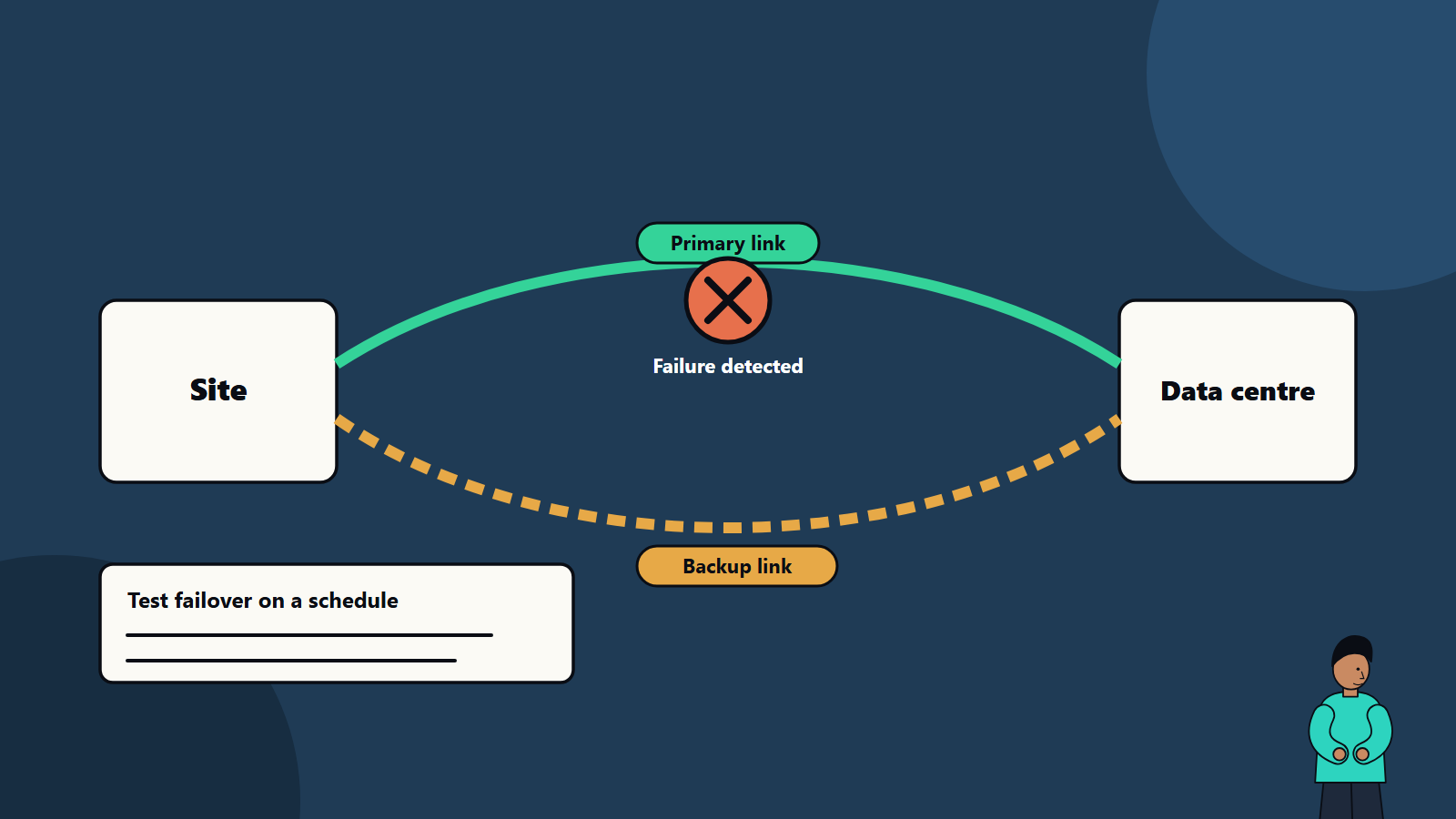
Redundancy only helps if traffic moves to the spare quickly and correctly.
- Mechanisms: routing protocols, first-hop redundancy, link aggregation, spanning-tree variants, virtual router pairs and software-defined wide-area networking policies.
- Detection: how quickly is a failure noticed? Use fast failure detection with short timeouts.
- Behaviour: does the session survive the switch? Voice and video may drop for a moment. Define acceptable interruption.
- Fail-back: decide whether traffic returns automatically, and how to avoid flapping between paths.
- Capacity: the backup must carry the load that matters. A small backup link may need traffic prioritisation to protect critical applications.
- Quality of service: prioritise voice, payments and key applications during degraded operation.
- Asymmetry: check that stateful firewalls and security tools handle traffic correctly during failover.
Test
Untested failover often fails when needed.
- Review designs with a failure-mode analysis: for each component, expected behaviour and recovery.
- Test in a lab for new designs and major changes.
- Planned production tests: during agreed windows, unplug a link, power down a device or disable a provider, and observe. Start with low-risk tests and build up.
- Chaos-style experiments in mature environments, with controls.
- Recovery drills: restore configurations from backup, replace a failed device and bring up a site from scratch.
- Record results, fix gaps and retest.
- Test frequency: at least annually for critical paths, and after major changes.
Monitor and respond
- Monitoring: link status, latency, packet loss, jitter, utilisation, device health, errors and temperature. Our guide to observability explains signals and alerting that apply here as well.
- Synthetic checks from key locations that mimic user journeys.
- Alerting to the right people, with severity levels and escalation.
- Configuration management: keep configurations in version control, back them up automatically and review changes. Our guide to infrastructure as code covers the same discipline for networks.
- Change management: most outages follow changes. Use peer review, staged rollouts and rollback plans.
- Runbooks: step-by-step guides for common failures, kept accessible when the network is down.
- Incident response: roles and communication. See our guide to incident response planning.
Security and resilience
Attacks such as denial of service, ransomware spreading across networks and compromised devices reduce availability.
- Segment critical systems.
- Protect management interfaces.
- Keep firmware patched.
- Use denial-of-service protection from providers where exposure justifies it.
- Plan for degraded operation if security devices fail, deciding whether to fail open or closed.
Our guide to zero trust security shows how access control and segmentation fit together.
Cloud and remote work
- Connect to cloud providers through redundant paths.
- Design applications to survive loss of a zone or region where needed. See our article on high availability design.
- Support remote staff with resilient access services and alternative methods if a gateway fails.
- Consider cellular or satellite backup for critical remote sites.
Cost and priorities
Resilience costs money. Link spending to the cost of downtime: lost sales, productivity, contractual penalties and reputation. A simple approach:
- Rank services by criticality.
- Estimate cost per hour of outage.
- Compare options and their cost, such as a second internet link or a standby firewall.
- Invest first where the risk reduction per currency unit is largest.
Small organisations can gain much from basics: two internet providers with automatic failover, a spare switch and firewall configuration backups, power protection and documented recovery steps.
Common mistakes
- Two links from the same provider and duct.
- Redundant devices that share a single power circuit.
- Never testing failover.
- Backup links too small for real traffic.
- Ignoring configuration backups.
- Alerts nobody sees.
- No out-of-band access.
- Complex designs nobody understands.
- Forgetting the people and process side.
A starting plan
- List critical services and their availability targets.
- Map single points of failure along their network paths.
- Fix the top three risks, such as a second provider, a standby device and power protection.
- Configure and test failover.
- Set up monitoring and write runbooks.
- Schedule yearly resilience tests.
How SoftSapien supports network resilience
SoftSapien designs, builds and operates resilient networks and supports testing and recovery planning, for single offices and multi-site organisations. See our server and storage solutions and managed services.
To review your network, visit the contact page and chat with our team, send a message or schedule a free consultation call.
Frequently asked questions
What is network resilience?
The ability of a network to keep working through failures and recover quickly, through redundancy, fault tolerance, tested failover and good operations.
Are two internet providers enough?
Only if they are truly diverse. Two providers sharing one duct or upstream network can fail together, so check physical routes and upstream paths.
Why test failover?
Untested redundancy often fails when needed. Regular tests find misconfigurations, undersized backup links and gaps in procedures.
What is out-of-band management?
A separate path, such as a management network or cellular console, that lets you reach and fix devices when the main network is down.
Can SoftSapien review our network design?
Yes, and help test it. Contact SoftSapien through the contact page to chat with our team, send a message or schedule a free consultation call.