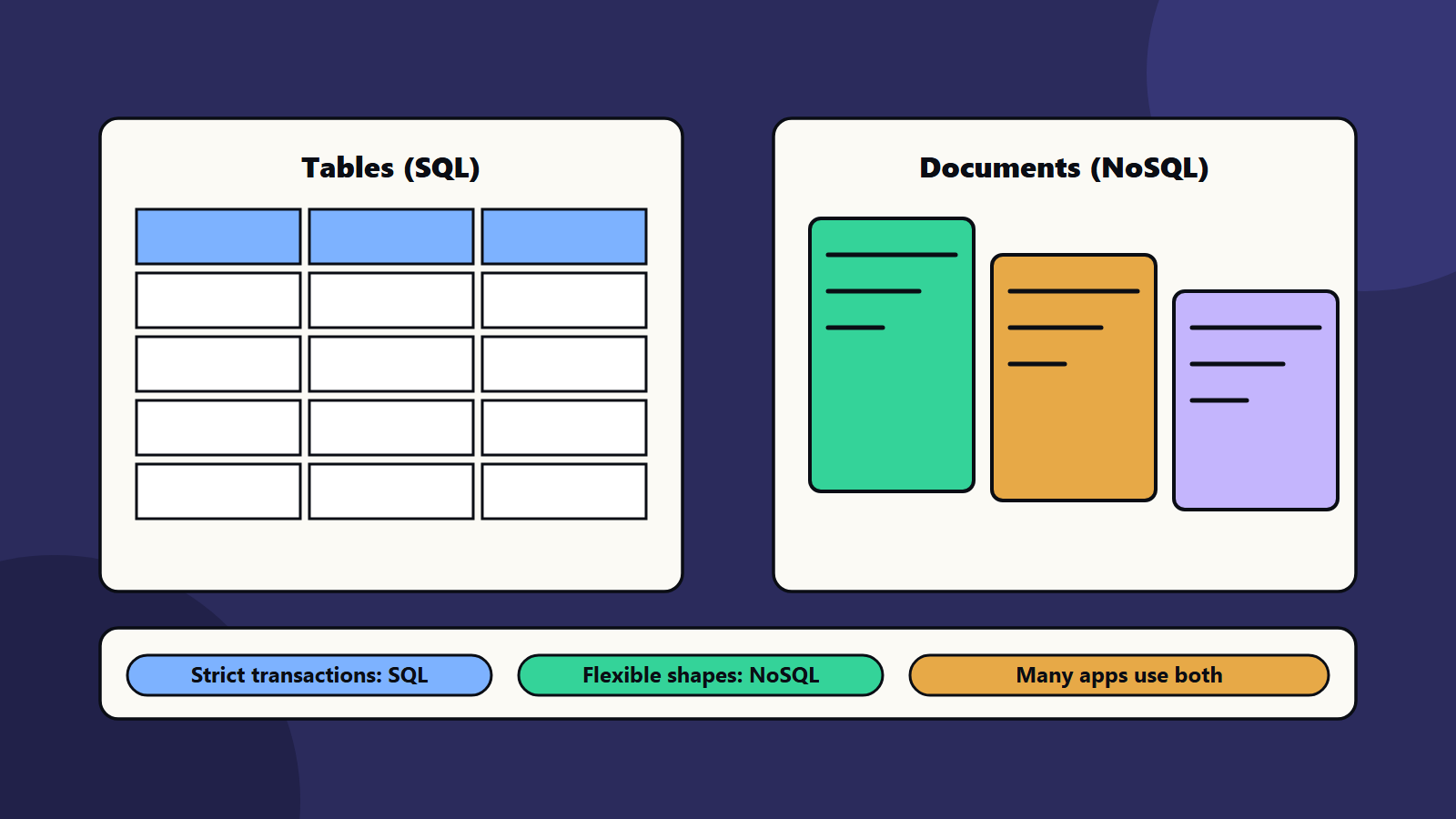
Short on time? The SQL or NoSQL question has no universal winner. Choose SQL, a relational database, when you need strict transactions, clear relationships and rich reporting. Choose NoSQL, such as document, key-value or wide-column stores, when data shapes vary, access is simple and scale or speed dominate. Many products use both. Decide from your access patterns, since fashion changes.
Teams often ask whether to use a SQL or a NoSQL database as if one were modern and the other old. In practice both are mature, and each was built for different jobs. Picking the wrong one is expensive to undo.
This article is a decision aid for SQL or NoSQL. It suits a founder choosing a first database and an architect-level team reviewing a platform. It uses public guidance from Microsoft, Amazon and the PostgreSQL project.
Key takeaways
- Start from access patterns: what you read and write, how often and in what shape.
- Relational databases give ACID transactions, joins and a strict schema, and suit order, billing and ledger data.
- NoSQL covers document, key-value, column-family and graph stores, each tuned for particular patterns.
- Most production systems use more than one store, a practice called polyglot persistence.
- Modern relational databases can also hold JSON and vectors, which blurs the line.
What the big platforms say
Microsoft’s data store models article says a single data store rarely satisfies all access patterns well, so most production systems use several models. It suggests a method: identify workload access patterns, map them to storage models, shortlist services, apply criteria such as consistency, latency, scale, governance and cost and combine models only where patterns clearly differ.
On relational stores, Microsoft lists strengths of multi-row transactional consistency, complex joins and strong constraints, with a caution that horizontal scale generally needs sharding or partitioning. Typical workloads are order management, inventory, financial ledgers and billing. On document stores, the strengths include natural mapping to application objects and flexible per-document schemas, for workloads such as product catalogues, content management and profile stores. Key-value stores bring simplicity and low latency for caches, sessions and feature flags. Graph stores fit deep relationship questions such as fraud rings and knowledge graphs.
Amazon’s description of DynamoDB shows the NoSQL trade clearly: a fully managed key-value and document database with single-digit millisecond performance at any scale, which omits features such as joins and asks you to denormalise your data model. It also offers ACID transactions, so the old claim that NoSQL never has transactions is out of date.
The PostgreSQL manual on JSON types shows the other direction: a relational database that stores JSON, with a binary type that supports indexing and containment queries, and a recommendation that most applications prefer the binary type. If your main need is some flexible fields next to relational data, this may be all you need.
SQL or NoSQL: the decision aid
Walk through these questions.
- Do you need multi-row transactions? Payments, stock and orders usually do. Choose relational, or a NoSQL store with transaction support after testing.
- Do you need joins and ad hoc questions? Reporting and analytics favour SQL.
- Is the data shape stable? A fixed schema gives safety. A fast-changing shape favours document stores or JSON columns.
- What is the access pattern? Point lookups by key at huge scale favour key-value or document stores. Deep links between items favour graph stores.
- How big will it get, and how fast? Very high write rates and size can favour a distributed NoSQL design, or a distributed SQL option.
- Who will run it? Skills and operations matter. A managed service can remove much of the work.
- What is the exit route? Open standards and common query languages ease later moves. See cloud exit strategy.
A worked example: an online marketplace
This example is illustrative.
A marketplace has buyers, sellers, products, orders, payments, search and recommendations.
- Orders, payments and stock: relational database, for transactions and constraints.
- Product catalogue with varying attributes: document store, or a relational table with a JSON column.
- Sessions and shopping carts: key-value store for speed.
- Search: a search engine fed from the catalogue.
- Recommendations by meaning: a vector store or a vector extension. See vector databases explained.
- Analytics: a warehouse or lakehouse fed by events. See data lakehouse architecture.
The team starts with one relational database holding orders and the catalogue, adds a cache for sessions and separates other stores only when measurements show the need. That keeps the first year simple.
Common myths
- “NoSQL is faster.” It is faster for certain access patterns and slower for others. Test with your own queries.
- “SQL does not scale.” It scales a long way, and with careful design much further. At extreme sizes you may shard or use distributed options.
- “NoSQL has no schema.” The schema moves into your application code. You still need to manage it.
- “We can switch later.” Moving data models is hard. Decide with care.
- “One database for everything.” It is fine at first. Be ready to add stores when patterns diverge.
Games and real-time products
Games often combine a relational store for accounts and purchases with key-value or document stores for state and leaderboards. See game backend services and game server hosting.
SQL or NoSQL for small business and enterprise
- Sole trader or small team: use one managed relational database, which is flexible and well understood. Add JSON columns where needed.
- Mid-size company: add a cache and a search service when the data shows the need, and agree who owns each store.
- Enterprise: set a catalogue of approved data stores with guidance on when to use each, security and backup standards, and cost reporting. See data governance basics.
Regional and regulatory notes
Where data lives and how it can be deleted matter for privacy law. Some stores replicate across regions by default. Confirm settings, and record where personal data is held.
Common mistakes
- Choosing by trend.
- Using a document store for data full of relationships.
- Using a relational database as a message queue.
- No plan for backups and restores. See disaster recovery testing.
- Splitting into many stores before the data demands it.
- Ignoring operations and cost.
A starting plan
- List the ten most common reads and writes in your product.
- Mark which need transactions, joins or flexible shapes.
- Pick the simplest store that serves most of them.
- Test your top queries at ten times today’s data.
- Add specialised stores only when tests or traffic show a gap.
How SoftSapien supports database decisions
SoftSapien’s data and software engineers review access patterns, design data models, compare SQL and NoSQL options, run performance tests and manage migrations. See our custom software development and big data services.
To choose a database with confidence, use the contact page to chat with our team, send a message or schedule a free consultation call.
Frequently asked questions
When should I choose SQL?
When you need strict multi-row transactions, clear relationships, joins and rich reporting, as in orders, billing and ledgers.
When should I choose NoSQL?
When data shapes vary, access is simple, or scale and speed dominate, using document, key-value, column-family or graph stores for the matching pattern.
Can one database do both?
Often partly. Relational databases such as PostgreSQL store JSON, and some NoSQL services offer transactions, so the line has blurred.
Is it hard to switch later?
Yes. Moving data models is costly, so decide with care and test your top queries at ten times your current data.
Can SoftSapien help choose a database?
Yes, with design and testing. Contact SoftSapien through the contact page to chat with our team, send a message or schedule a free consultation call.