Short on time? To reach inboxes, authenticate your domain with SPF, DKIM and DMARC, send only to people who asked for your email, make unsubscribing one click, keep spam complaints well under 0.3 percent and watch your sender reputation. Large mailbox providers now require these steps from bulk senders.
An email campaign can have a great subject line, a sharp offer and a perfect audience, and still fail because it lands in spam or never arrives. Deliverability is the discipline of making sure that legitimate email reaches the inbox. It rests on three technical foundations and several habits.
This guide explains SPF, DKIM and DMARC in plain language, the sender rules that large mailbox providers publish and practical steps for improving deliverability. It helps a small business sending a monthly newsletter, a software company sending product emails and a marketing team running large campaigns across regions.
Key takeaways
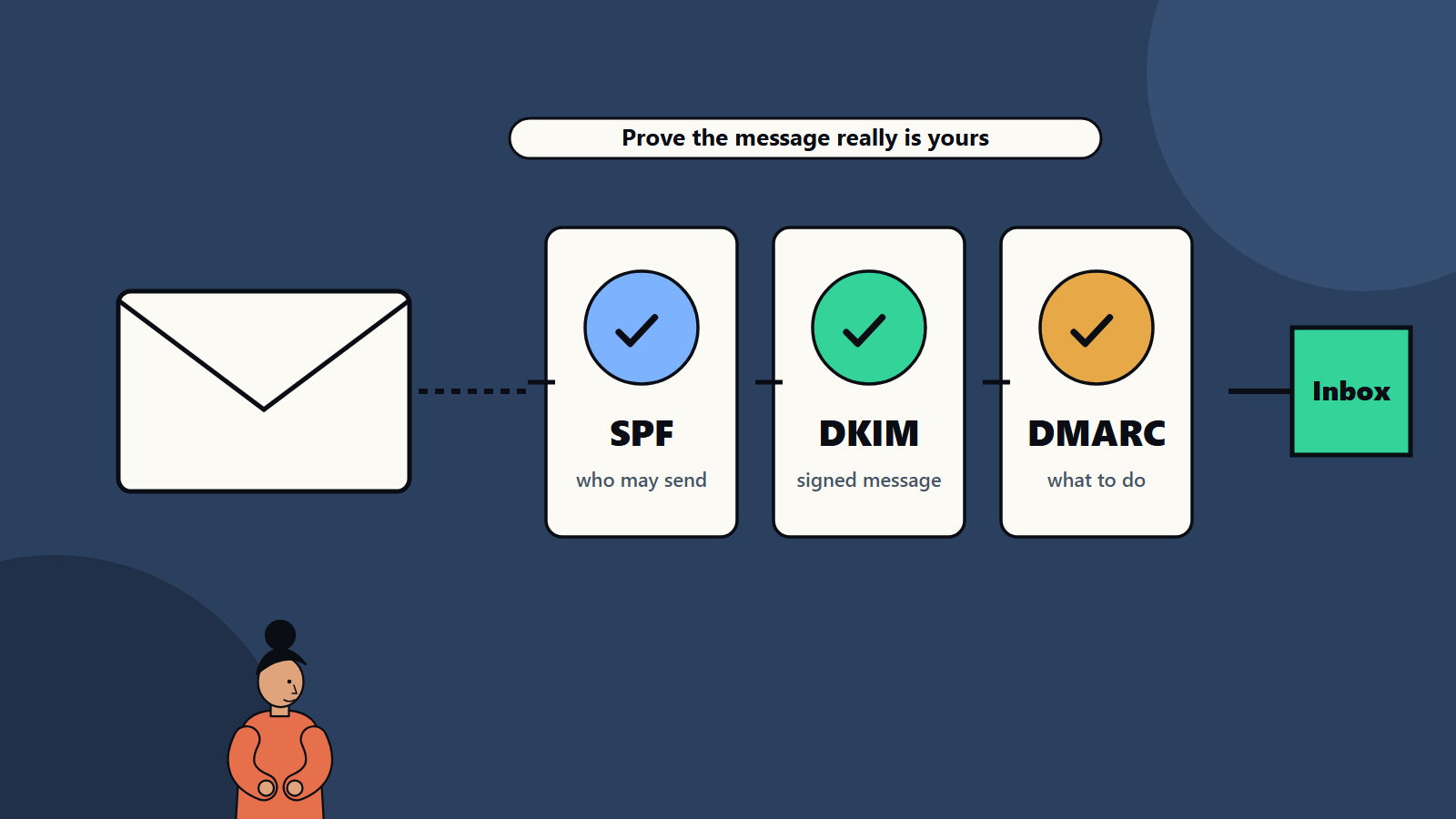
- SPF says which servers may send for your domain. DKIM signs messages so receivers can verify them. DMARC tells receivers what to do when checks fail and sends you reports.
- Mailbox providers set requirements for bulk senders, including authentication, easy unsubscribe and low spam complaint rates.
- Reputation depends on who you send to, how often and how they react.
- Clean lists, relevant content and consistent sending improve results more than clever subject lines.
- Monitor with provider tools and DMARC reports, and fix issues quickly.
How email authentication works
SPF: who may send
Sender Policy Framework is a DNS record that lists the servers and services allowed to send email for your domain. When a message arrives, the receiving server checks whether the sending server is on the list. Keep the record accurate, include every service that sends for you, such as your email provider, marketing platform and support tool, and watch the limit on the number of lookups.
DKIM: signed messages
DomainKeys Identified Mail adds a digital signature to each message. The sender holds a private key, and publishes the matching public key in DNS. The receiver uses the public key to verify that the message was signed by the domain and not altered in transit. Use keys of adequate length, rotate them periodically and set up a signature for each sending service.
DMARC: policy and reporting
Domain-based Message Authentication, Reporting and Conformance builds on SPF and DKIM. It checks that the domain in the visible From address aligns with the domain that passed SPF or DKIM. Your DMARC record tells receivers what to do with messages that fail: monitor only, quarantine or reject. It also asks receivers to send you reports showing who is sending mail in your domain’s name, which helps you find legitimate services you forgot and spot spoofing.
A common path is to start with a monitoring policy, review reports, fix legitimate senders and then move to stricter policies.
What mailbox providers require
Large providers publish rules for senders. Google’s guidance on email sender requirements, for example, sets requirements for senders who send more than 5,000 messages a day to Gmail accounts. As described on its sender guidelines page:
- SPF, DKIM and DMARC must be set up for the sending domain. The DMARC policy can be set to none, and for direct mail the From domain must align with the SPF or DKIM domain.
- Easy unsubscribe: marketing and subscribed messages must support one-click unsubscribe, with a clearly visible unsubscribe link in the body.
- Spam rate: the rate reported in Postmaster Tools should stay below 0.30 percent, and the page recommends staying below 0.10 percent.
The guidance also calls for valid forward and reverse DNS records, a TLS connection, correct message formatting and no impersonation of the provider’s own From addresses. For DKIM it recommends 2048-bit keys, with 1024 bits as a minimum for sending to personal accounts. Other providers publish similar or related requirements, and rules evolve, so check current documents for the platforms your audience uses. Smaller senders benefit from following the same practices.
Reputation: the human side
Technical setup gets you into the room. Reputation decides where you sit. Providers track signals such as:
- Complaints: people marking messages as spam.
- Engagement: opens, clicks, replies and deletions without reading.
- Bounces: messages to addresses that do not exist.
- Spam traps: addresses used to catch senders with poor list practices.
- Volume patterns: sudden spikes from a new sender.
- Content: patterns associated with spam or phishing.
- Consistency: steady sending from known infrastructure.
Practices that improve deliverability
List quality
- Collect consent clearly, and keep records of when and how. Laws such as the GDPR in Europe and CAN-SPAM in the United States, and similar rules elsewhere, set conditions for marketing email, and they vary by country.
- Use confirmed opt-in where possible.
- Never buy lists.
- Verify addresses at sign-up to reduce typos.
- Remove bounces quickly, and suppress addresses that bounce repeatedly.
- Sunset inactive subscribers after a period of no engagement, perhaps with a final re-engagement message.
Send relevant messages
- Segment by interest, behaviour and lifecycle stage.
- Match the content to what people signed up for.
- Set expectations about frequency, and keep to them.
- Make the sender name recognisable and consistent.
- Write honest subject lines that reflect the content.
Unsubscribing
- Include a visible unsubscribe link and support one-click unsubscribe headers for marketing messages.
- Process requests promptly.
- Offer preference options, such as fewer emails, as an alternative to leaving.
Design and content
- Balance text and images, and avoid one big image with no text.
- Use clean HTML that renders on many email clients, and test on major ones.
- Avoid misleading links and URL shorteners that hide destinations, and keep link domains consistent with your brand.
- Include a plain-text version and your physical address where the law requires it.
- Keep attachments small, or link to files instead.
Sending infrastructure
- Use dedicated or well-managed shared IP addresses from your email service provider. Warm up new IPs and domains by increasing volume gradually.
- Separate transactional email such as receipts and password resets from marketing, so a marketing problem does not block important messages. A subdomain for each stream is common.
- Maintain forward and reverse DNS records and use TLS.
- Monitor blocklists and respond if you are listed.
Monitoring
- Provider tools: postmaster dashboards from major mailbox providers show spam rate, authentication results and reputation.
- DMARC reports: aggregate reports show volumes and authentication outcomes by source.
- Email platform analytics: delivery, bounce, complaint and engagement rates.
- Seed tests and inbox placement tools give an indication of where messages land, though results vary by recipient.
- Alerts for sudden changes in bounce or complaint rates.
Review weekly during campaigns, and set thresholds that trigger a pause and investigation.
Troubleshooting
If deliverability drops:
- Check authentication: have SPF, DKIM or DMARC changed or broken, perhaps after adding a new tool?
- Look at spam complaint and bounce rates.
- Check blocklists and provider dashboards.
- Review recent changes: new list source, new content, higher frequency or new sending volume.
- Reduce volume and send only to the most engaged segments while you recover.
- Fix the cause, and rebuild trust gradually.
Security and brand protection
DMARC at an enforcement policy makes it much harder for criminals to send phishing emails that appear to come from your domain, which protects customers and your reputation. Pair it with staff training and monitoring. Our guide to cybersecurity for small business lists other protections.
Common mistakes
- Setting up SPF but not DKIM or DMARC.
- Several conflicting SPF records for one domain.
- Forgetting a third-party sender and failing authentication.
- Mixing transactional and marketing mail on one domain with no separation.
- Sending large campaigns to old lists.
- Hiding the unsubscribe link.
- Ignoring complaint data.
A starting checklist
- Inventory every service that sends email for your domain.
- Publish SPF and DKIM for each, and a DMARC record in monitoring mode.
- Review DMARC reports for a few weeks, and fix gaps.
- Move DMARC to a stricter policy when ready.
- Add one-click unsubscribe and clean your list.
- Monitor provider dashboards and set alert thresholds.
How SoftSapien supports email performance
SoftSapien sets up and audits email authentication, designs lifecycle and campaign programmes and integrates email with CRM and analytics. See our performance marketing and digital experience services.
To review your email setup, visit the contact page and chat with our team, send a message or schedule a free consultation call.
Frequently asked questions
What do SPF, DKIM and DMARC do?
SPF lists servers allowed to send for your domain, DKIM signs messages so receivers can verify them and DMARC sets what to do when checks fail and sends you reports.
What do large mailbox providers require from bulk senders?
Authentication with SPF, DKIM and DMARC, one-click unsubscribe with a visible link and a spam complaint rate kept well below 0.3 percent, ideally below 0.1 percent.
How do I improve sender reputation?
Send only to people who asked for email, remove bounces, sunset inactive subscribers, send relevant content at a steady pace and make unsubscribing easy.
Should marketing and transactional email be separated?
Yes. Separate streams, often on subdomains, so a marketing problem does not block receipts and password resets.
Can SoftSapien audit our email set-up?
Yes, from DNS to campaigns. Contact SoftSapien through the contact page to chat with our team, send a message or schedule a free consultation call.