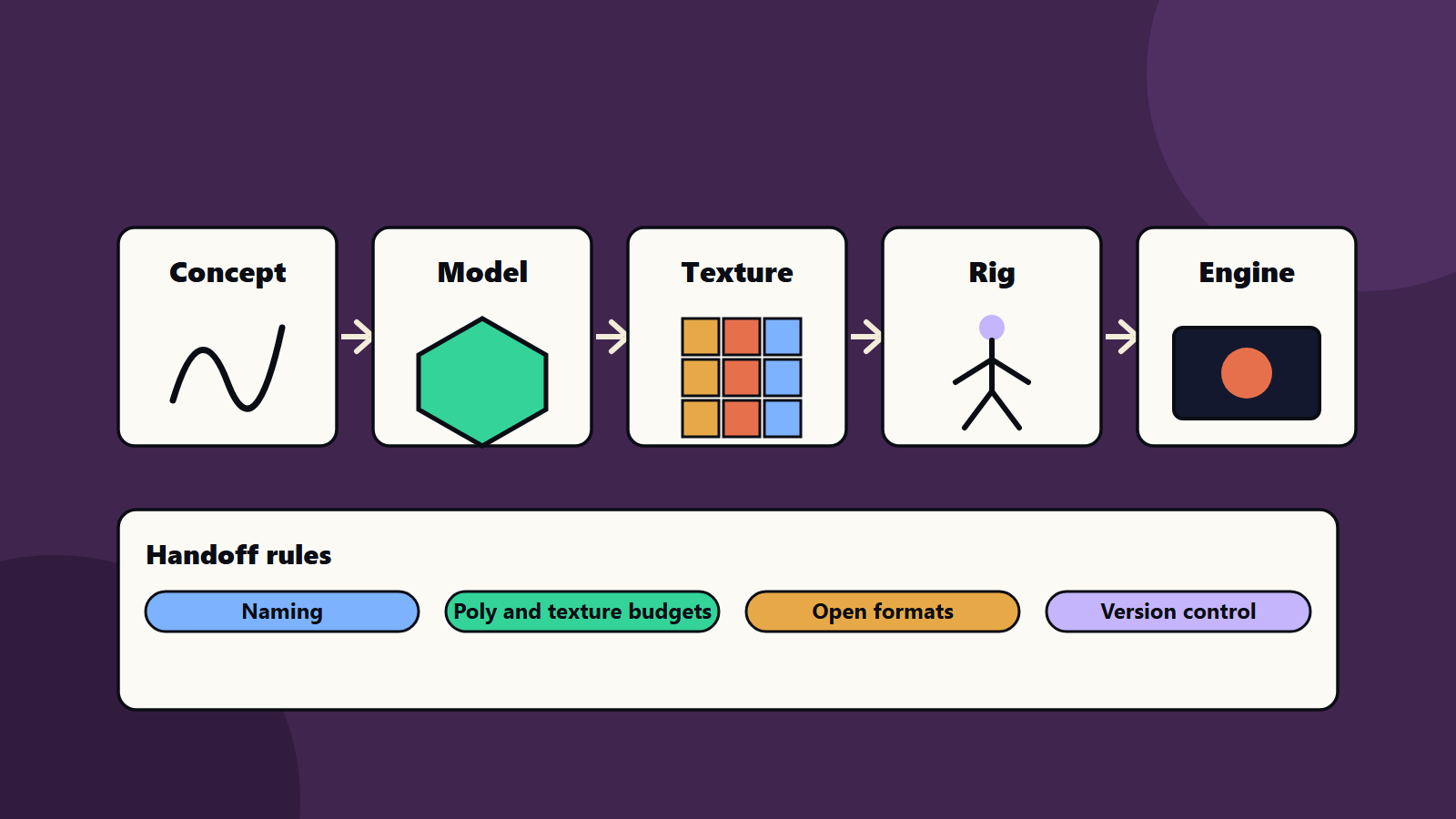
Short on time? Game art pipelines move an idea from concept art to a model, textures, rig, animation and the engine. Most delays come from handoffs, and drawing is rarely the cause. Agree naming, budgets, file formats and review steps early, use open formats and version control, test assets in the engine from day one and automate checks. Small teams need the same habits at a lighter scale.
A character that looks great in a modelling tool can be too heavy for a phone, have broken textures in the engine or arrive with a different scale from the level. Each of those problems costs days. They come from the path the asset travels, which is the art pipeline.
This article explains game art pipelines for artists, technical artists and producers, on mobile, PC and console. It suits a two-person indie team and a studio with large art groups.
Key takeaways
- A game art pipeline is the agreed route and rules that move assets from concept to engine.
- Handoff rules cover naming, scale, budgets, formats, review and ownership.
- Open formats such as glTF and OpenUSD help assets move between tools.
- Version control for large files and automatic checks catch problems early.
- Test every asset in the engine as soon as it exists.
The stages
- Concept and reference: sketches, mood boards and style guides.
- Modelling: shapes and detail, with a budget for triangles.
- Texturing and materials: surface looks, with texture sizes set by platform.
- Rigging and animation: skeletons, skin weights and motion.
- Effects and lighting: particles, shaders and baked light.
- Engine integration: import settings, collision, level of detail and testing.
- Review and polish: art direction notes, performance checks and fixes.
At every arrow, someone hands work to someone else. That is where rules help.
Handoff rules that save time
- Naming: one scheme for files, materials and bones, so tools and scripts can find things.
- Scale and orientation: one unit system and one up axis across tools.
- Budgets per asset type: triangles, bones, material count and texture sizes, set per platform. See game rendering basics and PC game optimisation.
- File formats and export settings: written down, with templates.
- Folder structure: the same in every project.
- Definition of done: what an asset needs before it moves on, such as clean topology, tested in the engine and reviewed.
- Owner: one person responsible for each asset’s state.
Open formats and scene formats
The Khronos Group describes glTF as a royalty-free specification for delivering 3D scenes and models to engines and applications, designed to keep files small and reduce runtime processing. It uses a JSON description that can be packed into a single binary file, supports physically based materials and has been published as an international standard, ISO/IEC 12113:2022.
For larger scenes and many artists, the OpenUSD introduction describes Universal Scene Description as an open source framework for interchanging and assembling 3D scenes from many assets. Data lives in layers, and a stronger layer can override a weaker one, so artists can work on the same scene in separate layers without erasing each other’s work.
You do not need both in a small project. Choose one exchange format your tools support, and use it consistently.
Version control for big files
Art files are large. Normal version control struggles with them. Git LFS is an open source extension that keeps lightweight text pointers in the repository and stores the large file contents on a remote server. Many studios use similar systems with locking, so two artists cannot overwrite the same file.
Agree on rules for branches, locks, commit messages and backups. See our CI/CD starter pipeline for how automated builds fit in.
A worked example: a character for a mobile and console game
This example is illustrative.
A team builds a hero character for both a phone and a console.
- Concept: the art director signs off front, side and back views and a colour palette.
- Modelling: the artist builds one high detail model, then a mobile version at a lower triangle budget and a console version at a higher one. Both use the same rig layout.
- Textures: two sets, with smaller sizes and compression for mobile.
- Rig and animation: one skeleton, with a limit on bones for mobile.
- Export: a script exports in the agreed format with the right scale, and a validator checks naming, triangle count and texture sizes.
- Engine: the technical artist imports the model, sets level of detail steps and collision and checks frame time on a low-end phone and the console.
- Review: the director reviews in the game lighting and the engine, and notes changes.
When the validator fails an export, the artist sees the reason in minutes and not at the end of the sprint.
Automate the boring checks
- Validate names, scale, budgets and missing textures on export or commit.
- Build asset previews and thumbnails automatically.
- Run an import test in the engine in the build pipeline.
- Report asset size and memory use per level.
Fit these into your wider game testing and QA plan.
Small team and studio views
- Two or three people: keep one page of rules, one folder structure and one validation script. Review assets in the engine weekly.
- Studio: add a technical art role, shared libraries, locking, build automation and a formal review calendar.
- Outsourcing: give external studios the same rules, templates and validator, and review early deliveries closely. See game co-development and outsourcing.
Regional and rights notes
Check licences for stock assets, fonts and tools, and keep records of who made what. If you work with studios in other countries, agree intellectual property terms in writing and respect local employment and tax rules.
Common mistakes
- No budgets until the game runs slowly.
- Different scale and axes between tools.
- Reviewing art only in the modelling tool.
- Overwriting each other’s files.
- Skipping import tests.
- No owner for assets in flight.
A starting plan
- Write a one-page art bible: names, scale, budgets and formats.
- Build a simple validator for exports.
- Set up version control for large files.
- Test the first asset end to end in the engine.
- Review the pipeline after each milestone, and fix the slowest handoff.
How SoftSapien supports game art pipelines
SoftSapien’s game engineers and technical artists design art pipelines, build validators and import tools, set budgets for mobile, PC and console and support outsourcing and live content. See our game development and UI and UX design services.
To smooth your art pipeline, use the contact page to chat with our team, send a message or schedule a free consultation call.
Frequently asked questions
What is a game art pipeline?
The agreed route and rules that move assets from concept art through modelling, texturing, rigging and animation into the game engine.
What rules help most?
Naming, scale and axes, per-platform budgets, export settings, folder structure, a definition of done and a named owner for each asset.
Why use open formats?
Formats such as glTF and OpenUSD help assets move between tools and teams without locking you into one program.
How should large art files be versioned?
Use version control built for large files, such as Git LFS or systems with file locking, so artists do not overwrite each other.
Can SoftSapien help set up our pipeline?
Yes, with tools and validators. Contact SoftSapien through the contact page to chat with our team, send a message or schedule a free consultation call.