Short on time? Prompt engineering for business means writing clear instructions that give AI tools what they need. State the task, give context, show an example, set the format, add limits and give the tool a way out when it does not know. Test prompts on real cases, save the good ones and check every answer that matters. No prompt replaces human review.
Two people ask an AI tool the same thing. One gets a useful, ready-to-use answer. The other gets something vague. The difference is usually the prompt.
This article gives plain rules for prompt engineering for business teams. It suits a sole trader using a chat assistant and a large firm building shared prompts for hundreds of employees. The rules come from public guidance by the major AI platforms, plus practical habits for teams.
Key takeaways
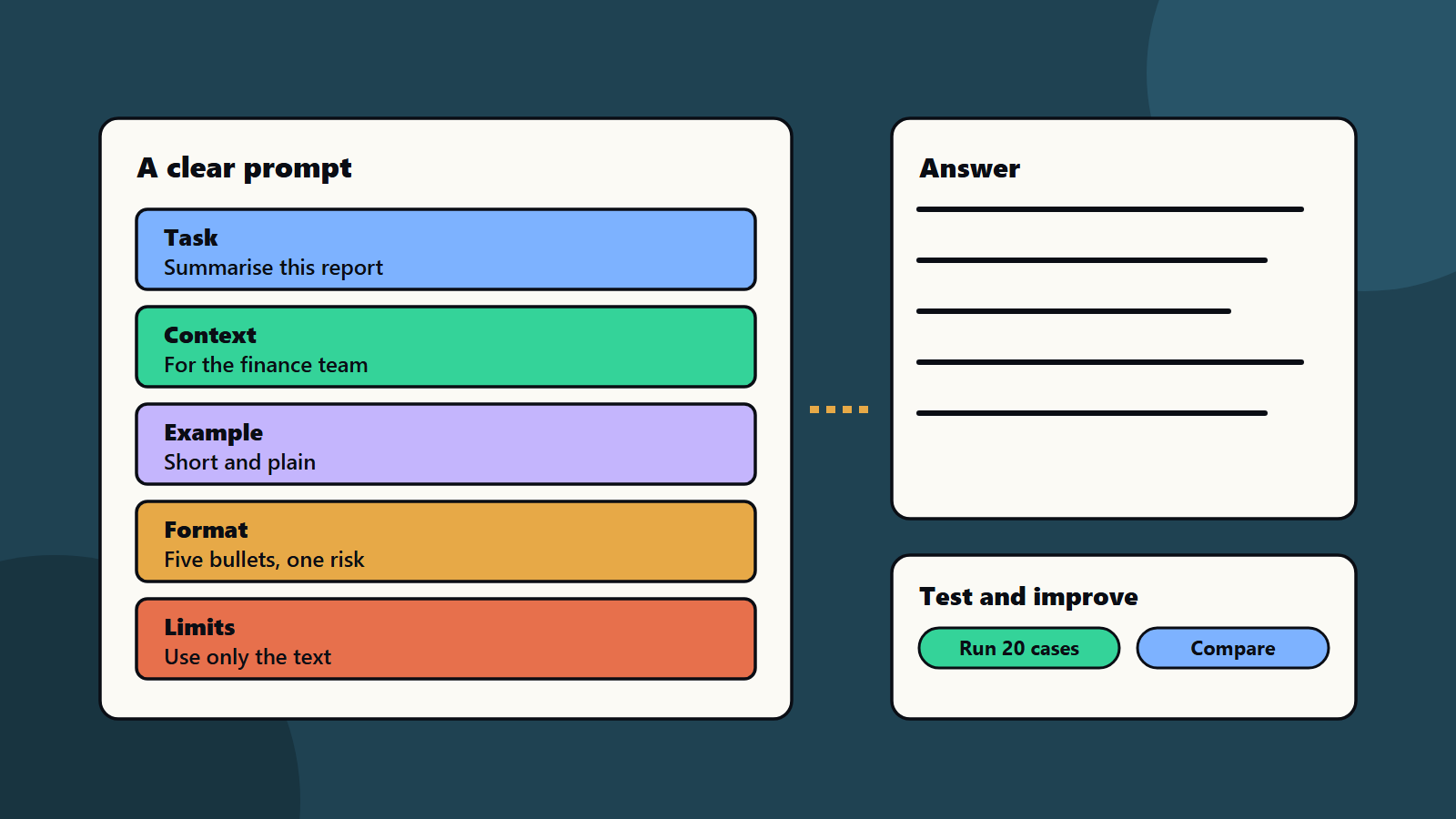
- Good prompts state the task, give context, show examples, set the output format and add limits.
- Prompt design is iterative. Test, compare and improve.
- Grounding answers in supplied text reduces made-up content.
- Save, name and share prompts that work, and agree who checks the output.
- Protect private data, and follow your AI policy.
Plain rules from the major platforms
Google’s prompt design strategies list six habits: give clear instructions, add few-shot examples, supply context, specify the format, set constraints and iterate, since prompt engineering is iterative.
Microsoft’s prompt engineering techniques describe prompt components: instructions, primary content, examples, cues and supporting content. It notes that examples condition the model for the current request only, that the order of information can change the result and that it can help to give the model an “out”, such as “respond with not found if the answer isn’t present”. It also stresses that you must still validate responses, because a prompt that worked once may not work everywhere.
The NIST AI Risk Management Framework adds the management view: AI use should be governed, with trust and risk considered in design, use and evaluation.
Seven rules for prompt engineering for business
1. Say the task first
Start with what you want. “Summarise this report for the finance team in five bullet points.” Not “Here is a long report.”
2. Give context
Say who the reader is, what the goal is and what matters. “The reader is a busy director who must decide on a budget.”
3. Show an example
One or two examples of the style you want teach more than a paragraph of rules. Keep example formats consistent.
4. Set the format
Ask for the shape of the answer: bullets, a short email, a table described in words, a checklist or a single sentence.
5. Add limits
Say what to use and what to avoid. “Use only the text below. Keep it under 150 words. Do not give legal advice.”
6. Give an out
Tell the tool what to do if it cannot answer. “If the answer is not in the text, say it is not stated.”
7. Iterate
Run the prompt, read the result, change one thing and run again. Keep notes on what helped.
A worked example: from weak to strong
This example is illustrative.
Weak prompt: “Write something about our new service.”
Result: a generic, boastful paragraph.
Stronger prompt:
“Task: write a 120-word email announcing our new cloud backup service to existing small business customers. Context: our customers are shop owners with no IT team. We want them to book a free review. Style example: short sentences, friendly, no jargon. Facts to use: daily backups, restore tested monthly, support by phone. Use only these facts. Format: subject line, then two short paragraphs, then one call to action. Limits: do not promise prices or dates. If a fact is missing, leave a note in square brackets.”
Result: a focused draft that a person can check and send. The person still reviews facts and tone.
Prompts by team
- Marketing: drafts, outlines and variations, with brand voice rules supplied. See brand voice guidelines.
- Sales: account research summaries and call notes, with facts supplied from your own records.
- Support: answer drafts from approved articles, with hand-over rules. See customer service automation.
- Finance and operations: summaries and checks on supplied data. See AI in finance operations.
- HR and legal: first drafts and comparisons that a qualified person reviews.
- Engineering: code explanations, tests and documentation, with review and security checks.
Build a shared prompt library
- Store prompts in one place with a name, purpose, owner and date.
- Add the version of the tool and any settings used.
- Keep a few example inputs and outputs for testing.
- Review and retire prompts that stop working.
- Tag prompts that touch customer or personal data, and apply stricter rules.
Keep it safe
- Do not paste secrets, personal data or confidential contracts into tools your policy does not approve.
- Know whether the provider keeps or learns from your inputs. See open-weight versus hosted AI models.
- Beware of instructions hidden in documents or web pages that you paste in. See prompt injection explained.
- Check facts, figures and quotes before use.
- Keep a human accountable for anything published or sent. See responsible AI policy.
Test prompts that many people will use
For shared or customer-facing prompts, build a small test set of 20 realistic inputs. Run it after every change, and compare results. See testing AI features.
Small business and enterprise views
- Sole trader or small team: keep five trusted prompts, a short checklist and a habit of checking facts.
- Mid-size company: appoint a prompt owner per team, run a monthly share-and-review session and agree which tools are approved.
- Enterprise: govern prompts like other content: libraries, access control, testing, logging where allowed and training.
Regional and language notes
Prompts in other languages can give different quality. Test in each language you need, and ask for plain wording that translates well. Follow local rules on data and on AI use in your region.
Common mistakes
- Vague asks with no context.
- Pasting long text with no instruction.
- Accepting the first answer.
- No format, so every answer looks different.
- Sharing private data with unapproved tools.
- Treating a good result once as proof it always works.
A starting plan
- Pick three tasks you repeat each week.
- Write a prompt for each using the seven rules.
- Test each on five real examples, and improve.
- Save the best in a shared library.
- Review the library monthly, and train new users.
How SoftSapien supports AI adoption
SoftSapien’s AI specialists help teams design prompt libraries, set up approved tools and policies, build tested assistants and train employees to use them well. See our AI development and conversational AI services.
To bring good prompting into your teams, use the contact page to chat with our team, send a message or schedule a free consultation call.
Frequently asked questions
What makes a good business prompt?
It states the task first, gives context, shows an example, sets the output format, adds limits and gives the tool an out when it does not know.
Why test prompts?
A prompt that worked once may not work everywhere. Test on realistic cases, compare results and keep what works.
How do we avoid made-up answers?
Supply the source text, tell the tool to use only that text, ask it to say when the answer is not stated and check important facts.
What should we never paste into an AI tool?
Secrets, personal data and confidential material that your policy and the tool terms do not allow.
Can SoftSapien help our teams use AI well?
Yes, with policy, tools and training. Contact SoftSapien through the contact page to chat with our team, send a message or schedule a free consultation call.