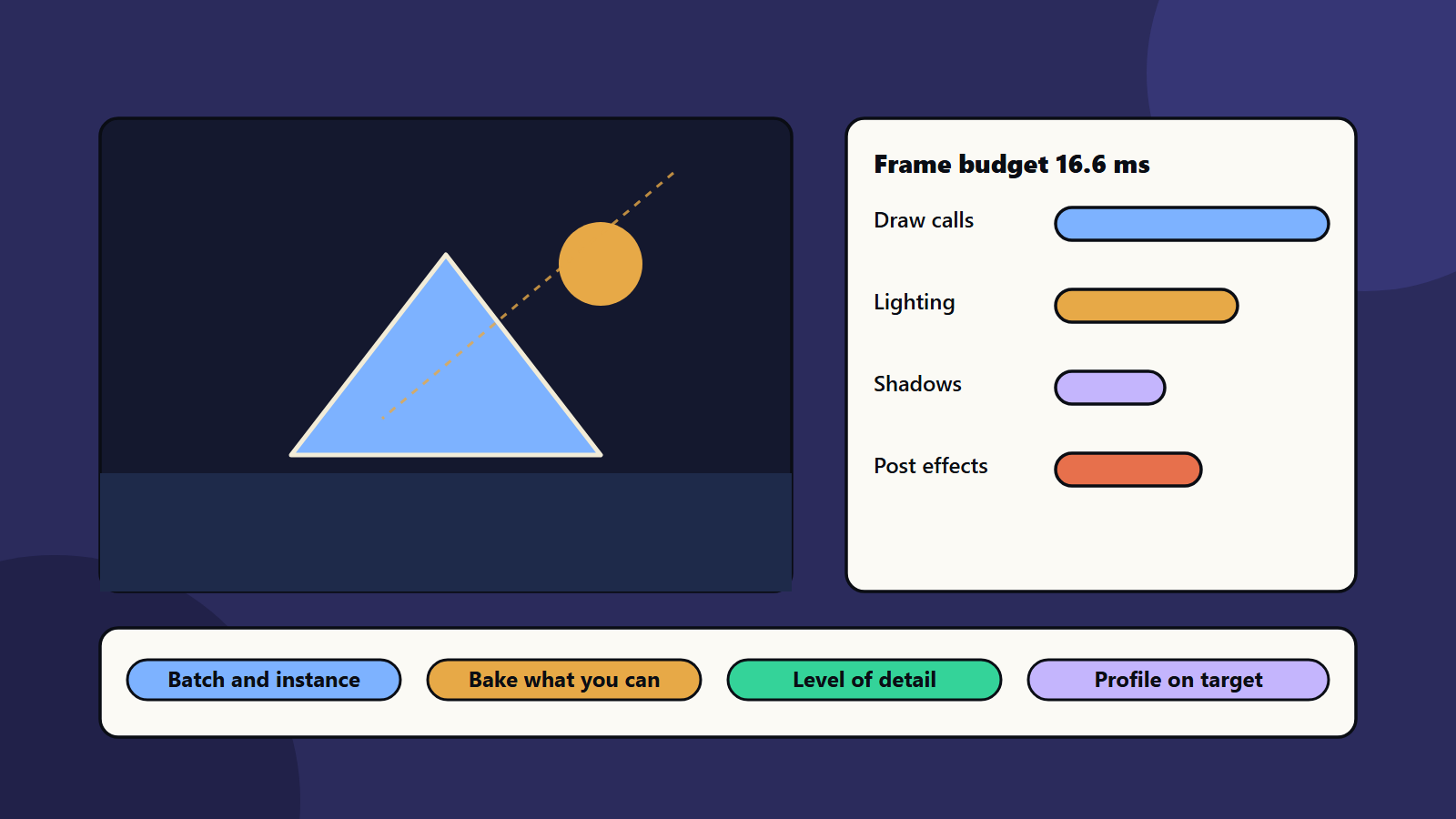
Short on time? Game rendering basics come down to a small set of ideas. The processor sends draw calls, the graphics card turns models into pixels, and lighting and effects add cost. Set a frame time budget, batch similar objects, reduce overdraw, bake light where you can and profile on real target devices before you change anything.
Every frame of a game is a small piece of art made in a few milliseconds. At 60 frames per second you have about 16.6 milliseconds for everything. Rendering takes the biggest share of that time.
This guide explains game rendering basics in plain words. It helps producers, designers and new developers talk with graphics engineers. It applies to mobile, PC and console games.
Key takeaways
- Game rendering basics start with the frame time budget: 60 frames per second leaves about 16.6 milliseconds.
- Draw calls, overdraw, lighting, shadows and effects drive cost.
- Batching, level of detail and baked lighting save time.
- Mobile, PC and console have different limits.
- Always profile on the target device before optimising.
Game rendering basics: how a frame is made
- The game updates: logic, physics and animation run on the processor.
- The processor prepares work: it tells the graphics card what to draw.
- The graphics card draws: it turns triangles into pixels, applies textures and light, and adds effects.
- The image appears on screen.
If the processor or the graphics card is slow, the frame is late. Our guide to PC game optimisation shows how to find which one limits you.
Draw calls
A draw call is one instruction to the graphics card: draw this object with this material. Too many draw calls can slow the processor, because each one has overhead.
Ways to cut them:
- Batching: combine many small objects into fewer calls.
- Instancing: draw many copies of one object in a single call.
- Texture atlases: pack many images into one texture, so objects can share a material.
- Fewer materials: reuse the same material where you can.
Mozilla’s WebGL best practices say it plainly: drawing 1000 sprites in one call is generally much faster than 1000 separate calls. The idea applies far beyond the web.
Geometry and level of detail
More triangles cost more. Use detailed models only up close. Level of detail swaps in simpler models as objects move away. Culling skips objects that the camera cannot see.
Overdraw and pixels
Overdraw happens when the card paints the same pixel many times, for example with layers of see-through smoke or leaves. Pixels cost time, so higher resolution costs more. Many games draw at a lower internal resolution and scale up.
Lighting
Lighting makes a scene feel real, and it is costly.
- Baked light: computed in advance and stored in textures. It is cheap at run time and does not change.
- Dynamic light: calculated every frame. It reacts to movement and costs more.
- Mixed: baked for static scenery, dynamic for moving objects.
Limit the number of dynamic lights, especially on mobile.
Shadows
Shadows add depth and cost a lot. Lower shadow resolution and distance on weaker devices, and use simple shadows for small objects.
Textures and memory
Large textures use memory and bandwidth. Use compression and mipmaps, and size textures for how big they look on screen. The same WebGL guide advises a per-pixel video memory budget and warns that graphics limits differ between devices, so check what each target supports.
Shaders and effects
Shaders are small programs that decide how surfaces look. Complex shaders cost more per pixel. Post effects such as bloom, blur and colour grading add up. Keep the ones that earn their cost, and make the rest optional.
Compiling shaders during play can cause stutter. Compile or cache them while loading. See game analytics for ways to spot where players see hitches.
Platform differences
- Mobile: battery, heat and memory are tight. Use simple lighting and fewer effects.
- PC: hardware varies widely, so offer graphics settings.
- Console: fixed hardware allows deep tuning, with strict memory and certification rules. See console game development.
Your engine shapes the tools you get. See game engines compared.
Profile before you fix
- Record frame time on the target device.
- Find out if the processor or graphics card is the limit.
- Fix the biggest cost first.
- Measure again.
Test on low, mid and high devices. See game testing and QA.
Common mistakes
- Optimising without a profile.
- Using many unique materials.
- Too many dynamic lights.
- Ignoring overdraw.
- Testing only on a strong development machine.
- Leaving shader compile stutter to the end.
A starting plan
- Set a frame time budget for each platform.
- Learn the profiler of your engine.
- Fix draw calls, then lighting, then effects.
- Add settings for lower quality.
- Retest each build against game rendering basics like the budget.
How SoftSapien supports game rendering
SoftSapien’s graphics and game engineers teach teams game rendering basics, profile builds, tune lighting and effects and ship on mobile, PC and console. See our game development and QA and testing services.
To improve your game’s visuals and speed, use the contact page to chat with our team, send a message or schedule a free consultation call.
Frequently asked questions
What is a draw call?
One instruction from the processor to the graphics card to draw an object with a material. Too many can slow the processor.
How much time does a frame have?
At 60 frames per second, about 16.6 milliseconds for everything, including logic, physics and rendering.
Is baked lighting better than dynamic lighting?
Baked light is cheap at run time and does not change. Dynamic light reacts to movement and costs more. Many games mix both.
How do we know what to optimise?
Profile on the target device, find whether the processor or graphics card limits you, fix the biggest cost first and measure again.
Can SoftSapien help improve rendering?
Yes, with profiling and tuning. Contact SoftSapien through the contact page to chat with our team, send a message or schedule a free consultation call.