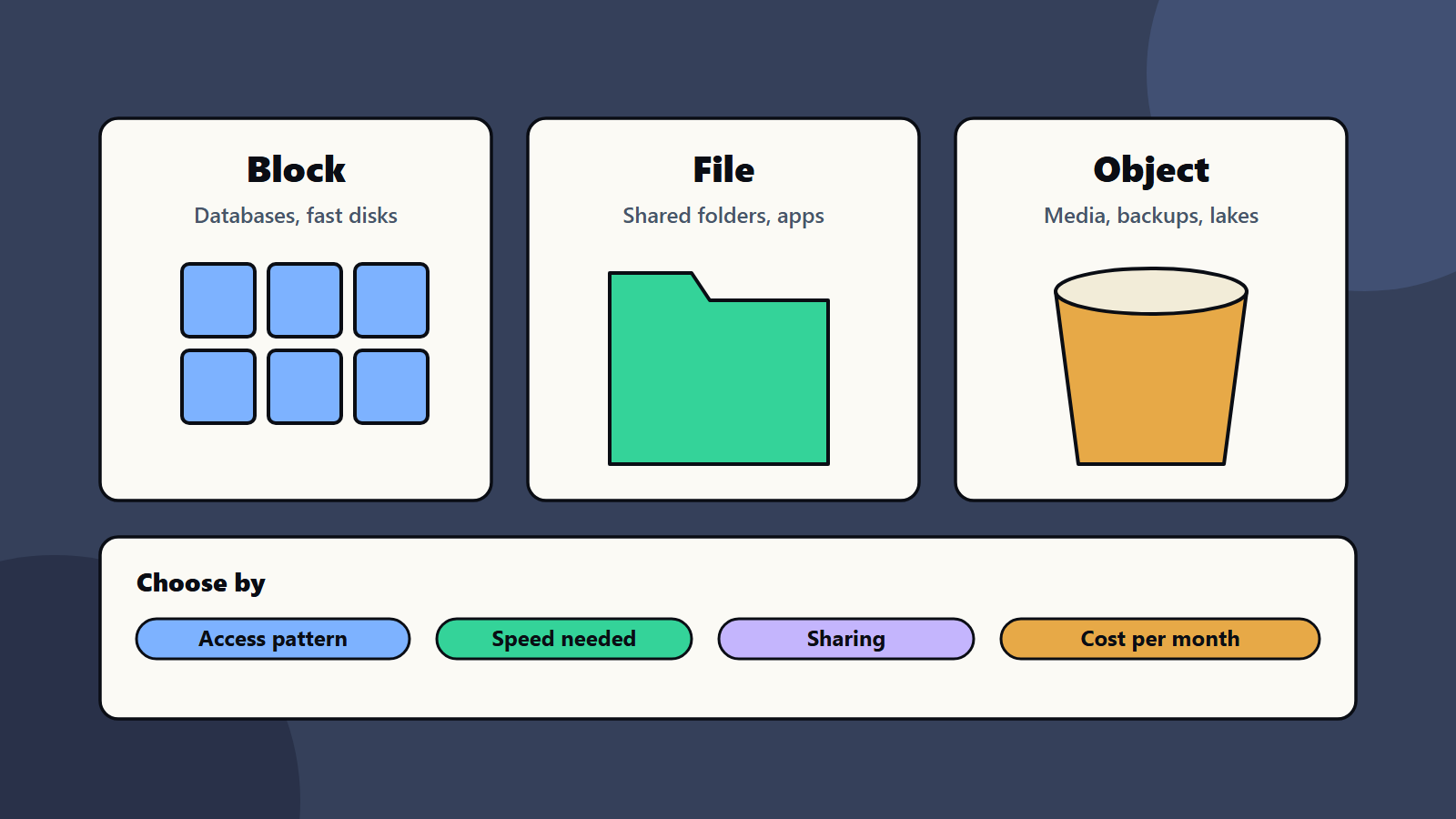
Short on time? Object, block and file storage solve different problems. Block storage gives fast, low-level disks for databases. File storage gives shared folders for applications and teams. Object storage gives cheap, huge, internet-friendly buckets for media, backups and data lakes. Pick by how data is accessed, how fast it must be, who shares it and what it costs.
Storage choices look like a detail until a database runs slowly, a shared drive cannot scale or a backup bill arrives. Most cloud providers and storage vendors offer three main types: block, file and object. They are not interchangeable, and a good design often uses all three.
This article is a decision framework for object, block and file storage. It works for a small business moving a file server to the cloud and for an enterprise planning a new platform.
Key takeaways
- Block storage suits databases and anything that needs low delay and direct disk behaviour.
- File storage suits shared folders and applications that expect a folder structure.
- Object storage suits large amounts of data that are read as whole items, such as media, backups and data lakes.
- Access pattern, speed, sharing and cost per month decide the choice.
- Many solutions combine two or three types, and each cloud names them differently.
Object, block and file storage in plain words
Block storage
Block storage splits data into fixed-size blocks and presents them as a raw disk. The operating system or a database decides how to use them. Google’s storage options advice says block storage is optimised for high-IOPS workloads, such as transaction processing, which makes it the usual home of databases and latency-sensitive applications.
File storage
File storage organises data as files in folders, and shares them over standard protocols such as NFS and SMB. Google describes it as suitable for lift-and-shift file systems, shared configuration and central logs. Microsoft’s Azure Storage overview gives a similar picture: managed file shares that you can mount from cloud or on-premises systems, useful when you want to replace or add to file servers.
Object storage
Object storage keeps each item, with its details, in a bucket and serves it through web APIs. It scales to very large sizes and fits data lakes, media libraries and backups. Azure’s Blob Storage description lists serving images and documents to browsers, streaming video and audio, and storing backup and archive data. Amazon’s S3 storage classes show how object storage adds cost tiers for data that is used less often.
A decision framework
Ask five questions in this order.
- How is the data accessed? Small random reads and writes point to block. Whole files opened by many users point to file. Whole objects fetched by applications or browsers point to object.
- How fast must it be? Databases and busy applications need low, steady delay. Media and backups can accept more.
- Who shares it? A single server uses a block disk. Many servers or users need a shared file system or an object API.
- How much data, and how fast will it grow? Object storage handles the largest and fastest-growing sets at the lowest unit cost.
- What does it cost? Compare monthly storage, request, transfer and retrieval costs as well as the headline price per gigabyte. See storage tiering.
A worked example: a growing online learning company
This example is illustrative.
The company has a customer database, 40,000 course videos, shared design files and nightly backups.
- Customer database: block storage attached to the database servers, with snapshots. Speed and consistency matter most.
- Course videos: object storage, served through a content delivery network. Videos are large, read whole and rarely changed.
- Design and office files: file storage with a managed share, so your team can mount it like a normal drive.
- Backups: object storage with a cooler tier and a copy in another region. See backup strategy and the 3-2-1 rule.
- Analytics extracts: object storage as a data lake zone. See data lake, warehouse and lakehouse.
One company, three types, each chosen for its job.
Scenarios by size
- Sole trader or small shop: a cloud file share or the storage built into your office suite is often enough. Add an object bucket for backups.
- Mid-size company: database disks for core systems, a managed file service replacing the old file server and object storage for backups and media.
- Enterprise: a storage standard with approved services, tiers, encryption, tagging and cost reporting, plus on-premises arrays where latency or rules require. See server refresh planning.
Protect and govern it
- Encrypt data at rest and in transit.
- Use role-based access, and limit public access to buckets.
- Turn on versioning and deletion protection where data matters.
- Test restores on a schedule. See disaster recovery testing.
- Tag storage by owner and purpose, and review costs monthly. See cloud cost optimisation.
Regional and regulatory notes
Where data is stored matters for privacy and sector rules. Choose regions on purpose, check replication settings and record where each dataset lives. See data residency and sovereignty.
Common mistakes
- Putting databases on file shares because they are easy to mount.
- Using object storage for workloads that need file locks or tiny random writes.
- Buying the fastest block storage for everything.
- Ignoring request and transfer fees on object storage.
- No lifecycle rules, so old data stays on costly tiers.
- Copying data to several places with no owner.
A starting plan
- List your datasets, and note how each is accessed.
- Match each to block, file or object storage using the five questions.
- Set lifecycle and backup rules per dataset.
- Pilot the change with one workload, and measure speed and cost.
- Write a short storage standard for your team.
How SoftSapien supports storage design
SoftSapien’s infrastructure engineers assess workloads, design block, file and object storage, plan tiering and backup, and run migrations with testing. See our server and storage solutions and cloud and datacenter solutions services.
To choose the right storage for your workloads, use the contact page to chat with our team, send a message or schedule a free consultation call.
Frequently asked questions
What is the difference between block, file and object storage?
Block storage gives raw, fast disks for databases. File storage gives shared folders over protocols such as NFS and SMB. Object storage keeps whole items in buckets reached through web APIs and scales cheaply.
Which storage suits a database?
Usually block storage, because databases need low, steady delay and direct disk behaviour.
Which storage suits backups and media?
Object storage, often with cooler tiers for older data and a copy in another region.
Can I mix storage types?
Yes. Most real systems combine two or three types, chosen workload by workload.
Can SoftSapien help design storage?
Yes, from assessment to migration. Contact SoftSapien through the contact page to chat with our team, send a message or schedule a free consultation call.