Short on time? Event-driven architecture lets systems announce what happened, and other systems react. It reduces tight links between services and suits workflows that need many reactions. It also makes flow harder to follow. Start with event notifications, design clear event names and data, plan for retries, duplicates and order, and invest in monitoring.
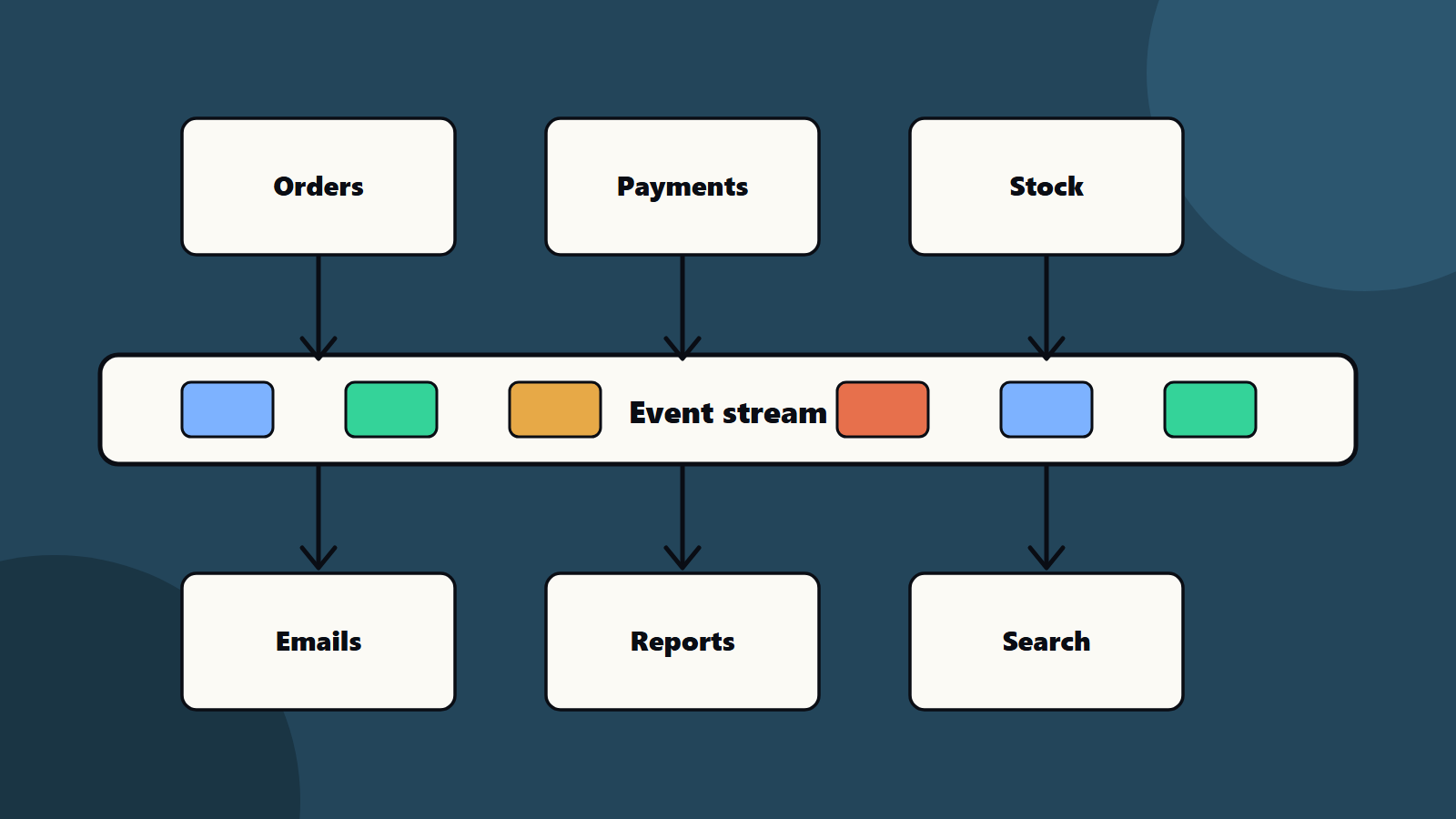
In a request-based system, one service calls another and waits for an answer. In an event-driven system, a service says “an order was placed”, and anyone who cares can react. Payments, stock, emails and reports each do their part without being called one by one.
This article explains event-driven architecture in plain terms. It suits a small team with a growing product and a large company linking many systems.
Key takeaways
- Event-driven architecture uses events, messages about things that happened, to link systems loosely.
- Martin Fowler lists four patterns: event notification, event-carried state transfer, event sourcing and CQRS.
- It adds flexibility and resilience, and it adds complexity in debugging, ordering and data copies.
- Design events carefully, and plan for duplicates, retries and changes.
- Monitor event flows, since the logic is spread across many services.
Requests and events
Request and response: Service A calls Service B and needs the answer now. The link is direct. If B is down, A waits or fails.
Event: Service A publishes a fact: “OrderPlaced”. It does not know who listens. Services B, C and D each react in their own time. If one is down, it catches up later.
Events fit when many parts of the business care about one thing, and when you want to add new reactions without changing the source.
Four patterns
Martin Fowler describes four patterns that people call event-driven:
- Event notification: a system emits an event to announce a change, without expecting a reply. It keeps coupling low and the set-up simple. The trade-off is that the overall flow becomes implicit, and so is harder to follow and debug.
- Event-carried state transfer: the event carries the changed data, so receivers keep their own copies and rarely call the source. It improves resilience and speed. The trade-off is more data duplication and more work for receivers.
- Event sourcing: the system stores every change as an event log, and derives current state by replaying it. It gives a strong audit trail and the ability to rebuild past states. The trade-offs include difficulty with outside systems on replay, hard schema changes and real complexity.
- CQRS: separate models handle reads and writes. It can simplify complex domains and suits uneven read and write loads. It adds the cost of two models, and it is often misused.
Most teams start with the first, add the second where needed and use the last two with care.
Core parts
- Producers create events.
- A broker or event stream carries them, with storage for a period.
- Consumers react.
- A schema describes each event’s fields.
- Monitoring shows flow and lag.
Different tools suit different needs: queues for tasks, publish and subscribe for broadcasting and logs for replay. Choose by volume, order needs, retention and team skill. Cloud providers offer managed versions of each.
Design good events
- Name them as past facts: “InvoicePaid” works, and “PayInvoice” reads like a command.
- Keep them small and stable: include an id, a time, the source and the key data.
- Version the schema, and keep old versions working for a while. See API versioning.
- Avoid secrets and excess personal data in events.
- Document each event, with owners and examples.
- Decide on the data inside: a small notice with an id, or the full data. Notices keep events light and make consumers call back. Full data cuts calls and spreads copies.
Handle the hard parts
- Duplicates: brokers may deliver a message twice. Make consumers idempotent, so a repeat does no harm.
- Order: events may arrive out of order. Use keys and sequence numbers where order matters.
- Failure: retry with limits, and use a dead letter queue for messages that keep failing.
- Delay: the system becomes eventually consistent. Show users honest status, such as “payment pending”.
- Transactions across services: use patterns like sagas, which are chains of steps with compensating actions, and avoid distributed locks.
- Reliable publishing: make sure a change and its event are saved together. Outbox patterns do this.
Test and monitor
- Test events with contract tests. See contract testing for APIs and microservices and test automation strategy.
- Replay sample events in test environments.
- Trace each event across services, with a shared correlation id. See observability.
- Watch queue length, lag and error rates.
- Practise failure drills. See high availability design.
When to choose it
Good fits:
- Many systems react to the same business events.
- You need to add new features without touching old ones.
- Workloads spike, and queues smooth them.
- Integration across teams or companies. See enterprise software integration patterns.
- Streaming data from devices. See IoT architecture.
Poor fits:
- A simple application with one database and few teams.
- Flows that need an immediate answer for the user.
- Teams with no monitoring skills yet.
Compare with other styles in web application architecture and composable enterprise. <!– expanded –>
What Microsoft adds
Microsoft’s Azure Architecture Center page on the event-driven style adds useful detail to the patterns above.
It defines the parts: event producers, event consumers and event channels, often implemented as brokers. It notes that producers do not know who is listening, and that consumers are decoupled from each other.
It separates two delivery models:
- Publish and subscribe: the infrastructure tracks subscriptions and sends each event to every subscriber. The event is not kept in a durable log, so late subscribers do not see past events.
- Event streaming: events are written to an ordered, durable log, and clients read from any position. This allows replay for recovery, for late consumers and for reprocessing after a bug fix.
It lists two payload styles: include all needed attributes in the event, or include only keys and let consumers fetch the rest. The first reduces calls and creates copies of data. The second keeps one system of record and creates more calls.
It describes two topologies: a broker topology, where components broadcast events and nobody coordinates the whole, and a mediator topology, where a mediator manages the flow, state and error handling at the cost of more coupling.
It is also honest about when not to use the style: simple request and response flows, business transactions that need strong consistency and teams with no experience of distributed asynchronous systems.
A worked example: an online order
This example is illustrative.
A shop wants to add loyalty points and delivery tracking without changing the order service each time.
Today: the order service calls payments, stock, email and reporting one by one. If email is slow, the checkout is slow.
Event design:
- The order service saves the order and publishes “OrderPlaced” with the order id, time, customer id and items.
- Payments, stock, email, loyalty and reporting each subscribe.
- Each consumer handles duplicates by checking whether it has already processed that order id.
- Failed messages go to a dead letter queue, with an alert.
What changes for customers:
- Checkout is quicker, since it only saves the order and publishes the event.
- The confirmation email may arrive a few seconds later.
- Loyalty points appear shortly after the order.
What the team adds:
- A correlation id in every event and log line.
- A dashboard of queue length and time from “OrderPlaced” to each reaction.
- A rule that every new consumer has a contract test.
- A status field on the order, such as “payment pending”, so the screen is honest.
New feature: delivery tracking subscribes to “OrderPlaced” and “OrderShipped”. The order service is not touched.
Choosing tools
Match tools to needs.
- Task queues: one consumer handles each message. Good for background jobs.
- Publish and subscribe: many consumers see each message. Good for notifications.
- Event streams or logs: ordered, durable, replayable. Good for high volume and analytics.
- Managed cloud services: less to run, with provider limits and cost.
- Self-run brokers: more control, more to operate.
Ask: How many events per second? How long must they be kept? Is strict order needed? Do we need replay? What does the team already know? What is the exit route? See cloud exit strategy.
Migrating from request-based systems
- Find a seam. Choose a flow with many reactions, such as orders.
- Publish alongside the old calls. Emit the event and keep the old call for now.
- Move one consumer at a time. Switch each to listen to events, and turn off the old call.
- Measure. Compare speed, errors and support tickets.
- Retire the old paths.
- Repeat for the next flow.
This gradual style matches how teams modernise older systems. See legacy application modernization.
An operations runbook
Write answers before an incident.
- Where are the queues and dashboards?
- What does a healthy lag look like?
- How do we pause a consumer safely?
- How do we replay events from a point in time?
- How do we handle a poison message that always fails?
- Who is on call, and how do they escalate?
- How do we roll back a schema change?
Set service targets for lag, as described in site reliability engineering and in Google’s chapter on service level objectives.
Team topology
- Each event has a producing team that owns its meaning and schema.
- Consumers own their reactions and their error handling.
- A small platform team runs the broker and the standards.
- An architecture group, or a lightweight review, keeps event names and rules consistent.
Small business and enterprise views
- Small team: use the queue or event service your cloud provider offers, start with one or two events and keep the design simple.
- Mid-size company: add schema rules, correlation ids and dashboards, and invest in contract tests.
- Enterprise: treat events as products, with a catalogue, owners, versioning policy and security review. Consider event streaming for high-volume and analytics use.
Security and privacy
Events are visible to many components. Keep personal data out of events where you can, or encrypt sensitive fields. Control who can publish and subscribe. Log access. Review events with your privacy team. See zero trust security.
Regional and regulatory notes
Events may cross regions and systems. Check where brokers and logs are stored, and how long events are kept, since retention may conflict with deletion rules for personal data. See data residency and sovereignty.
Common mistakes
- Using events everywhere.
- Vague event names and loose schemas.
- No plan for duplicates.
- No monitoring, so failures hide.
- Putting too much data in events.
- Event sourcing for a simple need.
- No owner for each event.
A starting plan
- Pick one workflow with many reactions, such as order placed.
- Define the event, schema and owner.
- Publish it from the source, and add one consumer.
- Add retries, idempotency and tracing.
- Review event-driven architecture lessons, then add more consumers.
How SoftSapien supports event-driven architecture
SoftSapien’s engineers design event-driven architecture, choose brokers and streams, build services, set up tracing and monitoring and move systems from tight links to events. See our enterprise software engineering and custom software development services.
To plan your event flows, use the contact page to chat with our team, send a message or schedule a free consultation call.
Frequently asked questions
What is event-driven architecture?
A style in which producers publish events about things that happened and consumers react, so systems stay loosely linked.
What are the main patterns?
Event notification, event-carried state transfer, event sourcing and CQRS, each with trade-offs in coupling, data copies and complexity.
When should we avoid it?
For simple request and response flows, where strong consistency is needed or when the team has no experience running asynchronous systems.
What are the hard parts?
Duplicate delivery, ordering, retries, eventual consistency, schema changes and tracing a flow across services.
Can SoftSapien help design event flows?
Yes, from design to operations. Contact SoftSapien through the contact page to chat with our team, send a message or schedule a free consultation call.