Short on time? Penetration testing explained simply: skilled testers act like attackers, with your permission, to find weaknesses in a system. Agree the scope and rules first, choose qualified testers, prepare accounts and contacts, read the report with your own risk view and fix and retest. A test is a snapshot, so keep routine security work going all year.
You lock your doors, and still you want someone to check the locks. A penetration test is that check for your software and networks. Honest, skilled people try to break in, so real attackers do not get there first.
This article gives penetration testing explained for business owners, product teams and security leads. It suits a small firm buying its first test and a large organisation running a testing programme.
Key takeaways
- A penetration test simulates attacker methods to check how secure a system really is.
- Scope, rules and timing must be agreed in writing before the test.
- Testers should be qualified and experienced, since quality depends on skill.
- A test is a snapshot in time. It does not replace routine security work.
- You own the risk decisions: fix, retest and learn from the findings.
What a penetration test is
The UK National Cyber Security Centre describes penetration testing as a way to gain assurance in the security of an IT system by simulating adversary techniques. It compares it to an external financial audit that checks internal processes. It also stresses that a test is not the main way to find vulnerabilities, and that it shows only that systems were free of known issues on the test day.
In plain words: a test checks that your everyday security work is actually working.
Types of tests
- Web application and API tests: look for flaws in logins, access rules and data handling. See our API security checklist.
- Mobile app tests: check the app and its back end. See our mobile app security checklist.
- Network and infrastructure tests: inside and outside your network.
- Cloud configuration tests: accounts, storage and identity settings. See cloud security and the shared responsibility model.
- Social engineering tests: phishing and phone calls, with strict rules.
- Physical tests: access to buildings and equipment.
- Red team exercises: longer, goal-based tests that also check your detection and response.
Black, grey and white box
- Black box: testers know little about the system, like an outside attacker.
- Grey box: testers get some access, such as a normal user account.
- White box: testers get full details and code. This finds more problems in less time.
Choose by your goal and budget. Many teams start with grey box.
Plan the scope
NCSC advises that scoping should involve risk owners, technical teams and the testers. Write down:
- Which systems, addresses and apps are in scope, and which are out.
- Test types and timeframe.
- Effort, usually in days.
- Rules: allowed methods, times and limits on disruption.
- Compliance needs, if any.
- Reporting format and who receives it.
- Emergency contacts if something breaks.
Share your latest vulnerability scans with the testers. They can check that your list is complete and correct. See vulnerability management.
Choose testers
- Look for relevant qualifications and experience for your type of system.
- Ask for sample reports, with sensitive details removed, and references.
- Check how they handle your data and how they protect their own tools.
- Ask who will do the work, since results depend on the individuals.
- Agree clear legal terms, including permission to test.
For independence, use a different team from the one that built the system.
Prepare your side
- Name a technical contact who can respond quickly.
- Set up test accounts and access.
- Back up important systems.
- Warn teams that watch for attacks, if you want a realistic exercise, and keep a small group informed to avoid real emergencies.
- Document special care needed for fragile or critical systems.
- Accept that testing cannot promise zero impact.
Understand the report
A good report includes:
- A summary for leaders.
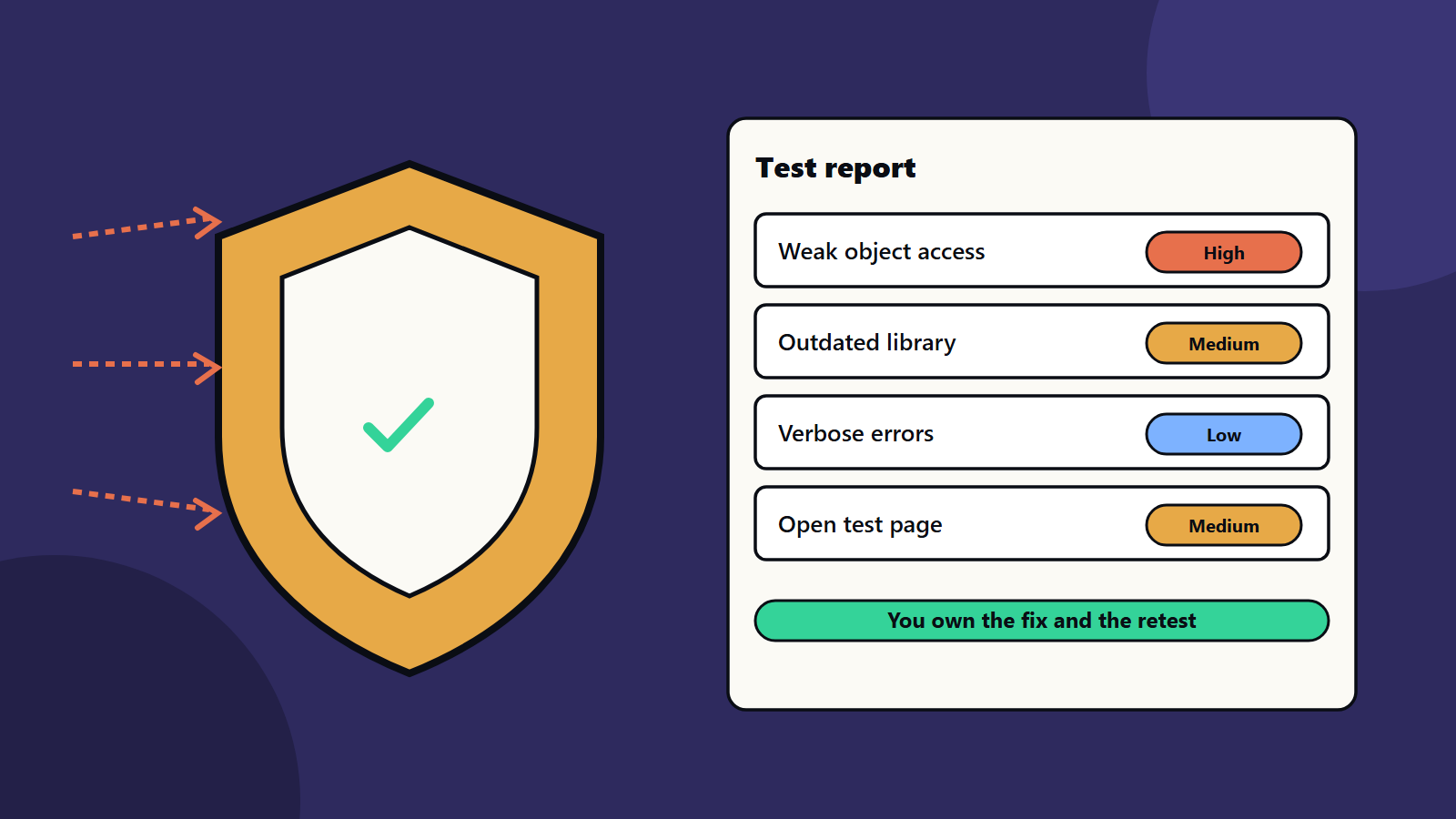
- Findings with severity, evidence and steps to reproduce.
- Recommended fixes.
- Notes on what was tested and what was not.
NCSC notes that your organisation owns the risk decisions. Severity ratings are a starting point, so neither dismiss them nor accept them blindly. Pay special attention to problems you did not already know about, and think about how to detect similar ones in future.
Fix and retest
- Triage findings by risk to your business.
- Assign owners and dates.
- Consider alternatives to the suggested fix, such as removing unneeded software or adding monitoring.
- Fix, then ask the testers to retest the serious items.
- Feed lessons into design, code review and training. See security awareness training.
Make testing part of a programme
- Test before major releases and after big changes.
- Run routine scans and code checks all year. See our CI/CD starter pipeline.
- Run an incident response drill. See incident response planning.
- Track fix times and repeat findings.
<!– expanded –>
What the standards say
Penetration testing explained well starts with three public sources that give a reliable base.
The NCSC guidance, cited above, covers scoping, choosing testers, preparing and acting on findings.
NIST Special Publication 800-115, the Technical Guide to Information Security Testing and Assessment, was published in 2008. It helps organisations plan and run technical security tests, analyse findings and develop mitigation strategies. It covers penetration testing, vulnerability scanning and security examination, and it ties testing to risk assessment. NIST describes it as an overview that sits below a full testing programme, and it is useful as a vocabulary and a checklist for planning.
The OWASP Web Security Testing Guide is an open resource for web application testers and developers, licensed under Creative Commons, with a stable version and a version in development. Testers often use it as a framework for web tests. Ask your provider which frameworks they follow.
Penetration testing explained through a customer portal
This example is illustrative.
A company is about to launch a customer portal with logins, invoices and file uploads.
Weeks before the test:
- The team lists the portal, its API and the admin site as in scope, and the corporate network as out of scope.
- They agree a grey box test, with two normal user accounts and one admin account.
- They choose a five-day window and a staging copy with realistic data, with no real customer data.
- They name a contact who can answer within an hour, and an emergency number.
During the test:
- Day one: the testers map the application and its API.
- Days two and three: they test sign-in, access to other users’ invoices, file upload and session handling.
- Day four: they test the admin site and the infrastructure settings.
- Day five: they confirm findings and prepare the report. They tell the team at once about one serious finding, without waiting for the report.
Report:
- One high finding: a user can read another user’s invoice by changing a number in the address.
- Two medium findings: an outdated library and an upload that accepts risky file types.
- Three low findings: detailed error messages and weak security headers.
After the test:
- The team fixes the high finding within two days, and the medium ones within two weeks.
- The testers retest the fixes.
- The team adds an automated access test to the build pipeline, and asks why code review missed the flaw.
- The launch goes ahead after the retest passes.
What drives cost and time
- Size and complexity of the scope.
- Number of user roles.
- Depth: quick checks or deep manual testing.
- White, grey or black box.
- Quality of documentation and test accounts.
- Retest needs.
- Reporting requirements.
Ask for the effort in days, and what each day covers. Compare proposals on scope and method as well as price.
Reading severity
When you read penetration testing results, remember that testers rate findings by severity, often by impact and ease of use. Use their rating as a start, then add your own view:
- How much damage could this do to your business?
- Who could exploit it, and how easily?
- Are there other controls that reduce the risk?
- How hard is the fix?
Keep the final decision in your risk process. NCSC advises against dismissing ratings and against accepting them blindly.
Common findings across web and API tests
- Weak access checks between users.
- Weak login protection and session handling.
- Outdated software with known flaws.
- Misconfigured cloud storage or services.
- Verbose errors and debug pages.
- Missing input checks.
- Secrets in code or logs.
Many link back to everyday engineering practice. See API security checklist, software supply chain security and secrets management.
Reporting to leaders
Leaders want a short, honest picture.
- What was tested, and what was not.
- The number of findings by severity.
- Business risks in plain language.
- What has been fixed, and what remains with dates.
- What you will change in process to prevent repeats.
Keep the technical detail in an appendix for engineers.
Penetration testing for small business and enterprise
- Sole trader or small business: if you use a hosted platform, check what its provider tests and what you must test, such as your own settings and plugins. A small, focused test of your login and payment flow can be worth it.
- Mid-size company: test before major releases, and combine with automated scans.
- Enterprise: run a programme: scheduled tests, a panel of providers, shared reporting, tracking of fixes and links to risk registers.
Regional and regulatory notes
Some standards and laws expect regular testing, especially for payments, finance, health and public services. Rules may specify who may test and how reports are kept. Get the written permission of any third party that hosts your systems, and follow local laws on testing and data handling.
Common mistakes
- Testing with no clear scope.
- Hiring on price alone.
- Treating a clean report as proof of safety.
- Leaving findings unfixed.
- No retest.
- Testing only once, years ago.
- Skipping legal permission for systems hosted by others.
A starting plan
- List your most exposed systems.
- Write the scope and rules with the testers.
- Run a grey box test on the top system.
- Fix and retest within a set time.
- Schedule penetration testing again after major changes.
How SoftSapien supports security testing
SoftSapien’s security consultants help you plan penetration testing, prepare systems, review reports, fix findings and build a continuing security programme. See our cybersecurity consulting and QA and testing services.
To plan a test, use the contact page to chat with our team, send a message or schedule a free consultation call.
Frequently asked questions
What is a penetration test?
A test in which skilled testers simulate attacker methods, with permission, to check how secure a system really is.
Is a clean report proof of safety?
No. A test shows only that systems were free of known issues on the test day, so routine security work must continue.
What is the difference between black, grey and white box?
Black box testers know little, grey box testers have some access such as a user account, and white box testers receive full details and code.
Who owns the risk decisions?
You do. Severity ratings are a starting point, so apply your own view of impact and fix important findings, then retest.
Can SoftSapien help with security testing?
Yes, from scoping to remediation. Contact SoftSapien through the contact page to chat with our team, send a message or schedule a free consultation call.