Short on time? Ransomware readiness comes down to four checks. First, keep backups that attackers cannot reach, and test them. Second, use strong sign-in with phishing-resistant multi-factor authentication. Third, patch exposed systems fast. Fourth, write a response plan and practise it. Police and national cyber agencies advise against paying, so plan to recover without it.
Ransomware locks or steals your data and demands payment, so ransomware readiness matters to every organisation. It hits hospitals, schools, factories, shops and councils. The pain is usually less about the malware and more about not being able to run the business while systems are down.
This article is a ransomware readiness checklist with a response timeline. It suits a small business with one server and an enterprise with many sites. It draws on public advice from CISA and the UK National Cyber Security Centre.
Key takeaways
- Keep offline, encrypted backups and test restoring from them.
- Use phishing-resistant multi-factor sign-in, especially for email, remote access and administrator accounts.
- Patch internet-facing systems first, and segment networks to limit spread.
- Write a response plan, name roles, keep contact details offline and practise.
- Authorities discourage paying ransoms, since payment does not guarantee recovery.
What the agencies advise
The CISA ransomware guide gives four prevention steps:
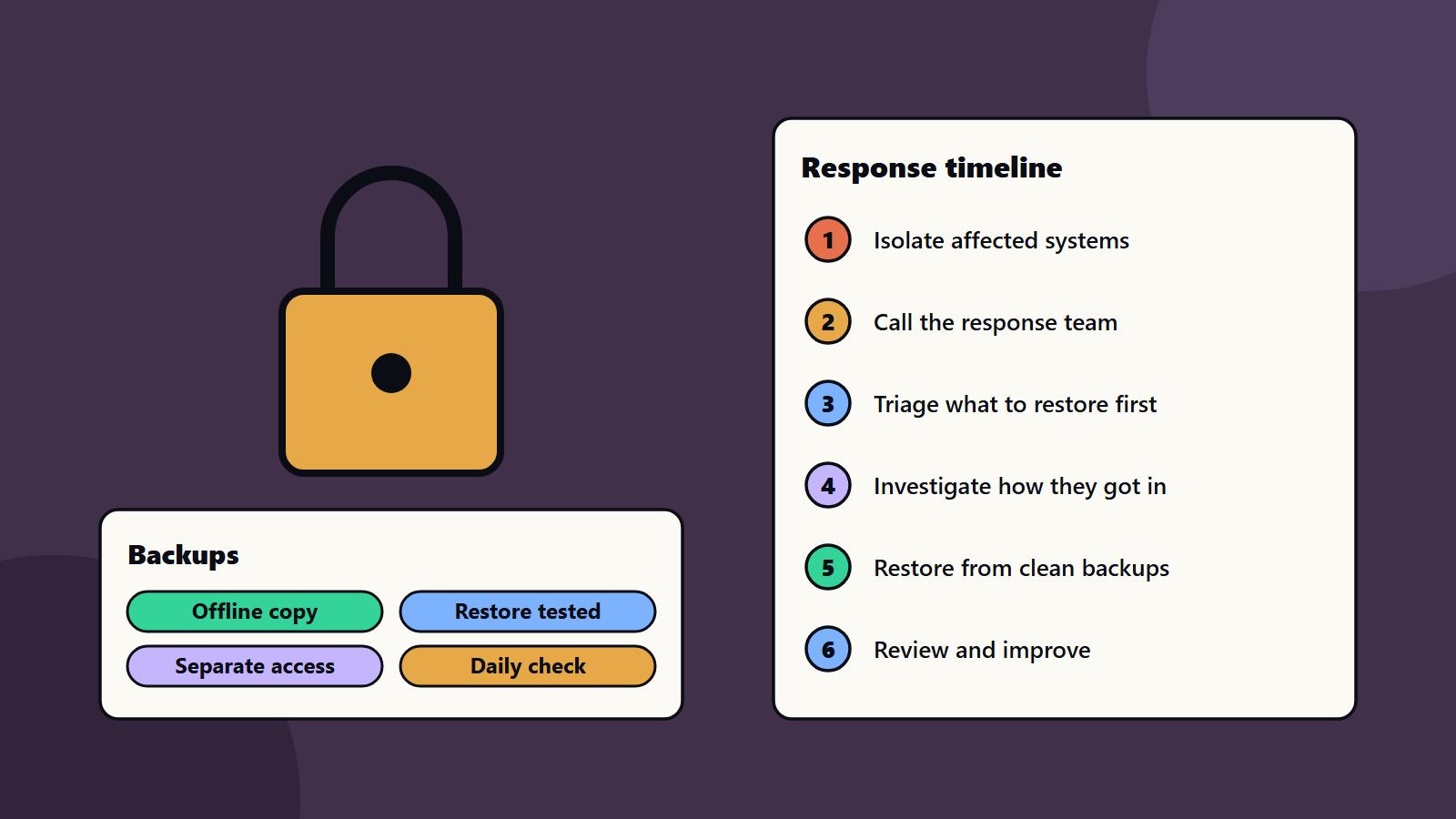
- Keep offline, encrypted backups of critical data, and test them. Many ransomware variants try to delete or lock any backup they can reach.
- Patch quickly. Start with servers that face the internet and flaws that attackers already use.
- Use phishing-resistant multi-factor sign-in for all services. Email, remote access and accounts that reach critical systems come first.
- Split the network into segments. Keep business units apart, and keep IT apart from operational technology. This limits how far an attack can spread.
For response, CISA gives these steps. Isolate affected systems fast. Decide what to restore first. Find how the attackers got in. Report the attack. Remove their access. Restore from clean backups in priority order. Then learn from the event.
The UK NCSC’s ransomware advice says to keep a recent offline backup of your most important files, and to report attacks to the right authority. It also explains why the NCSC and UK law enforcement discourage paying. Payment does not guarantee recovery. Your device stays infected. It funds criminals, and you may be targeted again. Plan your communications, and look after the welfare of your people during the response.
The NIST Cybersecurity Framework gives a wider structure for managing cybersecurity risk, which you can use to organise the checklist below.
The ransomware readiness checklist
Backups
- Keep at least one copy offline or immutable, in a separate account or location. See backup strategy and the 3-2-1 rule and cloud backup and immutable storage.
- Back up configurations, identity systems and keys as well as data.
- Test a full restore, and time it.
- Protect backup admin accounts with separate credentials.
Access
- Require phishing-resistant multi-factor sign-in where you can. See passwordless authentication.
- Remove old accounts and unneeded administrator rights.
- Limit remote access, and watch for unusual sign-ins.
- Store secrets safely. See zero trust security.
Patching and exposure
- Know what is exposed to the internet.
- Patch exposed systems and known exploited flaws first. See vulnerability management.
- Retire unsupported systems or isolate them.
Network design
- Segment networks so one infected machine cannot reach everything. See network segmentation.
- Keep business systems apart from machines and sensors on the factory floor.
People
- Teach employees to spot phishing, and make reporting easy. See security awareness training.
- Make sure someone answers the phone and can act at night.
Detection and logging
- Collect logs from sign-in, email, endpoints and network devices.
- Alert on mass file changes and disabled security tools.
- Keep logs where attackers cannot erase them.
Write the response plan
A good plan fits on a few pages. Include:
- Roles: who leads, who decides, who talks to employees, customers, regulators and the press.
- Contacts: phone numbers kept offline, for your response provider, insurer, lawyer and authorities.
- First hour steps: isolate, preserve evidence, switch to out-of-band communication.
- Restore order: a ranked list of systems, with dependencies and target times.
- Decision rules: who decides about notifying, about outside help and about any contact with attackers, with legal advice.
- Message templates: messages for employees, customers and partners.
- Recovery checks: how to confirm systems are clean before reconnecting.
See incident response planning and corporate communications during a technology incident.
A worked example: a 60-person manufacturer
This example is illustrative.
A manufacturer finds that file servers show locked files on a Monday morning.
Hour one: the IT lead isolates the affected servers, tells the managing director and calls the response provider from a personal phone, since email may be compromised.
Hours two to six: the team checks which systems are hit. Backups on a separate offline system are intact. The finance system and the production scheduling system are marked as first to restore.
Day one: responders find that attackers entered through a remote access account with no multi-factor sign-in. The team disables the account, resets credentials and blocks the access route.
Days two and three: systems are rebuilt from clean images, data is restored from backups, and production resumes on manual schedules until the scheduling system returns.
Week two: a review adds multi-factor sign-in to all remote access, a restore test every quarter and a separate network for factory machines.
The business recovers without paying, because backups worked and the plan was clear. The same event without tested backups would have been far worse.
Practise your ransomware readiness plan
- Run a one-hour tabletop exercise twice a year, with leaders and technical teams.
- Test restoring one important system from backup each quarter.
- Update contact lists and roles after people change roles.
- Record lessons and fix them. See disaster recovery testing.
Insurance, legal and reporting
Cyber insurance may require certain controls. Reporting duties differ by country and sector, and some regions require quick notice of breaches. Learn the rules for each place where you operate, and ask a lawyer to review your plan.
Small business and enterprise views
- Sole trader or small business: use a cloud service with built-in versioning, add multi-factor sign-in everywhere, keep one offline backup and write a one-page plan with a phone number for help.
- Mid-size company: segment the network, centralise logs, test restores and sign a response retainer.
- Enterprise: run a programme with metrics, regular exercises, supplier requirements, tested continuity plans and board reporting.
Common mistakes
- Backups connected to the same network and accounts.
- Never testing a restore.
- Multi-factor authentication missing on remote access.
- Flat networks.
- Plans stored only on systems that will be locked.
- Waiting to call for help.
- No decision rules, so panic decides.
A starting plan
- Check that one backup is offline and test a restore this month.
- Turn on strong multi-factor sign-in for email, remote access and admins.
- List internet-facing systems, and patch them first.
- Write a three-page response plan and print it.
- Practise with a one-hour exercise.
How SoftSapien supports ransomware readiness
SoftSapien’s security and infrastructure consultants assess your ransomware readiness, design backups and access controls, write and rehearse response plans and support recovery. See our cybersecurity consulting and managed services offerings.
To check your readiness, use the contact page to chat with our team, send a message or schedule a free consultation call.
Frequently asked questions
What is the most important ransomware defence?
Offline or immutable backups that you have tested, plus strong sign-in and prompt patching of exposed systems.
Should we pay the ransom?
The UK NCSC and law enforcement discourage paying, since payment does not guarantee recovery and may invite further attacks. Take legal and expert advice.
How often should we test?
Restore one important system each quarter, and run a tabletop exercise at least twice a year.
What goes in a response plan?
Roles, offline contacts, first hour steps, a restore order, decision rules, message templates and recovery checks.
Can SoftSapien help us prepare?
Yes, with assessment and exercises. Contact SoftSapien through the contact page to chat with our team, send a message or schedule a free consultation call.