Short on time? Vector databases explained in one line: they store numbers that capture the meaning of text, images or other data, and find the closest matches fast. You may need one for AI search or retrieval, and many teams can start with a vector extension in a database they already use. Choose by data size, speed, filters, cost and skills.
Normal search looks for matching words. AI search looks for matching meaning. A question about “refund for a broken laptop” should find a page titled “Returns and repairs”, even with no shared words.
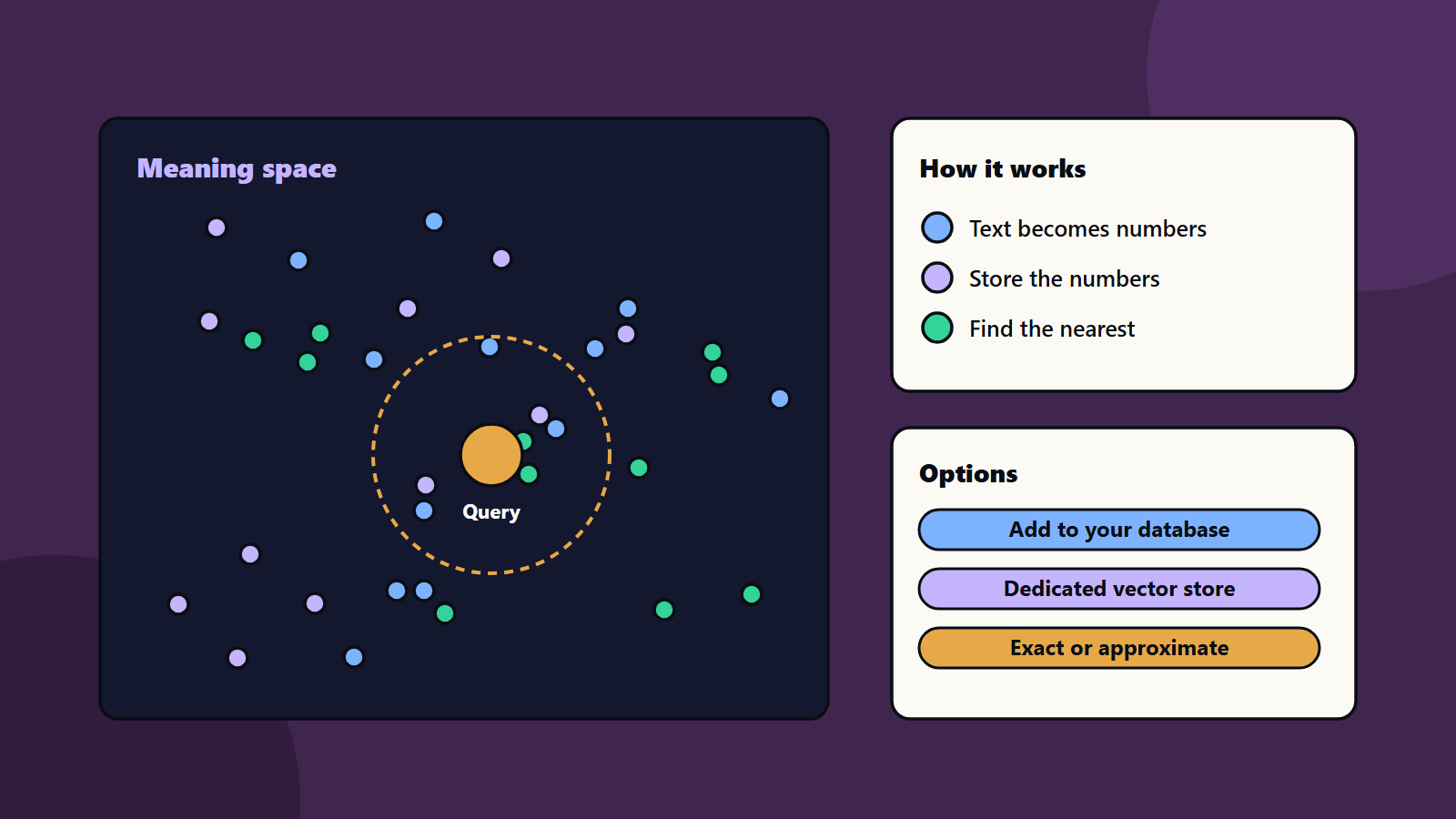
To do this, systems turn content into lists of numbers called embeddings, and store them for fast comparison. That storage is where vector databases come in. This article gives vector databases explained in plain terms, for a small team adding AI search and for an enterprise running many AI tools.
Key takeaways
- A vector database stores embeddings and finds the nearest ones to a query.
- It powers AI search, recommendations and retrieval for chat assistants.
- Small projects can often use a vector extension of an existing database.
- Exact search is simple and slow at scale. Approximate search is fast and may miss a few matches.
- Plan for access control, updates, filters, cost and testing of result quality.
What is an embedding
An embedding is a list of numbers that represents the meaning of an item. A model creates it. Items with similar meaning get numbers that sit close together. You can picture each item as a point in a very large space, and similar items as neighbours.
What a vector database does
- Stores embeddings along with the original text or a link to it, and extra details such as date, language or owner.
- Searches by turning a question into an embedding and finding the nearest points.
- Filters results, for example by department or by who may see them.
- Updates as content changes.
Our guide to retrieval-augmented generation shows how these results feed a chat assistant with real company facts.
Exact and approximate search
An exact search compares the query with every item. It is accurate and gets slow as data grows. Approximate search uses an index to check only likely candidates. It is much faster and may miss a few true matches.
The open source pgvector extension for PostgreSQL shows both ideas. By default it runs exact nearest-neighbour search, which gives perfect recall. Adding an index enables approximate search, which trades some recall for speed. Its documentation describes two index types: HNSW, which offers a better speed and recall balance but builds slower and uses more memory, and IVFFlat, which builds faster and uses less memory with lower query performance. Read the pgvector documentation for details.
Distance measures also matter. Common choices include cosine, Euclidean and inner product. Use the one that suits your embedding model.
Do you need a separate database
You have three main options:
- An extension to a database you already run. Vectors sit beside other data, so you keep your backups, transactions and joins. This is a good start for many teams.
- A dedicated vector database. It can offer more speed at large scale, richer filtering and managed operation.
- A search platform with vector features. Useful if you already run one for text search.
Ask these questions:
- How many items, and how fast will they grow?
- How fast must answers be?
- Do you need filters and per-user access rules?
- How often does the data change?
- What skills does your team have?
- What does it cost to run?
- Can you export your data if you move?
Our guide to data lakehouse architecture can help place this piece in your wider data platform.
Quality matters more than the database
Poor results usually come from the content and the embedding, so fix those first.
- Clean the content. Remove duplicates and old pages.
- Split text sensibly. Chunks that are too big or too small hurt results.
- Choose a good embedding model, and test it on your own language and topics.
- Combine methods. Many systems mix keyword search with vector search.
- Test with real questions. Use a fixed set and measure how often the right item appears. See evaluating model output with a test set.
Security and privacy
- Apply the same access rules to vectors as to the source data.
- Remember that embeddings can leak information about the original text, so protect them.
- Keep personal data under your privacy rules.
- Log queries, and watch for misuse. See AI agent governance.
- Check where the data is stored. See data residency and sovereignty.
Cost and operations
Costs come from storage, memory for indexes, compute for search and the embedding model. Large indexes can need a lot of memory. Plan updates, rebuilds and backups. Track cost per query. See measuring AI cost. <!– expanded –>
Vector databases explained: what the big platforms say
Three descriptions from major technology sources show how the idea is framed.
Microsoft’s documentation for vector search in Azure AI Search says vector search matches on numeric representations of content. It can match by meaning, so “dog” and “canine” are close. It can also match across languages and across content types, such as text and images. The same page describes hybrid search, which runs vector and keyword search in one request and merges the results, and filtered vector search, which adds rules such as department or date.
Google’s Vector Search overview describes an engine built on Google Research technology for search, recommendations and generative AI apps. It separates dense embeddings, which capture meaning, from sparse embeddings, which capture text syntax and suit keyword search, and it supports mixing the two. It also describes filtering a search to a subset of the index with Boolean rules.
The open source pgvector project shows the same ideas inside PostgreSQL, with several distance measures and two index types.
Take two lessons from these sources. Hybrid search is normal, since keywords still matter for names, codes and exact terms. Filters are normal, since real data has owners, dates and permissions.
A worked example: searching a support knowledge base
This example is illustrative, and it keeps vector databases explained in one concrete case.
A software company has 4,000 help articles, release notes and forum answers. Customers search with their own words, so keyword search misses many questions.
Step 1: prepare the content. Remove duplicates and old versions. Add details to each item: product, version, language and audience.
Step 2: split into chunks. Cut long pages into sections of a few hundred words, so each chunk covers one idea. Keep titles with the chunk.
Step 3: create embeddings. Use one embedding model for all chunks. Record the model name, since changing it later means re-creating every embedding.
Step 4: store and index. Put chunks, embeddings and details in a vector store. Add filters for product and language.
Step 5: search. Turn the customer question into an embedding. Return the closest chunks, filtered by the customer’s product. Combine with keyword results for exact terms such as error codes.
Step 6: test. Build fifty real questions with known best answers. Measure how often the right chunk appears in the top five. Change chunk size, filters or models, and measure again.
Step 7: connect to answers. If a chat assistant writes the reply, give it only the retrieved chunks and ask it to cite them.
Teams are often surprised that steps 1, 2 and 6 improve results more than the choice of database.
Sizing and cost thinking
Do the sums early.
- Number of vectors: chunks multiplied by languages and versions.
- Vector size: more dimensions cost more memory and time.
- Memory: approximate indexes often live in memory for speed.
- Query load: peak queries per second, since averages hide spikes.
- Update rate: how often content changes and needs re-indexing.
- Embedding cost: the model charges for every chunk and every query.
For a small collection of tens of thousands of chunks, a vector extension on a normal database server is often enough. For hundreds of millions, a dedicated, distributed system may be worth its cost. Between those, measure. Our guide to measuring AI cost offers a way to track the full bill.
Hybrid search and ranking
Pure vector search can miss exact matches, such as a product code, and pure keyword search misses meaning. Hybrid search runs both and merges the lists. Some systems then re-rank the top results with a more careful model. This adds delay and cost, and it often improves the top results.
Test whether re-ranking helps your content before you add it.
Governance and access
- Apply the document’s access rules to every chunk as well as to the source system.
- Filter by permission before results go to a user or to an AI assistant.
- Remove deleted or expired content from the index promptly.
- Log queries for quality review, with personal data under control.
- Document the embedding model, the chunking method and the test results, so another team can repeat them. See data governance basics.
Small business and enterprise views
- Sole trader or small shop: use the search feature of your website or help platform first. Consider a vector extension only when customers cannot find answers.
- Mid-size company: start with a single database extension, one use case and a weekly quality review.
- Enterprise: treat vector search as a shared service, with standards for embedding models, permissions, logging and cost, so teams do not build ten separate systems.
Regional and regulatory notes
Where the vectors are stored matters. Some data must stay in a country or region, and cloud services have region settings. Embeddings made from personal data may still count as personal data under some laws, so involve your privacy team. See data residency and sovereignty.
Vector databases explained: questions to ask a vendor
- Which distance measures and index types do you support?
- Can we filter by metadata, and does filtering slow queries?
- How do you handle updates and deletes?
- Can we run hybrid search?
- How do you enforce permissions?
- Where is our data stored, and how do we export it?
- What does it cost at ten times our current size?
Common mistakes
- Buying a dedicated system before proving the use case.
- Skipping content clean-up.
- No test set for result quality.
- Ignoring access control.
- Using one chunk size for every document.
- No plan for changing the embedding model, which needs re-embedding everything.
A starting plan
- Pick one use case and fifty real questions.
- Build a small prototype with a vector extension.
- Measure result quality, speed and cost.
- Add filters and access rules.
- Move to a dedicated system only if the numbers demand it.
How SoftSapien supports AI search
SoftSapien’s AI engineers help teams with vector databases explained in practice: choosing storage, building retrieval, testing quality and securing data. See our AI development and data science services.
To plan your AI search, use the contact page to chat with our team, send a message or schedule a free consultation call.
Frequently asked questions
What is a vector database?
It stores embeddings, lists of numbers that capture meaning, and finds the closest ones to a query fast, often with filters on details such as product or language.
Do I need a dedicated vector database?
Often not at first. A vector extension of a database you already run can serve small and mid-size collections. Move to a dedicated system when measured speed or scale demands it.
What is hybrid search?
It runs vector search and keyword search together and merges the results, which helps with exact terms such as product codes.
What matters more than the database?
Content clean-up, sensible chunking, a good embedding model and a test set of real questions usually matter more than the storage choice.
Can SoftSapien help build AI search?
Yes, from prototype to production. Contact SoftSapien through the contact page to chat with our team, send a message or schedule a free consultation call.