Short on time? Technology projects succeed when people adopt the change. Explain why it matters, involve the people affected early, name a sponsor, train for real tasks, use local champions, support users after launch and measure adoption as well as delivery. Plan change work from the first week and budget for it like any other workstream.
A new system can be delivered on time, on budget and to specification, and still fail. Employees keep their old spreadsheets, customers ignore the new portal and the promised savings never arrive. The technology worked, and the change did not.
Change management is the discipline of helping people move from the old way to the new one. This guide covers practical steps for technology programmes in a ten-person company and in a global enterprise.
Key takeaways
- Treat adoption as a deliverable with an owner, a budget and measures.
- Start early: explain the reason, involve affected people in design and name visible sponsors.
- Map who is affected, how much their work changes and what worries them.
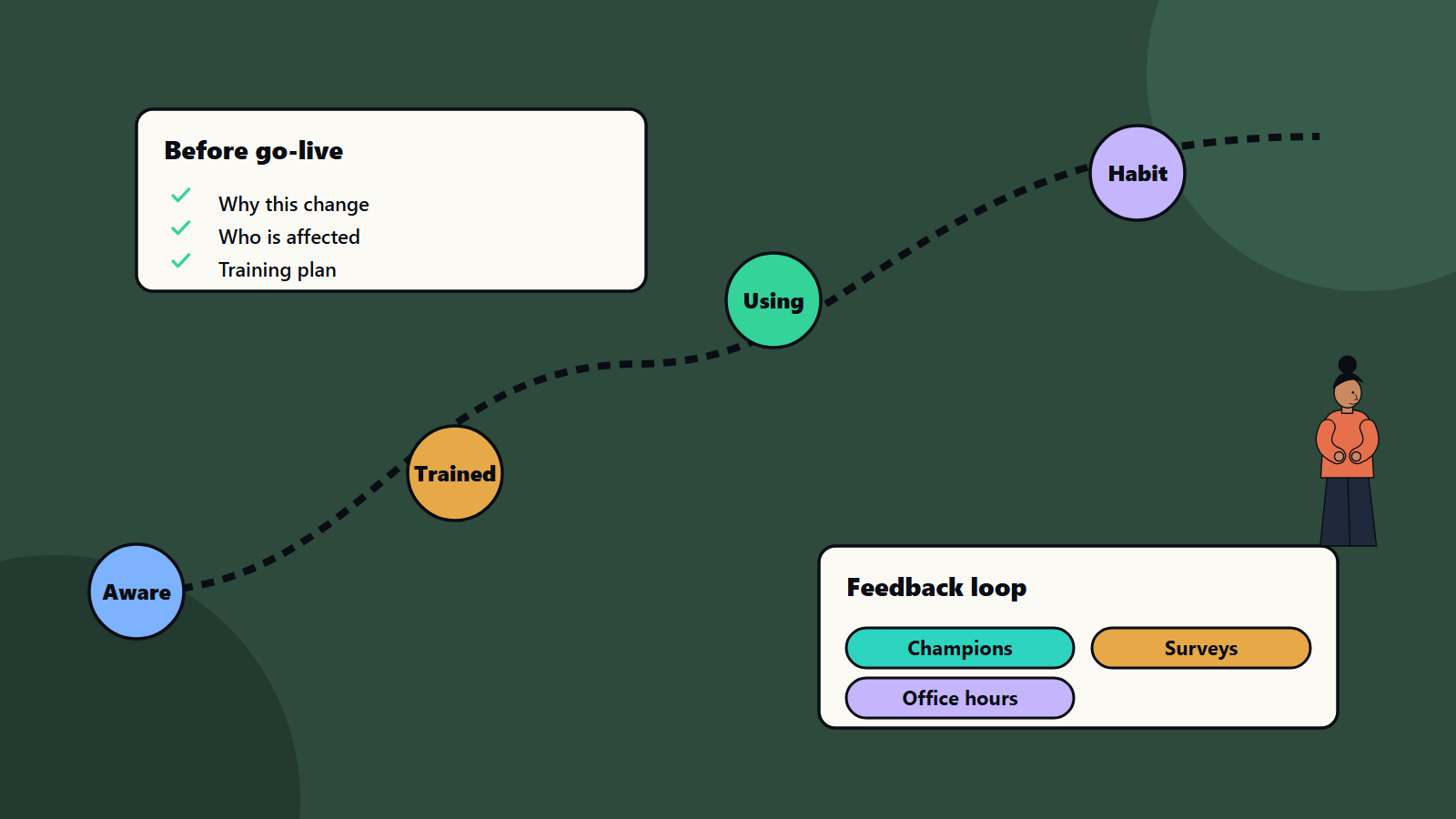
- Train around real tasks, and support people at go-live and for weeks afterwards.
- Measure use and outcomes, listen to feedback and adjust.
Why technology changes meet resistance
Resistance is usually reasonable. People worry about:
- Competence: will I look slow or foolish with the new tool?
- Workload: will I do two systems at once for months?
- Control and status: is my role shrinking?
- Trust: did anyone ask the people who do the work?
- Fatigue: this is the fourth change this year.
- Value: what is in it for me?
Treat these concerns as information. They often reveal real flaws in the design.
Build the foundation
A clear case for change
Explain in plain words why the change is needed, what will improve and for whom, what stays the same and what the timeline is. Link it to the organisation’s goals. Our guides to technology investment business cases and why digital transformation programmes stall show how vague goals undermine adoption.
Visible sponsorship
A senior sponsor should explain the reason, remove obstacles, take part in key events and use the new system themselves. People watch what leaders do. Middle managers matter as much, since employees take their cues from their own manager.
A change team
In a small organisation this is one person with time set aside. In a large one it is a network: a change lead, representatives from each area and local champions. Give them a clear role and protected time.
Understand the impact
Run an impact assessment for each group:
- Which tasks, tools, roles and decisions change?
- How large is the change: small adjustment, new process or new role?
- When does it happen, and what else is changing at the same time?
- What skills are needed?
- Who gains, and who loses something?
A simple grid of group against impact, with a plan for each, is enough. Include customers, partners and suppliers where they are affected.
Communicate
- Early and often, with honest updates, including setbacks.
- Two-way: hold sessions, surveys and open channels, and respond to what you hear.
- Tailored: a finance clerk, a branch manager and a director need different messages.
- Plain language that answers what changes for me, when and what support exists.
- Multiple channels: meetings, email, intranet, team huddles, short videos and demos.
- Consistent, with one source of truth for dates and decisions.
Involve people in design
People support what they help create. Invite users to workshops, prototype reviews and pilots. Their knowledge improves the design, and their involvement builds ownership. Our guide to UI and UX design process covers user testing methods. Pilots with a friendly group reveal problems before the wider rollout.
Train for real work
- Role-based training: teach each group the tasks they will do, using realistic examples.
- Hands-on practice in a safe environment beats slide decks.
- Several formats: live sessions, short videos, quick reference cards and in-tool guidance.
- Timing: close to go-live, with refreshers.
- Champions and super users who learn first and help colleagues.
- Accessibility: make materials usable by everyone. See WCAG accessibility.
- Assess readiness: can people complete key tasks before go-live?
Support the go-live
- Floor-walkers and a help desk with fast answers during the first weeks.
- A known-issues list, updated daily.
- Quick fixes for pain points, with visible progress.
- Parallel running only where needed, with an end date.
- Clear switch-off of the old system, since people cling to it if it stays available.
- Celebrate early wins, and share stories of real benefits.
Sustain the change
- Keep champions and office hours for several months.
- Update procedures, job descriptions and performance goals so that the new way is the normal way.
- Remove old reports and workarounds.
- Collect feedback, and schedule improvement releases.
- Hand over ownership to the business, with a product owner.
For programmes with many systems, align delivery and change plans. See enterprise software integration patterns, ERP implementation timelines and CRM implementation mistakes, where adoption problems recur.
Measure adoption and outcomes
- Awareness and readiness: survey results and training completion.
- Usage: active users, frequency, feature use and tasks done in the new system.
- Proficiency: error rates, time to complete tasks and support tickets.
- Sentiment: pulse surveys and comments.
- Business results: the benefits in the business case, such as time saved, faster cycle times and fewer errors.
- Workarounds: spreadsheets and shadow processes that persist.
Review weekly during launch and monthly afterwards. Our guide to OKRs for technology teams offers a way to tie goals and measures together.
Special situations
- AI and automation: people worry about jobs and trust. Explain how roles change, involve users in testing and set rules for human oversight. See AI agent governance and AI for small businesses.
- Mergers and migrations: combine technology change with culture and process change.
- Remote and global teams: adapt timing, language and format, and respect local practices.
- Customer-facing changes: use help content, notices and support channels that fit customers.
Common mistakes
- Treating change work as a communication email at the end.
- No sponsor, or an absent one.
- Training too early, too generic or too late.
- Ignoring middle managers.
- Turning off support right after go-live.
- Leaving the old system running.
- Measuring delivery and ignoring adoption.
- Changing too much at once.
A starting plan
- Name a sponsor and a change lead, and set an adoption goal.
- Run an impact assessment by group.
- Plan communication, training and support with dates.
- Pilot with a friendly group, and adjust.
- Go live with strong support, and switch off the old system on schedule.
- Review adoption weekly, then monthly.
How SoftSapien supports change management
SoftSapien’s consultants plan adoption alongside delivery, run impact assessments, build training and communication and measure use and benefits for technology programmes of every size. See our business transformation and business advisory consulting services.
To plan the people side of your programme, use the contact page to chat with our team, send a message or schedule a free consultation call.
Frequently asked questions
Why do technology projects fail to deliver benefits?
Often because people do not adopt the change. Weak sponsorship, late communication, generic training and no support after go-live are common causes.
When should change management start?
In the first weeks of the programme, with a sponsor, an impact assessment and a plan, well ahead of any launch email.
How do we measure adoption?
Track usage, task completion in the new system, proficiency, sentiment, persistent workarounds and the business benefits in the case.
Who should lead change?
A visible senior sponsor, a change lead with protected time and local champions in each affected team.
Can SoftSapien help with adoption?
Yes, alongside delivery. Contact SoftSapien through the contact page to chat with our team, send a message or schedule a free consultation call.