Short on time? Good level design guides players without telling them what to do. Teach one idea at a time in a safe place, test it, then combine it with others. Use layout, light, colour and landmarks to lead, vary intensity so peaks have rest around them, give players meaningful choices and playtest early with people who have not seen the level.
A player drops into a new level and knows within seconds where to go and what is dangerous, and nobody has said a word. That feeling is not luck. It comes from level design, the craft of shaping spaces so that play feels clear, fair and exciting.
This guide covers the main principles for designers, producers and founders, across mobile, PC and console games. It suits a solo developer building a puzzle game and a studio planning a large campaign.
Key takeaways
- Teach each new idea in a safe setting, let players practise, then test them, then combine it with earlier ideas.
- Guide with the environment: lines, light, colour, movement and landmarks.
- Control pacing by alternating tension and rest, and vary the type of challenge.
- Offer choices and visible goals, and keep fairness through clear rules and feedback.
- Prototype with simple shapes, then playtest with fresh players and watch and hold back from explaining.
Start with the player’s goal
Before drawing a map, write down what the level is for:
- The skill or mechanic it introduces or tests.
- The emotion you want: curiosity, tension, triumph, calm.
- How long it should take.
- What the player carries in from the last level, and what they take out.
A level that cannot be described in two sentences usually lacks focus.
Teach without words
Players dislike long tutorials. Strong levels teach through situations:
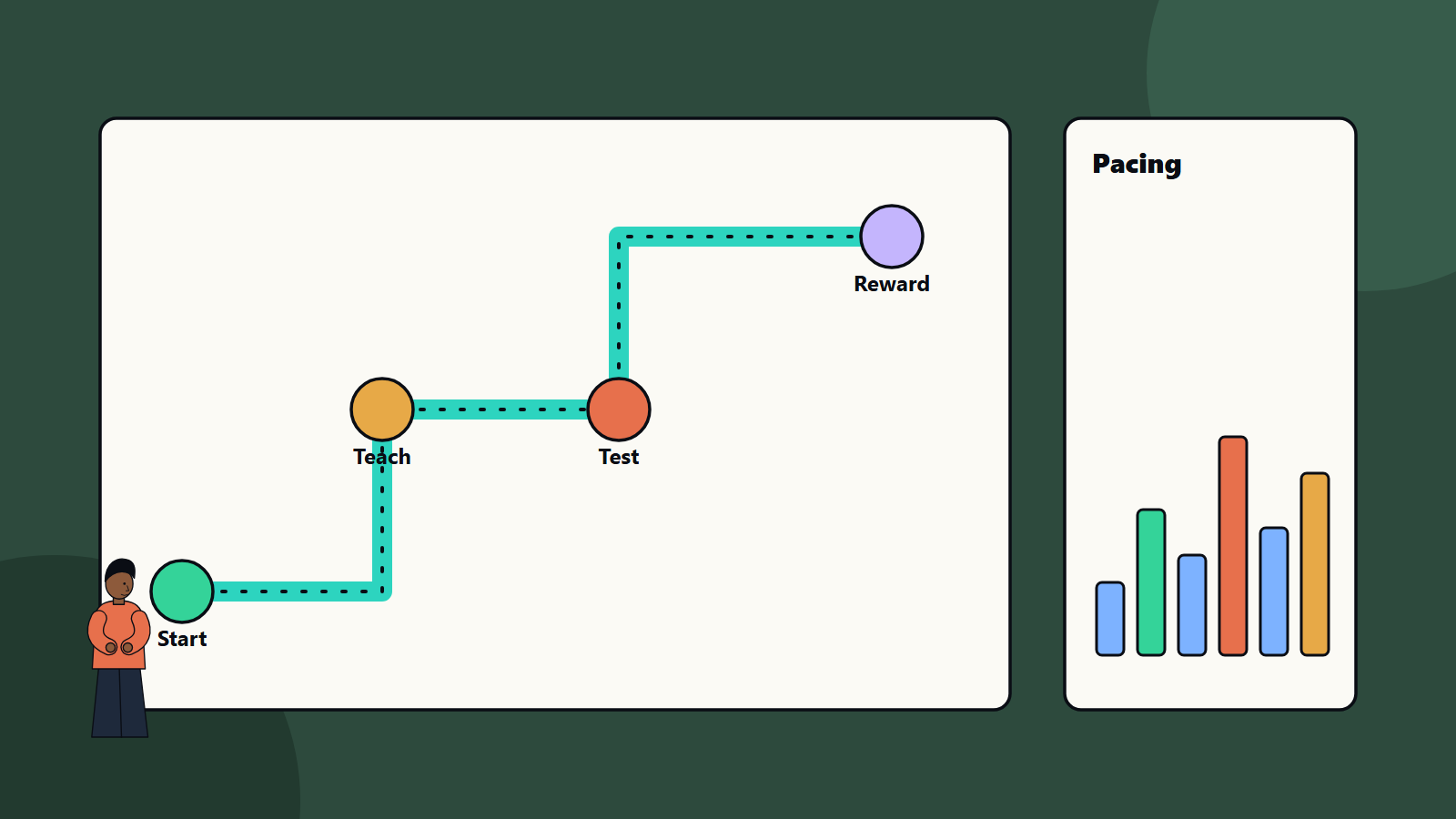
- Introduce a mechanic in a safe place, where failure costs little. A gap that is too small to be dangerous teaches jumping.
- Practise it with small variations.
- Test it with mild pressure.
- Combine it with a mechanic the player already knows.
- Twist it with a surprise late in the game.
Show before telling: let players see an enemy using a mechanic before they have to use it. Repeat the pattern consistently, so that the rules feel reliable. When text is needed, keep it short and put it where the player needs it.
Guide with the environment
Players follow cues that they barely notice:
- Lines and shapes: paths, rails, roads and rivers draw the eye.
- Light and contrast: a bright doorway in a dark room invites movement.
- Colour: use consistent colours for meaning, such as one colour for climbable surfaces or hazards.
- Landmarks: a tall tower or unusual shape helps orientation from far away.
- Movement and sound: flags, lights and audio cues attract attention. See our guide to game audio.
- Doorways and chokepoints: control where players look next.
- Camera framing: reveal the goal at the right moment.
Do not rely on colour alone, so that players with colour vision differences are not lost. See our guide to game accessibility.
Flow and pacing
Flow describes a smooth, engaging rhythm of challenge. Pacing is how you shape it over time.
- Alternate intensity: follow a tough fight with a quiet exploration space, then build again.
- Vary the challenge type: combat, puzzles, platforming, stealth and story moments.
- Build in rises: each peak should feel bigger than the last, with a climax near the end.
- Use pauses: rest areas let players absorb what happened, manage resources and feel the world.
- Control length: repeated, similar rooms tire players. Cut anything that does not serve the level’s purpose.
- Respect restarts: short, quick retries reduce frustration. Place checkpoints before hard sections and not after.
A pacing chart, with intensity plotted over the level, is a simple tool to spot flat or overloaded sections.
Layout and structure
- Linear levels: a clear path with controlled story and pace.
- Hub and spoke: a central area connecting several branches.
- Open spaces: freedom, with goals and cues that prevent aimlessness.
- Loops and shortcuts: returning to a known place by a new route rewards exploration.
- Verticality: height adds variety and creates sightlines.
- Scale: sizes should suit the character’s speed and the camera. A space that feels huge at walking speed may feel small when sprinting.
Challenge and fairness
- Give players the information needed to succeed before testing them.
- Telegraph dangers: a warning sound or animation before a trap fires.
- Keep difficulty readable, so that a failure teaches something.
- Offer options: more than one way through a challenge, for different styles.
- Reward risk with something that matters, and keep rewards visible.
- Avoid unseen deaths and unclear rules.
- Balance with your difficulty model. Our guide to game analytics shows how data reveals where players struggle.
Prototype and iterate
- Paper or whiteboard sketch of the flow.
- Greybox: build with plain shapes in the engine, with no art. If it is not fun in grey, art will not fix it. See our comparison of game engines.
- Playtest early with people who have not seen the level. Watch where they hesitate, get lost or ignore things. Resist the urge to explain.
- Fix and repeat.
- Art pass and lighting that support the design.
- Polish: performance, audio, collision and edge cases. See game physics and game testing and QA.
Fit this into the wider game development pipeline.
Interface and onboarding
Level design and interface work together. Prompts, maps and markers should help without hiding the world. Our guide to the UI and UX design process offers methods for testing clarity.
Common mistakes
- Explaining with text what the space could teach.
- Introducing several new ideas at once.
- Constant intensity with no rest.
- Hidden or unclear paths, so players feel lost.
- Unfair, unseen hazards.
- Placing checkpoints too far from hard sections.
- Polishing art before the layout is fun.
- Testing only with the team.
A starting plan
- Write the level’s purpose and one new idea.
- Sketch the flow and a pacing chart.
- Greybox it and playtest with three fresh players.
- Fix confusion first, then difficulty.
- Add art, audio and polish, and test again.
How SoftSapien supports game design and production
SoftSapien’s designers and developers prototype levels, run playtests, tune difficulty with data and deliver builds for mobile, PC and console. See our game development and UI and UX design services.
To shape your next level, use the contact page to chat with our team, send a message or schedule a free consultation call.
Frequently asked questions
How do levels teach without tutorials?
Introduce a mechanic in a safe place, let players practise, test it with mild pressure, combine it with known ideas and finish with a twist.
How do I guide players through a level?
Use lines, light, colour, landmarks, sound and camera framing, and do not rely on colour alone.
What is pacing in level design?
It is the rhythm of challenge over time: alternating tension and rest, varying challenge types and building towards a climax.
What is greyboxing?
Building a level with plain shapes and no art to test layout and flow. If it is not fun in grey, art will not fix it.
Can SoftSapien help with game design?
Yes, with prototypes and playtests. Contact SoftSapien through the contact page to chat with our team, send a message or schedule a free consultation call.