Short on time? Passwordless authentication replaces passwords with passkeys, device sign-in and hardware keys. It resists phishing, cuts password resets and speeds up sign-in. Move step by step: offer passkeys beside passwords, plan account recovery, update help desk steps, support old devices and measure sign-in success. Keep strong checks for high-risk actions.
Passwords cause many of the problems in security. People reuse them, forget them and give them to fake websites. Teams spend time on resets, and attackers spend time on stolen lists.
Passwordless authentication removes the shared secret. This article explains how it works and what to change, in plain words. It suits a small shop with a customer login and a large company with thousands of employees.
Key takeaways
- Passwordless authentication uses passkeys or hardware keys that never send a secret to the website.
- Passkeys resist phishing, since a fake site cannot use them.
- Plan recovery, shared devices and older systems before you switch off passwords.
- Roll out in stages, with passkeys offered beside passwords at first.
- Measure sign-in success, help desk tickets and account takeovers.
How passkeys work
The FIDO Alliance describes passkeys as a password replacement built on the FIDO2 standards, WebAuthn and CTAP. A passkey is a sign-in credential stored on a phone, computer or hardware security key.
In plain terms:
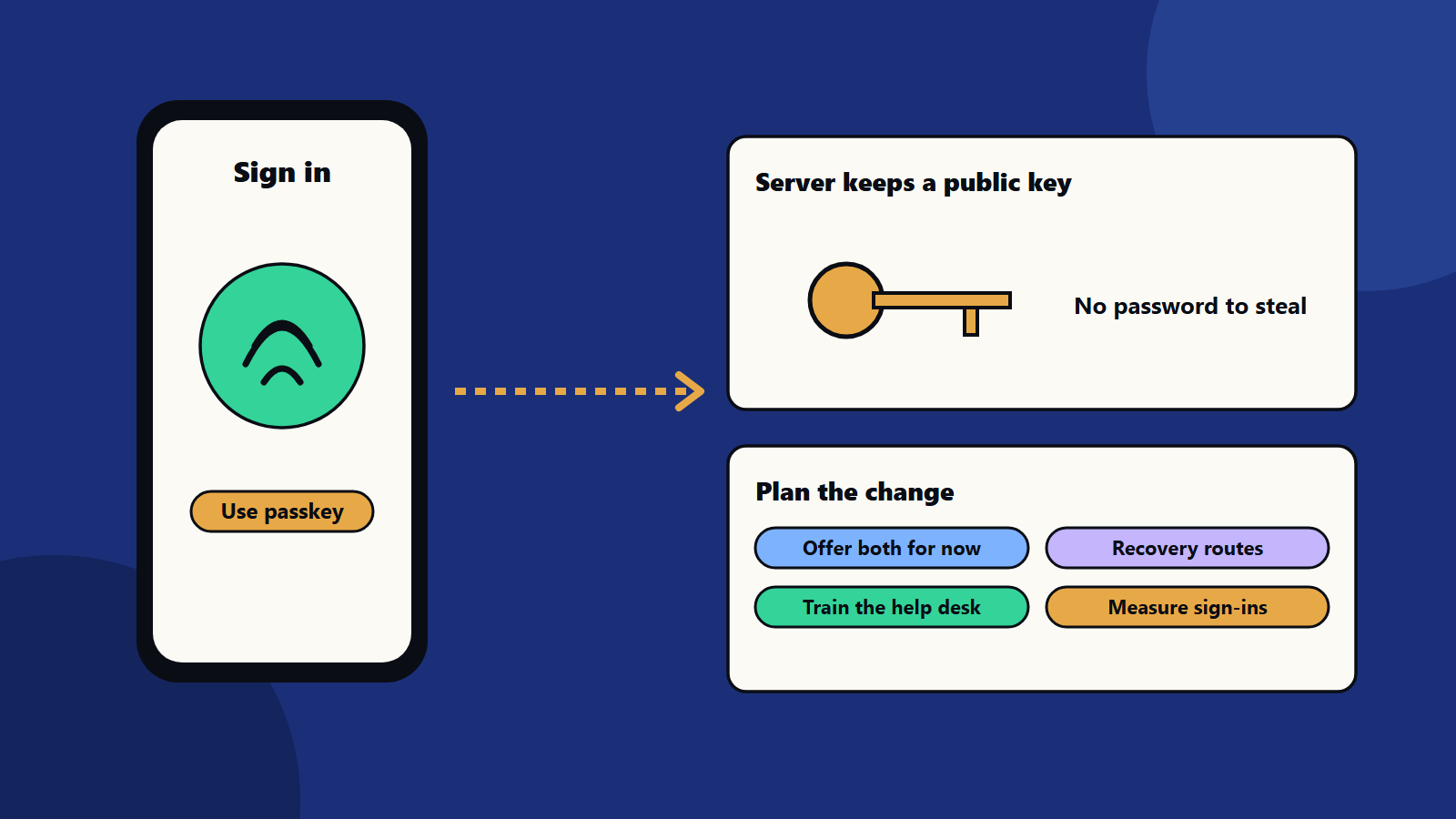
- When you create a passkey, your device makes a pair of keys. The website keeps the public key. The private key stays on your device.
- When you sign in, the website sends a challenge. Your device signs it after you unlock the device with a fingerprint, face scan or PIN.
- The website checks the signature with the public key.
There is no password to type, reuse or steal, and the website holds no secret that a breach could expose. If a phone has no passkey, a nearby phone can sign in a laptop by scanning a QR code, with Bluetooth confirming that the two are close.
Synced and device-bound passkeys
- Synced passkeys are stored by a passkey provider and copied, with end-to-end encryption, across the devices on the same account. They are convenient for consumers.
- Device-bound passkeys, such as those on hardware security keys, stay on one device. They give the highest assurance and suit administrators and sensitive roles.
Many organisations allow both, and choose by risk.
Why change
- Less phishing: a passkey only works on the real website.
- Fewer takeovers: no passwords to guess or stuff from old breaches.
- Faster sign-in: one touch.
- Less support work: fewer password resets.
- Lower cost: less reliance on text message codes.
Passwordless authentication also supports a zero trust approach. See our zero trust security guide and small business cybersecurity.
What you need to change
Sign-in flows
Add passkey sign-in and sign-up to your website and apps. Keep passwords as a fallback during the move. Use clear words, such as “Sign in with a passkey”. Offer to create a passkey right after a successful password sign-in.
Account recovery
Recovery is the weak point. If it falls back to email links or text messages, attackers will use it. Plan several recovery routes: another passkey, a hardware key, a trusted contact or an identity check by trained support teams. Keep recovery as strong as sign-in.
Help desk
Train support teams for new questions: lost phones, new devices and shared computers. Give them a clear process for identity checks.
Shared and older devices
Shared kiosks, older systems and some regions may not support passkeys. Offer a hardware key, a code from an app or another strong option for them.
Back-end systems
Update your identity provider and applications. Many identity platforms support passkeys already. For custom apps, use standard libraries. Check single sign-on, APIs and mobile apps. See our API security checklist and mobile app security checklist.
Privacy and rules
Biometric data stays on the device in most designs, which helps privacy. Check laws and policies for each country where you operate, and explain the process in plain language.
Roll out in stages
- Pick a pilot group, such as your IT team or a small share of customers.
- Turn on passkeys beside passwords.
- Measure success rates, time to sign in and support tickets.
- Nudge users with prompts and short guides.
- Remove weak options for high-risk accounts first: passwords, then text message codes.
- Review every quarter.
Treat it as a change programme with communication and training. See change management in technology programmes.
Measure
- Share of sign-ins using passkeys.
- Sign-in success rate and time.
- Password reset tickets.
- Account takeover and phishing incidents.
- Recovery requests and how many are fraudulent.
- User satisfaction.
<!– expanded –>
What the platform makers say
Three large platform sources describe passkeys the same way, with small differences that matter for planning.
Google’s passkey documentation describes a passkey as a digital credential tied to a user account and a website or app. People sign in with their device screen lock, such as a fingerprint, face, PIN or pattern. Google notes that biometric data stays on the device, that servers store only a public key and that passkeys are not reused across sites. It also advises developers to add reassuring messages about biometric privacy and to publish a support article that explains the change.
Apple’s passkey guidance says each account gets a unique key pair, with the private key on the device. Face ID or Touch ID authorise use. Passkeys sync across Apple devices through iCloud Keychain with end-to-end encryption, and they can be recovered if every device is lost, using account credentials, an SMS code and the device passcode.
The FIDO Alliance, which sets the standards behind passkeys, describes both synced and device-bound passkeys and notes that a nearby phone can approve sign-in on a laptop.
Plan for all three: synced passkeys for convenience, device-bound keys for high assurance and a clear recovery story.
Scenarios by organisation size
A one-person online shop
You may rely on a platform that already offers passkeys. Turn them on, add a short explanation on the sign-in page and keep email sign-in as a fallback. Do not build your own system.
A growing company with 200 employees
Use your identity provider for employee sign-in. Start with IT and finance, which handle the most sensitive systems. Issue hardware keys to administrators. Update the joiner and leaver process so that passkeys are created and removed with the account.
A bank or large regulated firm
Combine passkeys with transaction signing and risk checks. Keep detailed logs. Involve compliance early, since rules may specify how strong authentication must work for payments and for employees. Plan for staged migration across millions of customers and several channels.
A consumer app with global users
Support passkeys on web, iOS and Android. Test on older devices and in regions with different phone mixes. Offer clear language options for the prompts. Check privacy notices for each market.
Edge cases to plan
- Shared accounts: many teams share a login. Move to named accounts, or use a team vault with its own strong controls.
- Contractors and partners: give them accounts in your identity system, with limited access and an end date.
- Kiosks and shared computers: use hardware keys or a phone-based approval.
- Lost phone: the recovery route must not reintroduce weak passwords.
- Account sharing in families: decide how you handle accounts used by several people.
- Legacy systems: some older applications cannot use passkeys. Put them behind a modern single sign-on gateway where possible.
- Offline and low connectivity: test how sign-in works with poor networks.
Communicate the change
People accept new sign-in methods when they understand the benefit.
- Explain in one sentence: “Sign in with your fingerprint or face, with no password to remember.”
- Show a short animation or three screenshots.
- Answer privacy questions: biometric data stays on the device.
- Give a phone number or chat for help.
- Tell employees the date when passwords will end for their system.
Our guide to change management in technology programmes offers a plan for training and support.
Metrics for leaders
- Share of active users with a passkey.
- Share of sign-ins by method.
- Sign-in success rate and time to sign in.
- Password resets per month.
- Phishing reports and confirmed account takeovers.
- Cost of text message codes.
- Recovery requests and fraud rate in recovery.
Report monthly during the rollout, then quarterly.
Security checks before you switch off passwords
- Test recovery with a red team or a penetration test. See penetration testing explained.
- Check the session handling after sign-in, since stolen sessions bypass strong login.
- Review administrator and service accounts.
- Confirm logging and alerts for new passkey creation and recovery.
- Update your incident plan for lost devices. See incident response planning.
Regional and regulatory notes
Rules for strong customer authentication, identity checks and biometric data differ by country. Check requirements for payments, health and public sector services where you operate. Keep records that show how you meet them.
Common mistakes
- Strong sign-in with weak recovery.
- Removing passwords before every user group is ready.
- No plan for lost or shared devices.
- Unclear wording that confuses users.
- Forgetting administrators and service accounts.
- No help desk training.
A starting plan
- List your sign-in points and the systems behind them.
- Pick an identity provider with passkey support.
- Pilot with a small group, and design recovery routes.
- Train the help desk.
- Expand, and retire passwords step by step.
How SoftSapien supports passwordless authentication
SoftSapien’s security consultants and engineers plan and build passwordless authentication, recovery flows and rollout for apps, websites and workforce systems. See our cybersecurity consulting and web application development services.
To move beyond passwords, use the contact page to chat with our team, send a message or schedule a free consultation call.
Frequently asked questions
What is a passkey?
A sign-in credential tied to an account and a website or app. The device keeps a private key and the server keeps a public key, and you approve sign-in with your device unlock.
Are passkeys safer than passwords?
They resist phishing and credential theft, since there is no shared secret to type or reuse. Recovery and session security still need strong design.
What about lost devices?
Synced passkeys can be recovered through the account provider, and organisations should offer more than one recovery route that is as strong as sign-in.
How should we roll out?
Offer passkeys beside passwords, pilot with a small group, train the help desk, then retire weak options for high-risk accounts first.
Can SoftSapien help with passwordless sign-in?
Yes, from design to rollout. Contact SoftSapien through the contact page to chat with our team, send a message or schedule a free consultation call.