Short on time? Game AI basics cover how characters move, decide and react. Pathfinding such as A-star finds routes across a map. Behaviour trees and state machines choose what to do next. Keep rules simple and readable, test with many cases, tune for fun before smart, and budget processor time. Players enjoy believable, fair characters more than clever ones.
Enemies that find you, allies that follow and shopkeepers who go home at night all rely on game AI. It is not the same as the AI in chatbots. Game AI is a set of simple techniques that make characters seem alive.
This article explains game AI basics for designers, producers and new developers. It suits a solo developer building a small game and a studio planning a large world on mobile, PC or console.
Key takeaways
- Game AI basics have three parts: moving (pathfinding), deciding (state machines and behaviour trees) and sensing (what a character knows).
- Simple, readable rules beat complex ones, because designers can tune and test them.
- The goal is fun and fairness, so characters should be believable and beatable.
- AI uses processor time, so plan a budget and spread heavy work over several frames.
- Test with many seeds and edge cases, and log what characters decide.
Moving: pathfinding
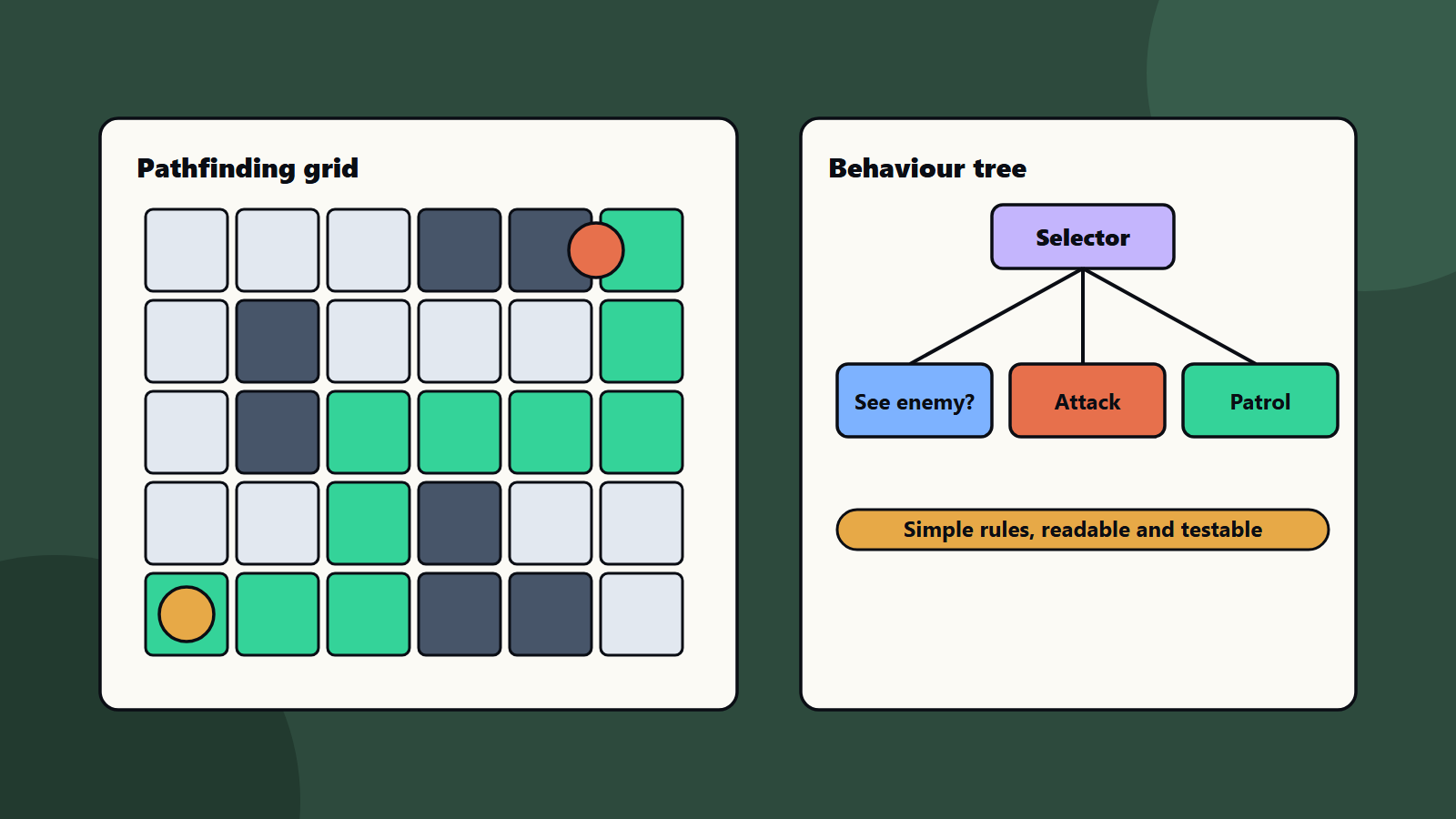
A character needs a route from here to there. The map is turned into a graph: points joined by links, such as tiles in a grid or areas on a navigation mesh.
Red Blob Games explains the main methods well in its introduction to A-star:
- Breadth first search spreads out evenly and finds shortest routes when every step costs the same.
- Dijkstra’s algorithm handles different costs, such as mud that is slower than road.
- A-star adds a guess of the distance to the goal, so it searches in the right direction and finishes faster.
The guess, called a heuristic, must not overestimate the distance, or A-star may miss the shortest route. The same page notes that A-star alone does not handle moving obstacles, group movement or path smoothing, so games add extra steps.
Tips for pathfinding:
- Use fewer nodes where you can, since fewer nodes mean faster searches.
- Share one search between many characters when they head to the same place.
- Spread long searches over several frames.
- Add steering rules so characters avoid each other and take corners smoothly.
Deciding: state machines and behaviour trees
State machines
A state machine has a few states, such as patrol, chase and attack, and rules for moving between them. It is easy to build and easy to read. It can grow messy when there are many states.
Behaviour trees
A behaviour tree is a branching list of checks and actions. A selector tries its children in order until one works. For example: if I see an enemy, attack. Otherwise, patrol. Trees are modular, so designers can reuse parts and read the logic at a glance.
Other methods
- Utility systems score each option and pick the best, which makes behaviour feel flexible.
- Goal planning lets characters work out steps to reach a goal.
- Learned models can drive some behaviour, but they are harder to control and test.
Pick the simplest method that gives the feel you want. Many successful games use state machines and behaviour trees only.
Sensing: what characters know
Characters should not know everything. Give them senses:
- Sight: a cone and a distance, with checks for walls.
- Hearing: noise events that reach nearby characters.
- Memory: where they last saw the player.
Fair senses make stealth and combat feel honest. Players accept defeat when they can see why it happened.
Game AI basics: making it fun and fair
- Telegraph attacks so players can react.
- Limit accuracy and reaction time so enemies can be beaten.
- Vary behaviour a little so fights do not repeat exactly.
- Use groups wisely: let only a few enemies attack at once.
- Adapt difficulty gently, if at all. See level design principles.
- Allow cheating carefully: many games give AI hidden help. If you do, keep it invisible and fair.
Performance
AI shares the frame with physics and rendering. See game rendering basics and PC game optimisation.
- Update far-away characters less often.
- Use simple behaviour for background characters.
- Cache results where they do not change.
- Profile on the weakest target device.
Test and tune
- Build a debug view that shows paths, senses and chosen actions.
- Log decisions, so you can see why a character acted.
- Test in odd spots: tight corners, moving platforms and crowded rooms.
- Replay with saved seeds. See procedural generation in games.
- Run automated bots and playtests. See game testing and QA.
- Watch real players, and fix what confuses them.
<!– expanded –>
How the big engines frame it
Two engine manuals show how professional tools shape these ideas, so it helps to know the vocabulary.
Unreal Engine describes behavior trees as a visual decision system. Its main parts are:
- Blackboard: a separate set of named facts, such as “target enemy” or “health low”, that the tree reads.
- Composites: nodes such as Selector and Sequence that decide how their children run.
- Decorators: conditions attached to a branch, which can stop the branch when a fact changes.
- Tasks: the leaf actions, such as moving or playing an animation.
- Services: small updates that run at set intervals while a branch is active.
Unreal also notes that its trees are event driven, so they react to changes without re-checking every rule on every frame. That is a useful habit in any engine: wake the AI when something changes.
Godot’s navigation documentation lists the building blocks of movement: navigation meshes, regions, maps, paths, agents, obstacles, links and layers, with separate overviews for 2D and 3D. The names differ between engines. The pattern is the same. You describe where characters may walk, ask for a path and let an agent follow it.
A worked example: a guard in a stealth game
This example is illustrative. Numbers are starting points for tuning, and every game needs its own values.
Goal: a guard who feels alert, fair and beatable.
States: patrol, investigate, chase, search and return.
Senses:
- Sight: a view cone of about 70 degrees and a range of 12 metres, blocked by walls.
- Hearing: noise events from running or breaking glass, with a radius.
- Memory: the last place the guard saw the player, kept for 15 seconds.
Rules:
- Patrol along a route with short pauses.
- If a noise is heard, walk to the noise and look around for a few seconds.
- If the player is seen, shout, then chase. Alert two nearby guards at most.
- If the player is lost, go to the last known place and search in a small circle.
- After the search time ends, return to the route.
Fairness choices:
- A short delay between first sight and full alert, so players can duck out of view.
- A visible and audible warning before the guard attacks.
- A cap on how many guards can attack at once.
Debug view: draw the cone, the path, the current state and the reason for the last change. Designers can then tune without reading code.
Run this guard in ten different rooms. Watch where it gets stuck, stares at walls or spots the player through corners. Each fix improves every other room too.
Choose a method by game type
- Puzzle and casual games: simple state machines, or fixed scripts. Players want clarity.
- Platformers: patrol and chase patterns with clear tells.
- Stealth and action: state machines or behaviour trees with strong senses and good feedback.
- Strategy games: pathfinding for many units, influence maps and planning for goals.
- Open worlds: crowds, schedules and layered behaviour, with level of detail to save time.
- Racing and sports: steering rules and rubber-band tuning, so races stay close.
- Multiplayer: server-side AI that all players see the same. See multiplayer netcode.
Team, tools and process
Good AI is a team effort.
- Designers describe behaviour in plain language and tune values.
- AI programmers build the systems and debug tools.
- Animators make actions readable, because players judge AI by what they see.
- Audio adds warnings and callouts. See game audio.
- QA tests odd cases and long sessions.
Set up three habits early:
- A shared document that lists each character type, its goal and its feel.
- A weekly session where the team watches AI in action and notes problems.
- Automated tests that run characters through test maps and check for stuck states.
Platform notes
- Mobile: budget processor time and battery. Use fewer active characters and simpler senses.
- PC: hardware varies, so scale the number of active agents with a setting.
- Console: fixed hardware lets you tune precisely, and certification checks stability over long sessions. See console game development.
- Accessibility: let players adjust enemy speed or reaction time, and give clear warnings. See game accessibility.
Measure whether the AI works
- Playtest observations: where players laugh, swear or quit.
- Telemetry: deaths per area, time to defeat each enemy type and how often enemies lose the player. See game analytics.
- Performance: milliseconds of AI per frame on the weakest device.
- Bugs: stuck states, falls through the map and repeated loops.
Questions to ask in a design review
- Can a player explain why the enemy did that?
- Can a designer change this behaviour without a programmer?
- What happens in a tight corridor, on stairs or on a moving platform?
- What is the worst case for processor time?
- How do we test it automatically?
Common mistakes
- Making AI smart before making it fun.
- Characters that know everything.
- No debug tools.
- Pathfinding every frame for every character.
- Complex rules nobody can read.
- Testing only in clean rooms.
A starting plan
- Write one sentence for how each character type should feel.
- Build pathfinding and one simple state machine.
- Add senses and a debug view.
- Playtest, then tune accuracy, reaction and group rules.
- Move to behaviour trees when the rules grow.
How SoftSapien supports game AI
SoftSapien’s game engineers build game AI basics into your project: pathfinding, behaviour trees, senses, debug tools and tuning for mobile, PC and console. See our game development and QA and testing services.
To make your characters feel alive, use the contact page to chat with our team, send a message or schedule a free consultation call.
Frequently asked questions
What is pathfinding in games?
It is finding a route across a map. The map becomes a graph, and algorithms such as breadth first search, Dijkstra and A-star search it, with A-star using a distance guess to finish faster.
When should I use a behaviour tree?
Use one when a state machine grows messy. Trees are modular and readable, with selectors, sequences, conditions and tasks, and designers can reuse parts.
How do I make enemies feel fair?
Telegraph attacks, limit reaction time and accuracy, give characters limited senses and cap how many attack at once.
How do I test game AI?
Build a debug view, log decisions, test odd spots such as corners and moving platforms, replay seeds and run automated bots plus playtests.
Can SoftSapien help with game AI?
Yes, from design to tuning. Contact SoftSapien through the contact page to chat with our team, send a message or schedule a free consultation call.