Short on time? Cross-platform game development means building for mobile, PC and console from one shared codebase. Pick an engine with the platforms you need, separate game logic from platform code, design controls and interfaces for each device, set per-platform performance budgets, test on real hardware and plan each platform’s store and certification rules from the start.
Reaching players on phones, computers and consoles from one project is tempting. A shared codebase can lower cost and keep versions in step. It can also hide differences that matter: a phone has a touch screen and a battery, a PC has endless hardware variety and a console has strict rules.
This guide explains how to plan a game that ships on several platforms without losing quality on any of them. It suits a small studio with an ambitious plan and a larger team supporting a live game on every device.
Key takeaways
- One codebase does not mean one experience. Design inputs, interfaces, performance and monetisation per platform.
- Choose an engine and middleware that support every platform you plan, including console programme access.
- Keep game logic separate from platform services such as saves, achievements, input and store features.
- Set separate performance and memory budgets for each target, and test on real devices.
- Plan certification, store rules and release schedules per platform, and keep a requirements matrix.
Decide which platforms and in what order
Not every game belongs everywhere. Consider:
- Audience: where do your players play, and what do they expect from this genre?
- Fit: a precise shooter needs a controller or mouse, and a puzzle game suits touch.
- Revenue model: premium, free with ads or in-app purchases, each fit platforms differently. See mobile game monetisation.
- Cost: each additional platform adds testing, submission and support work.
- Order: many teams launch on one lead platform, then follow with others once the game is stable. Others release together for marketing impact.
Choose the engine and tools
The engine sets the foundation. Check that it supports every target platform, and note any licensing, extension or programme requirements for consoles. Compare rendering, tools, scripting languages, third-party libraries, performance and team skills. Our guide to game engines compared explains the criteria. Build the same prototype slice on the weakest platform early, to confirm the plan is realistic.
Architecture for portability
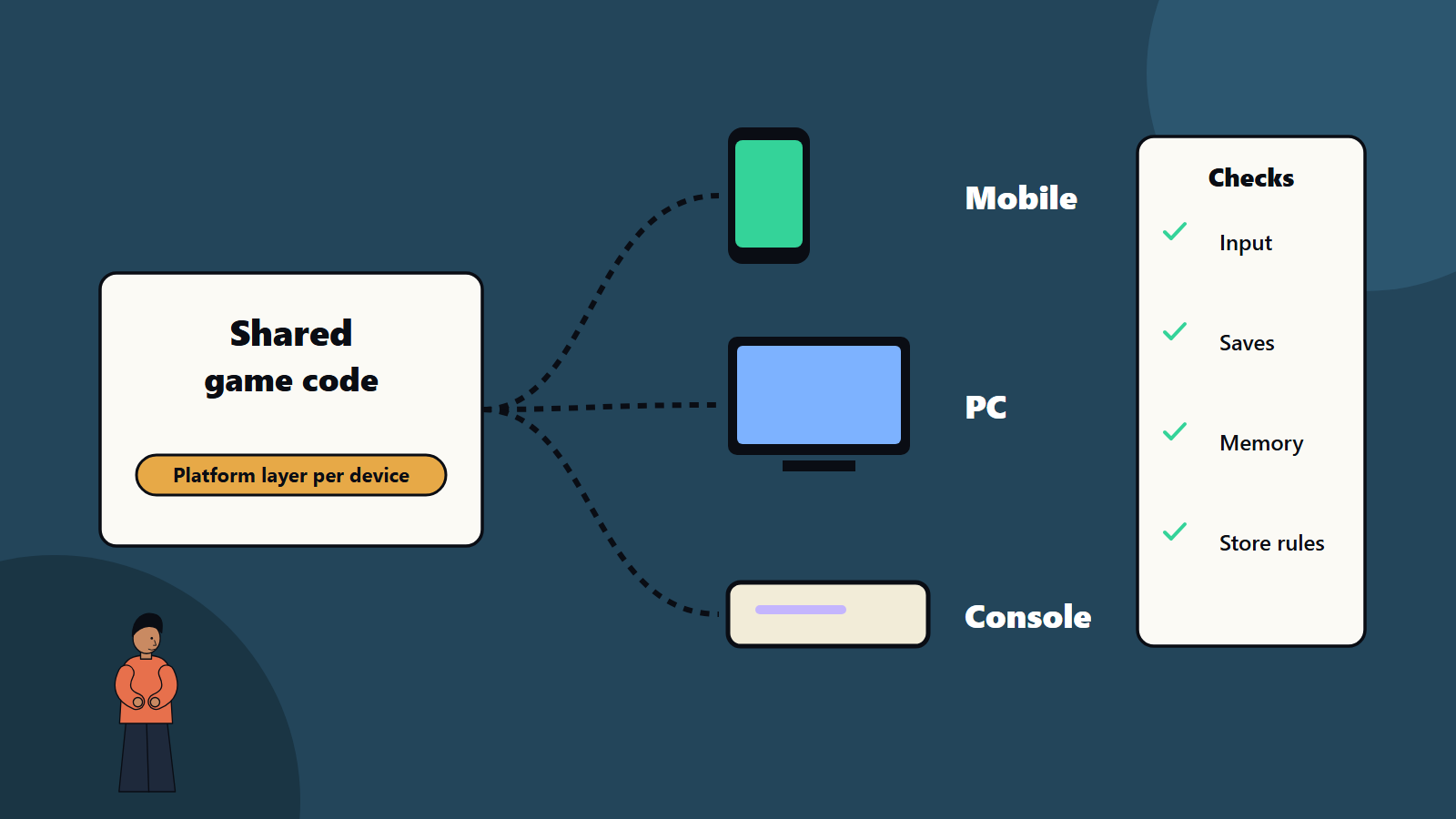
- Separate layers: game logic and content on top, a platform layer below for input, saves, audio output, achievements, networking, store and purchases.
- Use interfaces: the game calls a generic save function, and each platform supplies its own implementation.
- Avoid platform code in gameplay. Conditional compilation scattered everywhere makes the project fragile.
- Data-driven content: keep values and assets configurable per platform, such as texture quality or enemy counts.
- Continuous integration: build and test every platform automatically. See our CI/CD starter pipeline.
- Version control and branching that support platform-specific work.
Input and interface
- Touch: large targets, gestures, one-handed play and no reliance on precise cursor control.
- Mouse and keyboard: many keys and precise pointing allow richer controls.
- Controllers: consistent button mapping, glyphs that match the device in use and support for several controller types.
- Switching input: let players change between methods without restarting.
- Layouts: adapt interface scale and placement for screen size, viewing distance and safe areas. A menu that suits a phone may be tiny on a television.
- Remapping and accessibility: see our guide to game accessibility.
Performance and content budgets
Each platform has its own limits:
- Mobile: battery, heat, memory, storage size and a wide range of devices. Budget for thermal throttling during long sessions.
- PC: hardware variety and settings menus. See PC game optimisation.
- Console: fixed hardware, defined memory and load time targets, and sometimes handheld and docked modes.
Create content in a way that scales: multiple texture resolutions, level of detail models, quality presets and scalable effects. Set frame time and memory budgets per platform, and test against them in every build. Plan download size, since mobile stores and networks make big installs unattractive.
Networking and online features
Online services differ across platforms: friends, invitations, accounts, matchmaking and rules for cross-play. Decide whether players on different platforms play together, and how accounts link. Plan the server side for fairness across input types and latency. See our guide to multiplayer netcode and multi-tenancy architecture for back-end ideas.
Store and platform rules
- Mobile stores: policies on payments, privacy, content and updates.
- PC stores: each storefront has its own tools, features and rules.
- Consoles: developer programmes, requirements and certification. See console game development.
- Ratings and regional rules for each market.
Keep a requirements matrix with one row per rule and one column per platform, and review it at every milestone.
Testing
- Test on real devices at every milestone, covering low, mid and high mobile devices, PC tiers and each console.
- Automate smoke tests for every build.
- Test controls, interface scale, saves, interruptions, network loss and cross-play.
- Track bugs by platform, since some appear on one only.
- Plan compatibility and certification checks. See game testing and QA and our test automation strategy.
Live operations
Shipping is the start. Plan patches, updates and content for each platform, with release timing that stays close across them. Use analytics to see differences between platforms. See game analytics and the game development pipeline.
Common mistakes
- Assuming a port is a button press.
- Designing controls for one input and forcing them onto others.
- Platform code scattered through gameplay.
- Testing on one device and hoping.
- Ignoring download size and thermal limits on mobile.
- Late discovery of console requirements.
- No plan for cross-platform accounts and saves.
- Different release dates with no communication plan.
A starting plan
- Pick target platforms and a lead platform, with reasons.
- Choose an engine and confirm platform access.
- Build a platform layer and a vertical slice on the weakest target.
- Set budgets and a requirements matrix.
- Automate builds and tests for every platform.
- Plan releases, patches and support per platform.
How SoftSapien supports cross-platform games
SoftSapien’s game engineers design portable code, port and optimise for mobile, PC and console, run multi-device testing and support submissions and live operations. See our game development and mobile app development services.
To plan your multi-platform release, use the contact page to chat with our team, send a message or schedule a free consultation call.
Frequently asked questions
Is one codebase enough for mobile, PC and console?
Shared code helps, but input, interface, performance budgets, store rules and certification differ, so design and test for each platform.
Which platform should lead?
Pick it from your audience, genre fit, revenue model and cost. Many teams launch on one lead platform and follow with others once the game is stable.
How do we structure code for portability?
Separate game logic from a platform layer for input, saves, achievements, networking and purchases, and use interfaces for each platform implementation.
How should we test across platforms?
Use real devices at every milestone, automate smoke tests per build, and track bugs by platform.
Can SoftSapien help with multi-platform releases?
Yes, from architecture to submission. Contact SoftSapien through the contact page to chat with our team, send a message or schedule a free consultation call.